Short answer
Does Shopify calculate net profit for you?
No. Shopify does report profit, and it is decent as far as it goes: fill in the Cost per item field on a variant and you get the Profit margin, Cost of goods and Gross profit reports under Analytics. Gross profit there is net sales minus cost of goods, and Shopify's own definition of the number ends on the phrase "before other operating expenses".
Operating expenses is where most of your money goes. Card processing, the label you bought, the parcel that came back, the Google Ads click that won the order, your subscription, your apps, your salaries. None of it reaches that report. Shopify does keep a fuller profit breakdown behind the scenes, carrying the shipping you paid and duties, but Shopify itself describes that breakdown as measured before any returns are settled - a forecast of an order rather than a result.
Two more limits sit on the native figure. Shopify's help docs state that profit is reported only for products that had cost recorded at the time they were sold, so a variant you costed yesterday scores nothing on last month's sales. And Cost per item holds one current amount with no history behind it. Our Shopify gross profit page covers what that does to the number you read.
What do you subtract, and in what order?
Start at net sales, which Shopify defines as revenue after discounts and sales reversals, excluding taxes, shipping, duties and fees. That is the right starting line. Tax is money you hold for the tax office, and on a tax-inclusive store it is already sitting inside the price the customer paid, which is the most common reason a European store overstates its margin.
From there, five costs come out:
- Cost of goods - the unit cost, plus inbound freight and import duty where you pay them.
- Payment fee - the real card fee on the transaction, which moves with gateway, card type and country.
- Shipping and packaging - the label you paid for, the box, and any per-order handling.
- Returns - return postage, the restocking work, and the processing fee you do not get back.
- Ad spend - the marketing cost attributed to that order or that day.
What changes when the order crosses a border?
Two lines move. Duty and import tax appear, and if you quote them at checkout Shopify charges a transaction fee on top of the ones above.
Both are driven off a customs classification code on the product, and a store that never filled those in gets an estimate built from the product description instead. Filling in the HS code and country of origin takes one CSV upload and decides which of those two you get.
What does a $120 Shopify order actually pay you?
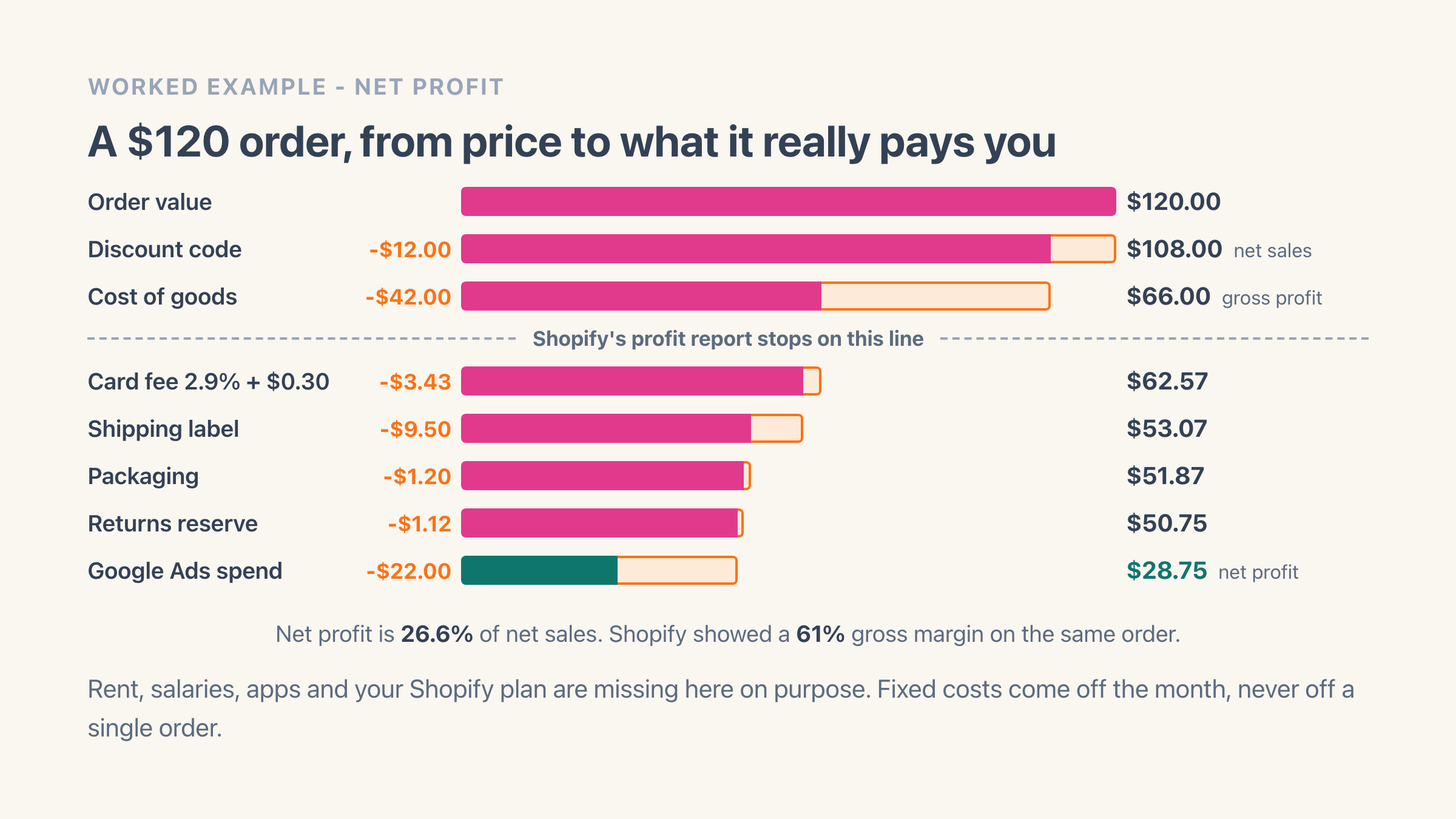
One item at $120, a 10% discount code, free shipping, sold in the US so there is no tax to strip out. Shopify reports a 61% gross margin on it. Here is every line between that number and what the order really pays you.
- Net sales: $120 less a $12 discount code = $108.
- Cost of goods $42, so gross profit is $66 and gross margin 61%. Shopify's report stops on this line.
- Card fee at 2.9% + $0.30 on the $108 charged: $3.43. Shipping label $9.50, packaging $1.20.
- Returns and ads: 8% of orders come back at $14 all in, so $1.12 per order, plus $22 of attributed Google Ads spend.
- Net profit before overhead: $28.75, which is 26.6% of net sales against the 61% Shopify showed.
Which of these numbers can Shopify give you?
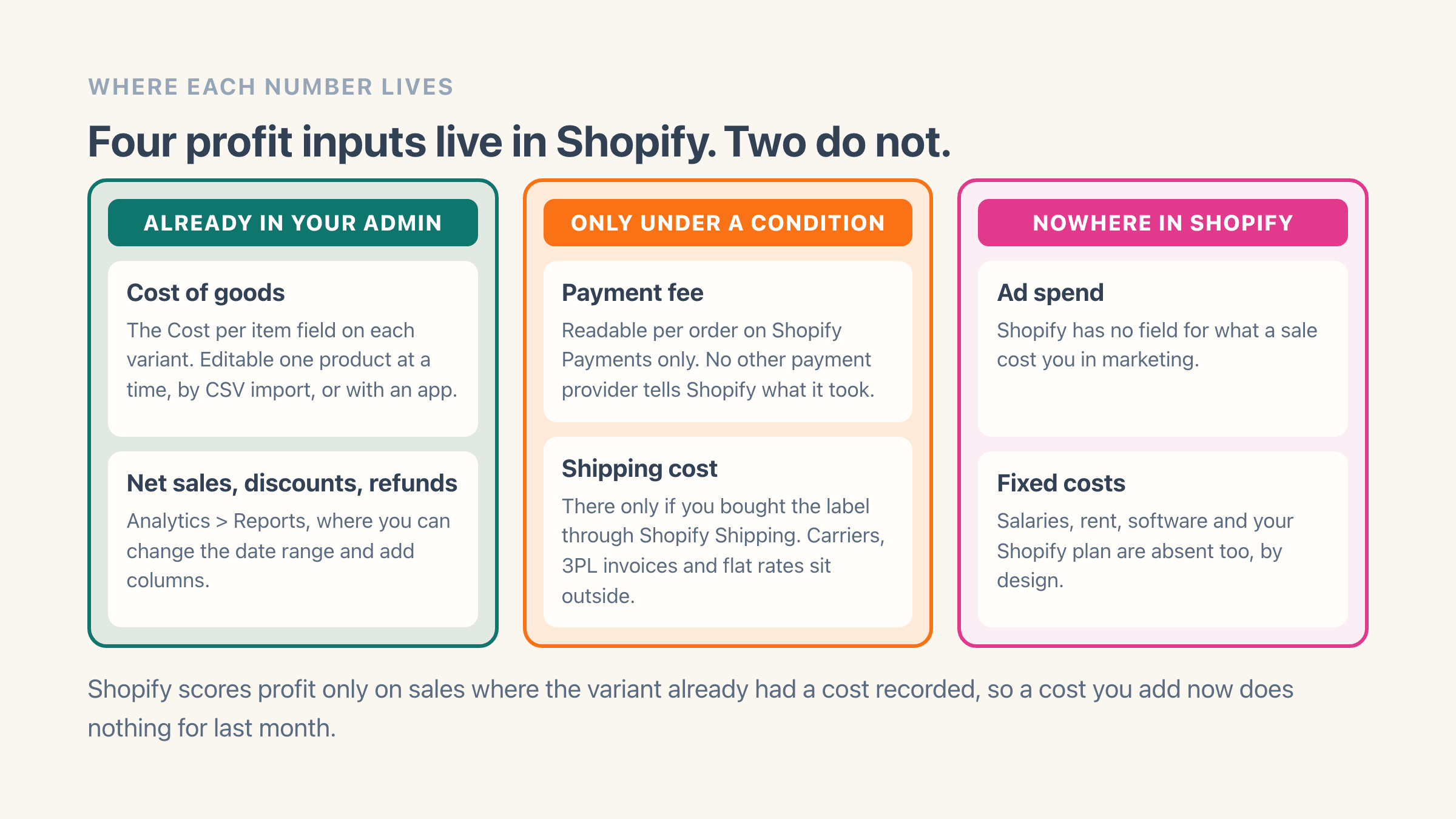
Four of the inputs are already in your admin. The gaps matter more, so here is where each one lives. Worth knowing before you start: the variant costs you fill in here are the same ones your total inventory value is built from, so the work pays twice.
- Cost of goods: the Cost per item field on each variant, editable one product at a time, through the product CSV importer, or with the bulk editor. Shopify holds one current cost per variant and keeps no record of what you used to pay.
- Net sales, discounts and refunds: Analytics > Reports, where you can change the date range and add columns.
- Payment fee: Shopify Payments only. Shopify records what it charged you on the order itself, and those same fees come off the payout you see under Finance. No other payment provider tells Shopify what it took.
- Shipping cost: in Shopify only if you bought the label through Shopify Shipping. Third-party carriers, 3PL invoices and negotiated flat rates live outside.
- Ad spend and fixed costs: nowhere in Shopify, by design.
Why do two profit apps disagree about the same order?
Nine times out of ten it is the payment fee. On a Shopify Payments store the real fee is readable per transaction, so any decent tool lands on the same figure. Take money through PayPal, Klarna or a local provider and no app can read your fee, because the fee is never recorded in Shopify at all. The best available answer is your contracted rate per gateway and card type, and a tool that shows that modelled number with the confidence of a measured one is lying to you politely.
Cost timing is the second cause. An app that reads today's Cost per item and applies it to a March order will disagree with one that froze the cost the day the order was placed. Only the frozen version survives a supplier price change.
What ROAS do you need before an order makes money?
In the worked example the ad spend cost more than the product did, which is normal on paid traffic. Before ads, that order was carrying $50.75. Divide the $108 of net sales by it and you get a break-even ROAS of 2.13.
Ads returning revenue at 2.13x earn you nothing. At 3x the order works. At 1.8x you are buying revenue with your own money.
This is why the ROAS in your ad account misleads. A 3x campaign on a 60% margin product is healthy and a 3x campaign on a 25% margin product loses money on every click, and Google reports 3x for both. Margin is a per-product number, so break-even ROAS has to be one too.
Easy Profit Calculator syncs Google Ads spend daily at campaign and product level, then divides profit before ads by spend to give a profit ROAS where anything under 1.0 is a losing campaign. Spend on other ad platforms is entered manually.
Do salaries and rent come out per order or per month?
Per month. Take the $28.75 from the worked example: a store doing 400 orders a month against $6,000 of subscription, apps, rent and part-time help carries $15 of fixed cost per order, so the sale really nets $13.75. Same order, three answers, and only the last one is money you can spend.
Do that division inside your per-order numbers, though, and you break every comparison afterwards. Rent does not rise because you sold one more mug, so a busy month makes each order look more profitable than the identical order in a quiet month.
Keep two layers. Per-order profit counts only the costs that order caused, and that is what you judge a product, a campaign or a discount code by. Period profit takes salaries, rent, software and your Shopify plan off the sum of those.
Easy Profit Calculator keeps fixed costs and salaries off individual orders for exactly this reason.
One detail on salaries: budget the full employer cost rather than gross pay. Payroll tax, pension and holiday accrual add 20% to 30% on top depending on the country, and a store budgeting take-home pay understates its overhead by roughly a fifth.
Can you calculate Shopify profit in a spreadsheet?
Yes, and under roughly 100 orders a month it is the right call. Export orders from Analytics, paste in a cost column keyed on SKU, add one fee formula per gateway, and you have a defensible monthly answer in an afternoon.
Three things break it as you grow. Costs change, and a sheet applies today's supplier price to last quarter's orders unless you version every price, which nobody does. Refunds land days or weeks later, so the sheet you finished on Monday is wrong by Friday. And ad spend has to be attributed to orders somehow, which turns a 20-minute export into a standing weekly job.
The break point is the week you start making decisions weekly instead of monthly. A spreadsheet gives you a report. A weekly decision needs a number that has already updated itself.
Is there a Shopify profit calculator that does this automatically?
Several, and we build one of them. Easy Profit Calculator runs the calculation above on every order: it reads Cost per item from your variants, takes the real Shopify Payments fee off the transaction where one exists, applies your own rules for shipping, returns and other gateways, and freezes the cost onto the order at the time of sale. If you are still shortlisting, TrueProfit against BeProfit is the head-to-head merchants ask about most, and the Sellerboard comparison covers the cheaper end of the field.
The thing I would check in any profit app is whether it admits when it is guessing. Every cost on an order here is labelled with where it came from - read straight from Shopify, worked out from a rule you set, taken from a spreadsheet you uploaded, or missing altogether - and a store-wide data-quality score out of 100 tells you what share of your orders are fully costed. A confident number sitting on missing data is worse than no number.
The free plan covers 100 orders a month with net profit per order, the dashboard and the negative-profit orders report. Pro at $19 a month adds cost rules, shipping and return costs, fixed costs and the Google Ads sync. Before you install anything, run your own figures through our free profit margin calculator in the browser.