Short answer
What you get
- The exact Shopify Payments fee taken off every order's profit, free plan included
- Each fee marked exact or estimated, so you know which numbers are measured
- Your own rates per payment method and card type, for PayPal and the rest (Pro)
- A fees report with the rate you really pay on each provider (Pro)
- Currency conversion, cash-on-delivery, chargeback and platform charges split out (Pro)
- VAT taken out of revenue by default, so tax-inclusive stores read true
- A free plan for up to 100 orders a month
What fees does Shopify charge on every order?
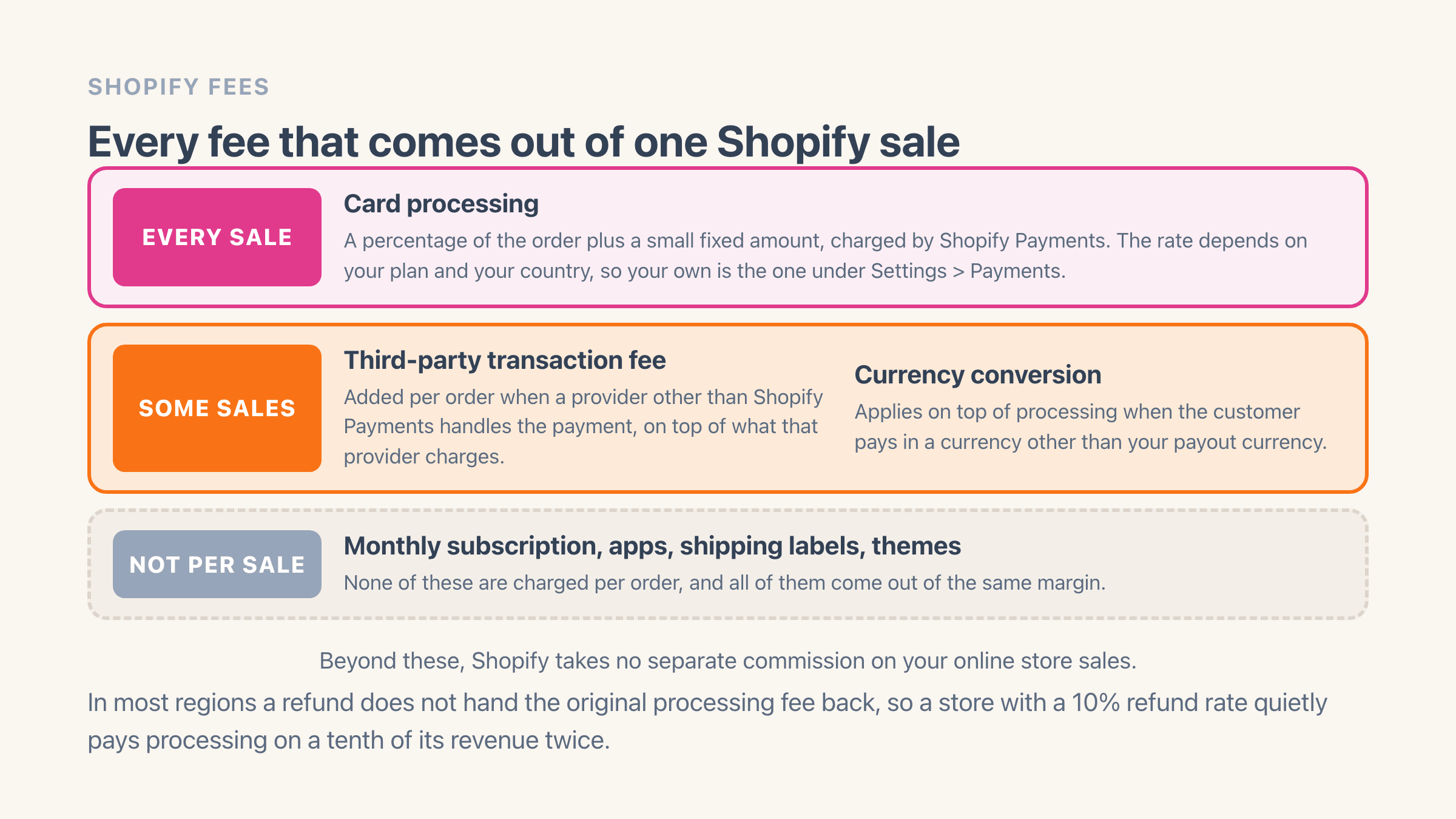
Two fees can land on a single order. The first is card processing: a percentage of the order value plus a small fixed amount, taken by whoever moves the money. That rate depends on your Shopify plan (higher plans get lower rates) and on the country you sell from, so one universal number would only mislead you - yours sit in your admin under Settings > Payments and on Shopify's pricing page.
The second only applies if you take payments through a provider other than Shopify Payments, such as PayPal or Stripe running your checkout: Shopify then charges its own transaction fee per order on top of what that provider already takes. Switching to Shopify Payments removes the extra fee entirely, which is why most stores that can use it do.
Past those two, Shopify takes no commission on your online store sales. What leaves with each order is processing, plus the third-party transaction fee if it applies to you. The monthly subscription, your apps and your shipping labels are billed to you separately rather than skimmed off the sale, which matters when you are trying to work out why a good month still felt tight.
What Shopify fees do most merchants forget?
Currency conversion is the quietest of them. When a customer pays in a currency other than the one you get paid in, a conversion fee applies on top of processing, so every foreign order costs a little more than your rate card suggests. A store selling into three countries can carry this for a year without ever seeing it as a line.
Refunds sting twice. You hand the customer their money back, but in most regions the processing fee from the original charge does not come back to you - Shopify's help pages on refunds cover how this works where you sell. A store with a 10% refund rate is quietly paying processing on a tenth of its revenue twice. The cheapest version of that fee is the one you never pay, which is why an order Shopify marks as high risk is worth reading before it ships rather than after.
Then there is the tail nobody budgets for. Your payment provider charges a fee when a customer disputes a charge - what a chargeback costs you is more than the order value once that fee is counted - and cash on delivery carries its own surcharge if you offer it. Neither happens often enough to feel like a cost, and both land on the orders that already went wrong. Where the same buyer keeps producing those orders, the cheapest fix is stopping the checkout before it becomes an order.
Selling across a border adds one more. If you quote duties and import taxes at checkout, Shopify takes a transaction fee for calculating them, and its own note calls the current rate a temporary one. That fee only exists once you switch the feature on, and the estimate it pays for is only as good as the customs code sitting on the product.
Finally, everything around the sale: the monthly subscription, your app subscriptions, shipping labels, a theme. None of these are per-sale fees, but they come out of the same money, which is why a store can make a decent margin on every order and still finish a slow month down.
What the fees do to your margin: a worked example
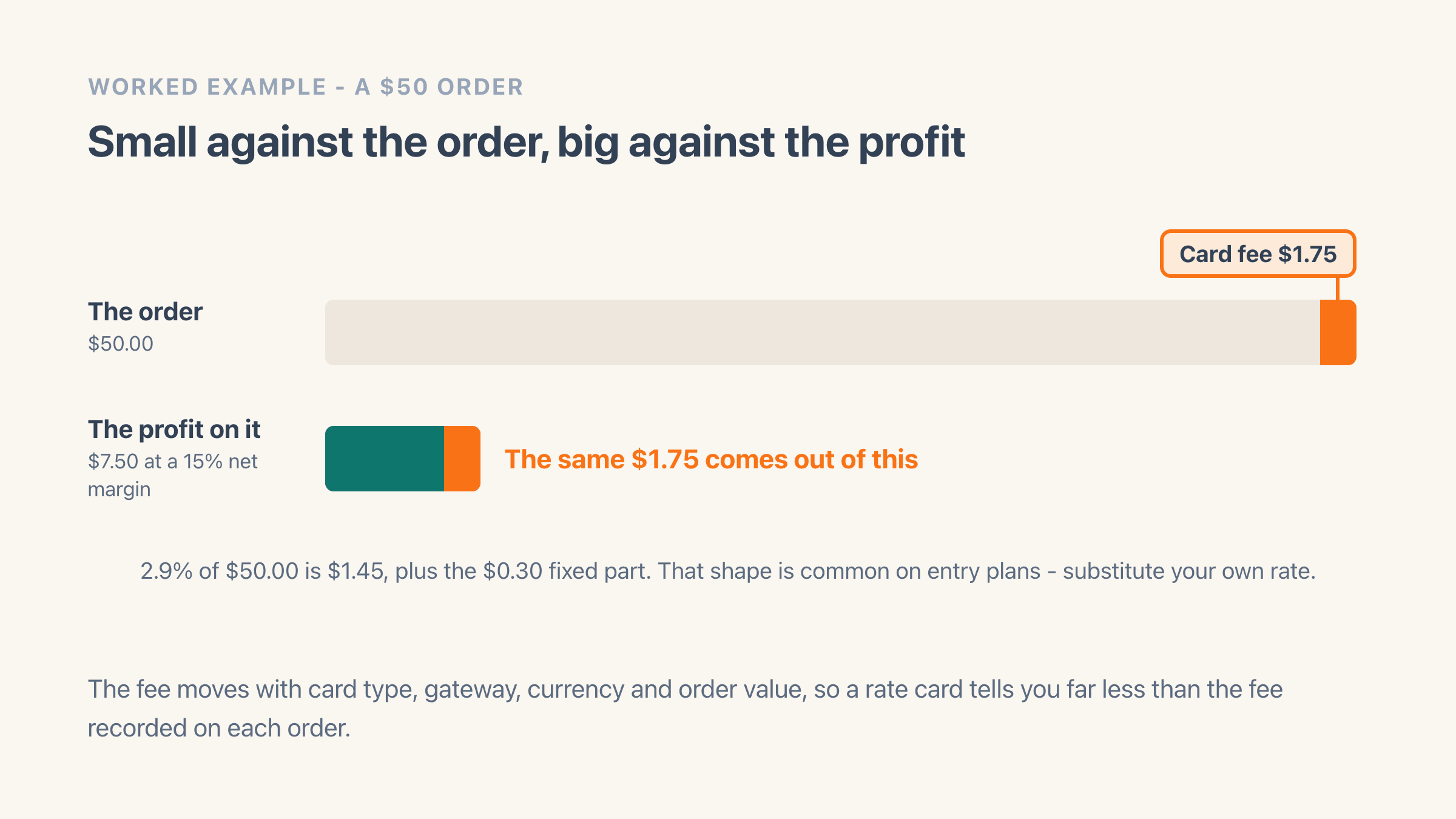
Say your card rate is 2.9% plus 30 cents (a common shape for entry plans - substitute your own rate). On a $50 order, processing takes about $1.75. That sounds small until you put it next to the profit: if your net margin is 15%, the order earns $7.50, and the payment fee alone consumed almost a quarter of the profit before you counted it.
The thinner the margin, the worse the ratio gets. A store keeping 20 cents on the dollar gives roughly a sixth of its profit to getting paid. A store keeping 10 cents gives about a third. Nothing about the fee changed - only what was left for it to eat.
This is why the fee on each order matters more than remembering rate cards. It moves with the card type, the provider, the currency and the order value, so the same store pays a different effective rate in December than it did in June. If you want your own figure, take last month's payment fees and divide them by last month's profit.
Why do the fees cost more on a VAT-inclusive store?
Because the card fee is charged on the whole amount the customer paid, VAT included, and the VAT was never yours to keep. Take that same $50 order in a country where 25% VAT sits inside the price: $10 belongs to the tax office, $40 is your revenue, and the $1.75 fee still comes off the full $50.
So the fee is 3.5% of the order and 4.4% of the money you actually keep. The gap matters because it points at a bigger problem: on a tax-inclusive store, Shopify's sales total still has the VAT inside it, so revenue and margin both read high, and every cost measured against them looks smaller than it is.
Easy Profit Calculator takes the VAT back out of revenue by default on tax-inclusive stores, working the rate out from each order's own tax lines rather than assuming one national rate. If your bookkeeping wants tax counted in, there is a setting for that in calculation preferences. The default is the one that matches what reaches your bank.
How do I see the exact Shopify fee on each order?
If you take payments with Shopify Payments, Shopify records what it charged on each order, and Easy Profit Calculator reads that figure instead of estimating it - those orders are marked exact. For any other provider you enter your rate once, per payment method and per card type where they differ, and those orders are marked estimated, so you can always tell a measured number from a modelled one.
Setting your own fee rules needs the Pro plan. The Shopify Payments figure is subtracted from your profit on the free plan too, which is enough for most stores that only take cards through Shopify.
The payment and transaction fees report, on Pro, then totals what each provider cost you over any period, shows the rate you are really paying on each, and pulls out the currency conversion, cash-on-delivery, chargeback and platform charges Shopify never separates. A provider showing a near-zero rate is the tell that its fees are not being captured yet.
That turns "Shopify takes about 3%" into something you can act on: which provider is cheapest for the orders you actually get, what returns really cost once the unreturned fee is counted, and whether the lower card rate on a higher Shopify plan would cover the plan.