Short answer
How they compare
| Feature | This appEasy Profit CalculatorFree, then from $19/mo | SellerboardFrom $9/mo, trial only |
|---|---|---|
| Genuine free planNot just a time-limited trial | Yes - 100 orders/mo | No - 30-day trial |
| Cheapest paid plan | $19/mo (2,000 orders) | $9/mo (600 orders) |
| Labels each cost exact vs estimatedSo you know which numbers to trust | Yes | Not listed |
| Data-quality score for the whole store | Yes | Not listed |
| Ad networks synced | Google Ads | Facebook, Google, Bing, Pinterest, TikTok |
| Payment-fee rules by card type and gateway | Yes | Not listed |
| Below-cost and suspicious-discount alerts | Yes | Not listed |
| Built Shopify-first | Yes | Amazon-first, Shopify added |
| App Store rating | New | 4.1 (59 reviews) |
Why merchants look for a Sellerboard alternative
Sellerboard earned its name in the Amazon-seller world and brought the same formula to Shopify: a real-time profit and loss dashboard at the lowest paid price in the category, $9 a month for 600 orders (their published pricing, July 2026). Its Shopify version is rated 4.1 from 59 reviews, the smallest review base among the established profit apps.
The searches for an alternative tend to come from two places. Stores that want to see the tool working on their own numbers before paying anything, since Sellerboard has a 30-day trial but no free tier. And stores that want a tool designed around Shopify's own mechanics - gateways, card-type fees, POS orders, staff discounts - rather than a multichannel dashboard adapted from Amazon. In its App Store reviews (July 2026), some users also report ad-spend sync lag.
What Easy Profit Calculator does differently
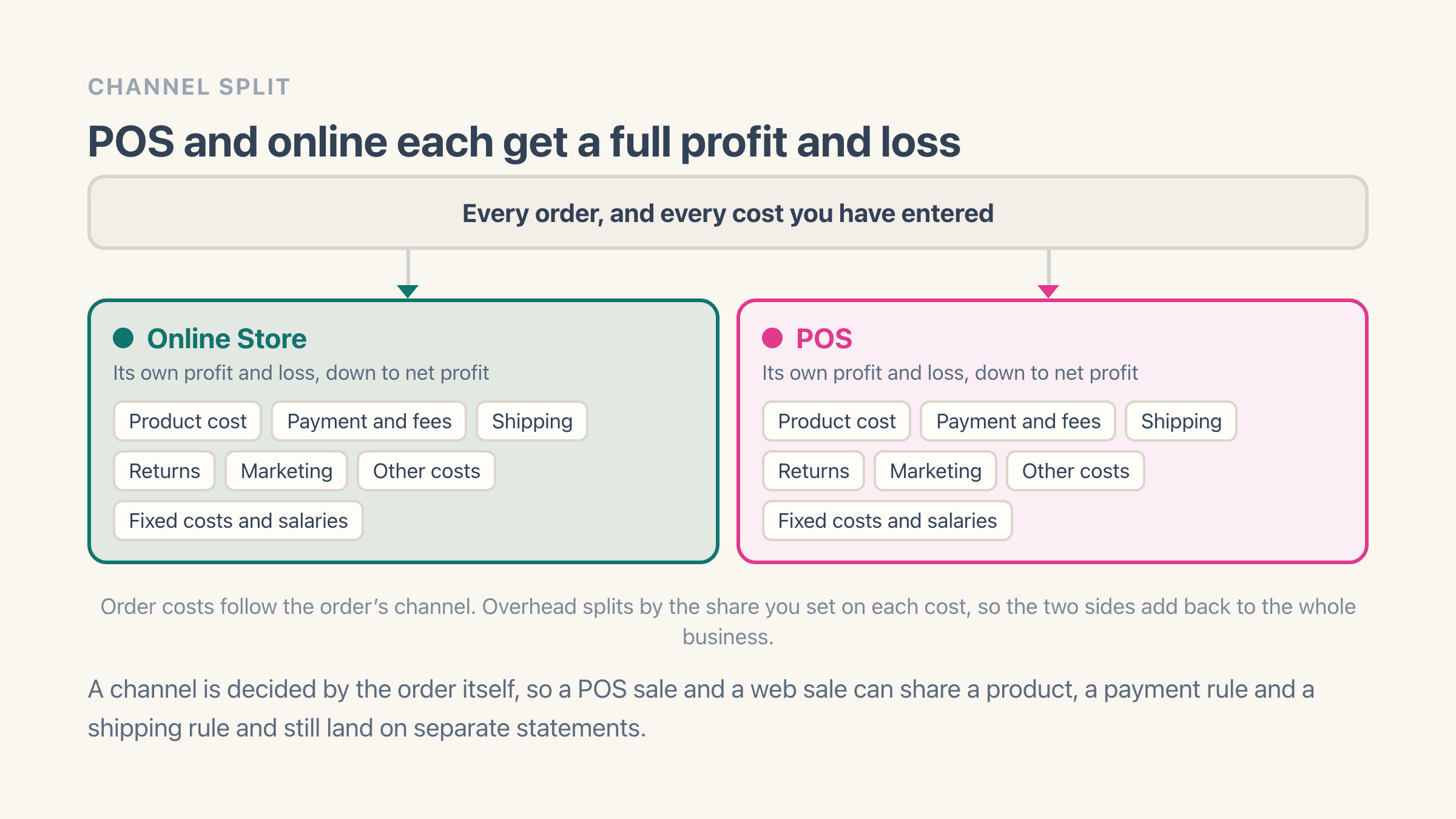
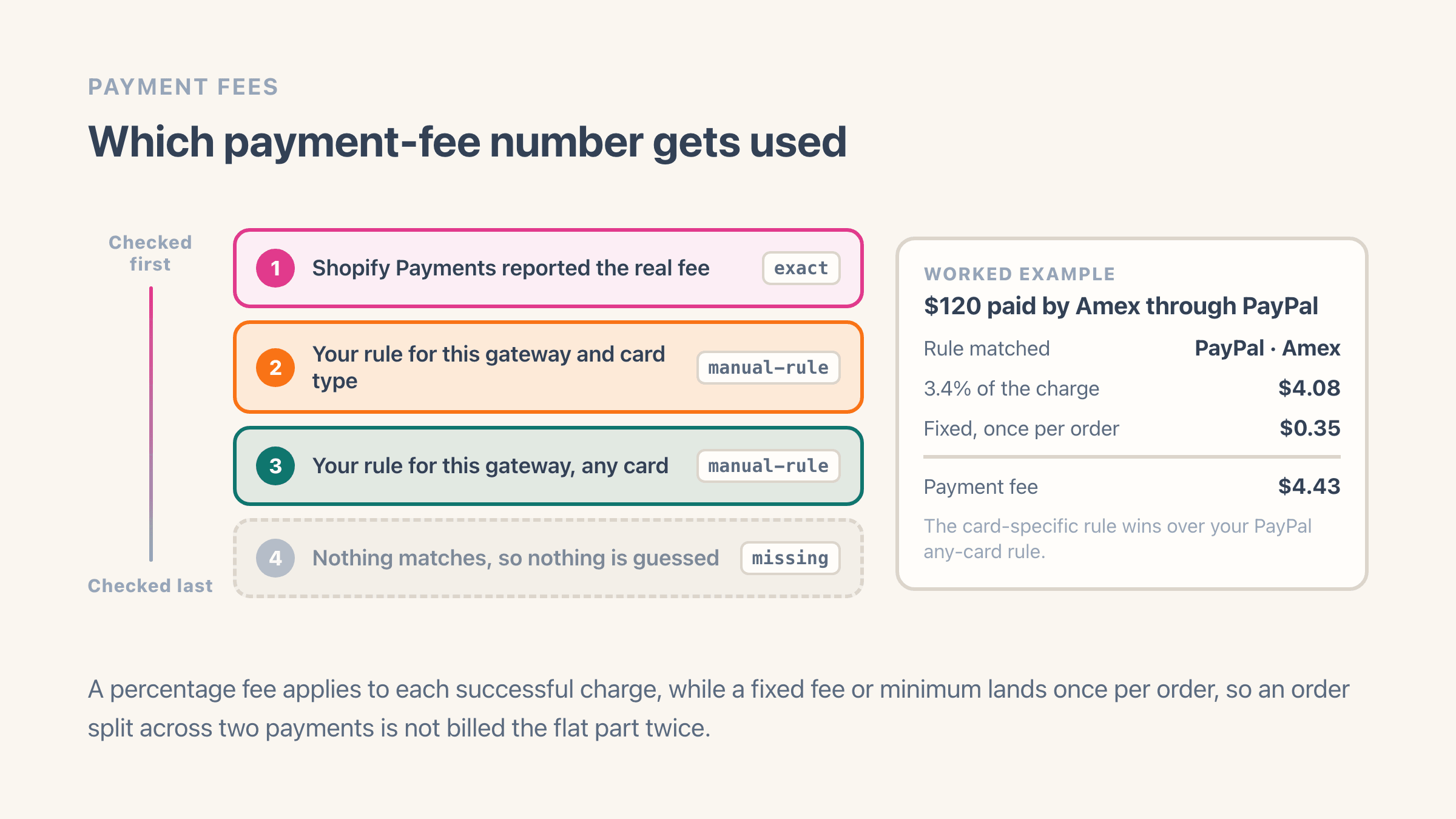
Easy Profit Calculator is built Shopify-first by a working Shopify merchant. Every order carries its full cost stack with a source label on each cost - exact, from Shopify, from Google Ads, from a rule, or estimated - and a data-quality score that points at the products and orders where data is missing. Payment fees are modelled the way Shopify actually charges them: per gateway and per card type.
It also watches for the leaks that are specific to running a real store: below-cost sales, suspicious staff discounts, price overrides, and orders that lost money.
- A genuine free plan: 100 orders a month, no trial clock
- A source label and confidence flag on every cost
- Payment-fee rules down to the card type and gateway
- Alerts for below-cost orders and suspicious staff discounts
- Soft order caps - a nudge at the limit, never a lock-out
- Built by a merchant running over $5M a year on Shopify
Where Sellerboard is the better fit
Price, at low volume. If you are past the free tier's 100 orders but under 600 a month, Sellerboard's $9 Standard plan is cheaper than our $19 Pro, and that is simply the maths. Its 30-day trial is also the longest in the category, so testing it costs nothing for a month.
It also syncs more ad networks - Facebook, Bing, Pinterest and TikTok alongside Google - and if you sell on Amazon as well, Sellerboard's Amazon heritage means one familiar tool across both. If those fit your store, it is a reasonable choice.
What can you already see in Shopify's own reports without an app?
Gross profit, and that is where it stops. Shopify ships five profit reports covering gross profit by product, by variant and by POS location, plus profit margin by order and average profit margin by market. Every one of them does the same sum: net sales minus what the goods cost you.
The gap is everything below that line. Shopify's own documentation says the calculation leaves out taxes and shipping costs other than the shipping you charged the customer, and Shopify has no way of knowing what you spend on ads, payment processing, packaging, returns or your own wages. Net sales is measured after discounts and excludes tax, shipping and fees, so a discount code moves the figure while the label you bought to send the parcel never touches it.
One rule decides whether your built-in report means anything at all. Shopify's help pages state that profit is reported only for products and variants that had cost recorded at the time they were sold, and sales with a blank Cost per item drop out of the calculation rather than counting as free stock.
A catalogue with patchy costs therefore reports a margin that is flattering and wrong. Compare net sales where a cost was recorded against net sales where none was, and you will know inside a minute how much of your store the report is actually describing.
Do you need a profit app at all?
You may not need any app in this category. A store with a short product list, stable supplier prices, flat shipping rates and no ad spend gets most of the way on Cost per item plus Shopify's gross profit report, and a spreadsheet closes the rest once a month.
These tools start earning their fee when ad spend is big enough to decide whether an order was worth taking, when shipping costs swing by parcel or country, or when the order count gets high enough that spotting the loss-makers by eye stops working.
Discounts are the one place Shopify does report per code, in a report called Sales by discount codes, and what that report shows and leaves out is worth reading before you assume an app is the only way to see it.
The manual version is written up in how to calculate net profit on Shopify if you would rather try that first, and the wider question of whether the store makes money at all is worth settling before you shop for tools.
Choose Easy Profit Calculator if
you want to start free, you want each cost labelled exact or estimated with a data-quality score, and you want a tool built around Shopify's own mechanics - card-type fees, POS orders, staff discounts.
Choose Sellerboard if
your volume sits between 100 and 600 orders a month and the $9 entry price wins, you spend across Facebook, Pinterest or TikTok, or you also sell on Amazon and want one tool for both.