Short answer
How we picked
- Does it count every cost - product cost, fees, shipping, returns, ads - or only some?
- Can you tell which numbers are measured and which are estimated?
- How many ad networks does it pull spend from without you typing it in?
- Is there a genuine free plan, or only a trial?
- What does it cost at the order volume you will hit in six months, including any per-order overage?
At a glance
| Feature | This appEasy Profit CalculatorOurs | TrueProfit | Lifetimely | BeProfit | Triple Whale | GoProfit |
|---|---|---|---|---|---|---|
| Free plan | Yes - 100 orders/mo | No | Yes - 50 orders/mo | No | Yes | Yes - 50 orders/mo |
| Cheapest paid plan | $19/mo | $35/mo | $79/mo | $49/mo | $219/mo | $12/mo |
| Orders on that cheapest plan | 2,000 | 300 | 500 | Not listed | Not listed | 250 |
| Mobile app for iOS and Android"Not listed" means the app's own App Store listing does not mention it, not that it is missing. | No | Yes | Not listed | Not listed | Not listed | Not listed |
| Several stores in one rollup | No | Yes | Not listed | Yes | Not listed | Not listed |
| App Store rating | New - no reviews | 5.0 (802) | 4.9 (459) | 4.3 (172) | 4.1 (85) | 4.8 (85) |
1.TP: True Profit Analytics
Best rated, and the widest ad-network sync
The category leader on reviews, and it is not close: 802 of them at 5.0. It pulls spend from Facebook, Google, TikTok, Bing, Snapchat and Amazon, which is more networks than anything else here, and it is the only app in this roundup whose listing advertises iOS and Android apps.
Plans are cut by order volume, from $35 for 300 orders a month up to $200 for 3,500, with extra orders charged on top.
If you buy traffic on four or five networks and want the numbers on your phone, start here. Our TrueProfit alternative page is the closer head-to-head.
- Six ad networks synced, the most of any app here
- Mobile apps for iOS and Android
- Several stores viewable in one dashboard
Watch out: No free plan, and $35 only covers 300 orders a month, so a store doing 900 orders is on the $100 tier before it has counted a single cost.
2.SimplyCost - Profit Analytics
Cheapest way to see profit at all
One plan, $4.99 a month, no order tiers. That makes it the cheapest app in this roundup by a wide margin and the only one whose bill does not move when you have a good quarter. It syncs Facebook, Google, Pinterest, Snapchat and TikTok spend, lets you set gateway fees and recurring expenses, and works out shipping cost by weight, quantity or order value. It has been on the App Store since 2016.
- Flat $4.99 a month whatever your order volume
- Five ad networks synced at that price
- Shipping cost rules by weight, quantity or order value
Watch out: A dashboard and reports, and that is the extent of it. Their listing does not mention cohorts, lifetime value or per-order drill-down, so it answers "how did we do" rather than "which order lost money".
3.GoProfit: Profit Analytics
Best free plan to start on
Free for 50 orders a month, then $12 for 250 and $59 for 2,000, which is the gentlest paid step in this roundup. It carries a Built for Shopify badge, syncs Google, Facebook and TikTok, and its Smart Alerts watch your metrics and tell you when something moves. The Pro plan adds a five-year lookback and industry benchmarks.
- Free plan, then only $12 a month
- Built for Shopify badge
- Alerts that watch metrics rather than waiting for you to log in
Watch out: Extra orders cost $0.20 each, capped at $500 a month, so a busy month can bill far above the plan price. Set a calendar reminder to check your usage.
4.Easy Profit CalculatorOurs
Best for knowing which of your numbers to trust
Ours, and the reason it exists is the thing every app on this list does quietly: filling a missing cost with an estimate and printing the total in the same confident black text as a measured one.
Easy Profit Calculator marks each cost as exact, pulled from Shopify, pulled from an ad platform, from a rule you set, or estimated. It then gives the store a data-quality score, so you can see how much of your profit figure is actually known.
Free to 100 orders a month, $19 for 2,000, and the order caps are soft - passing one gets you a nudge, not a locked dashboard.
- Every cost labelled exact or estimated, with a data-quality score for the store
- Free plan covers 100 orders a month
- Payment-fee rules down to the card type, plus break-even ROAS
- Going over a cap nudges you rather than locking the dashboard
Watch out: Google Ads is the only ad platform that syncs on its own; spend from Meta and everywhere else is typed in by hand. It also covers one Shopify store, has no mobile app, and has no reviews yet - three of the apps above have hundreds.
5.Lifetimely Profit Analytics
Best for lifetime value and cohorts
Where the others answer "what did we make", Lifetimely answers "what is a customer worth over three years". Cohort reports, lifetime value, payback and forecasting sit alongside the profit dashboard, with an AI profit agent on top and Amazon data available for another $75 a month. If you are deciding what you can afford to pay to acquire a customer, this is the sharpest tool here. See our Lifetimely alternative page for the head-to-head.
- The deepest lifetime value and cohort reporting in this roundup
- Free plan for stores under 50 orders a month
- Shopify and Amazon in one view
Watch out: The step off the free plan is $79 for 500 orders, the steepest first paid tier here, and it climbs to $299.
6.Profitario - Profit Analytics
Best for a few stores and a non-English team
Two things here that almost nothing else in this roundup has. Its Growth plan covers three stores and Pro covers six, all rolled into one dashboard, and the app itself is available in English, Spanish, French, German, Italian and Portuguese. Add 40-plus integrations, from AliExpress and Printful to Stripe and PayPal, and a Built for Shopify badge. Ours does neither of those things: one store, English only.
- Three to six stores in one rollup, depending on plan
- Interface in six languages
- Built for Shopify badge, and a free plan to try it on
Watch out: Extra orders are charged per order on top of every paid plan, up to $300 a month on Starter. One 2-star reviewer describes a surprise bill after passing the cap without a warning.
7.Sellerboard Profit Analytics
Best price per order at high volume
Read the order limits rather than the prices and Sellerboard is the value pick in this roundup: $9 covers 600 orders a month, $19 covers 1,800, and $79 buys unlimited orders. No other app here sells unlimited. It comes from the Amazon seller world, so the reporting leans spreadsheet - flexible reports emailed to you on a schedule - and it breaks ad efficiency down by product and UTM tag. Our Sellerboard alternative page covers the differences.
- Unlimited orders for $79, the only unlimited plan here
- 600 orders for $9, the best price per order at the entry tier
- 30-day trial, twice the length of most
Watch out: The lowest rating in this roundup at 4.1, with 6 of its 59 reviews at one star, and several of those describe ad spend importing wrongly.
8.Profit Calc: Profit Calculator
Best for dropshippers and multi-currency stores
Built for stores whose costs live somewhere else. It syncs supplier costs from AliExpress, Printful, Printify, CJ Dropshipping, ShipHero, ShipBob and Shippo, handles multiple currencies using the exchange rate on the day of the order rather than today's, and its listing counts 21 interface languages. For a print-on-demand or dropshipping store buying in one currency and selling in three, that combination is hard to match.
- Supplier cost syncing from seven fulfilment platforms
- Historical exchange rates rather than a single current rate
- Interface in 21 languages
Watch out: No free plan, and the entry tier is $29 for 500 orders, so a small store pays more than it would on most of this list.
9.BeProfit - Profit Analytics
Best for multichannel rollups
For brands selling in more than one place. BeProfit consolidates several shops into one profit view and adds UTM attribution and custom reporting on the way up, with Amazon, Facebook, Google, Klaviyo and TikTok connected. Its listing publishes prices without order limits, so ask support what your volume costs before the trial ends. See our BeProfit alternative page for the head-to-head.
- Several shops and marketplaces in one profit view
- UTM attribution and custom report building
Watch out: Starts at $49 with no free plan, and 11 of its 172 reviews are one star, several of them about billing and cancellation.
10.Triple Whale
Best if you want an analytics platform, not an app
The biggest thing on this list and the least like the rest of it. Triple Whale is a full analytics platform with its own tracking pixel, multi-touch attribution across channels, and an AI operator that will build and change ad creative. The free plan is genuinely usable for attribution, then it is $219 a month and $749 for the automation tier.
- Multi-touch attribution with its own pixel
- Free plan with a 12-month lookback and ten users
- AI agent that acts on ad accounts rather than only reporting
Watch out: The paid step is $219, more than ten times most of this list, and reviewers who left one star mention how much there is to learn before it pays off.
How to choose a profit tracker
Five of the ten start free: Easy Profit Calculator, GoProfit, Profitario, Lifetimely and Triple Whale. The other five want a trial and a card. If you sell across several stores, that cuts the list to Profitario, BeProfit and TrueProfit. If you want the bill to stay still, SimplyCost is the only flat-rate option at $4.99.
Then price the tier you will be on in six months rather than the one on the button. Most of these charge by monthly orders, and two of them - GoProfit and Profitario - keep billing per order once you pass the cap, which is how a $30 app turns into a $200 month. Sellerboard is the outlier that sells unlimited orders outright, at $79.
One more thing worth settling early: whether you are buying a profit tracker or an analytics platform. Triple Whale, Lifetimely and BeProfit answer questions about attribution and customer value that the cheaper apps do not ask. If all you want is to know whether last month made money, paying platform prices for it is a waste. Our Shopify profit checklist walks that question through without installing anything.
How do you know a profit number is real?
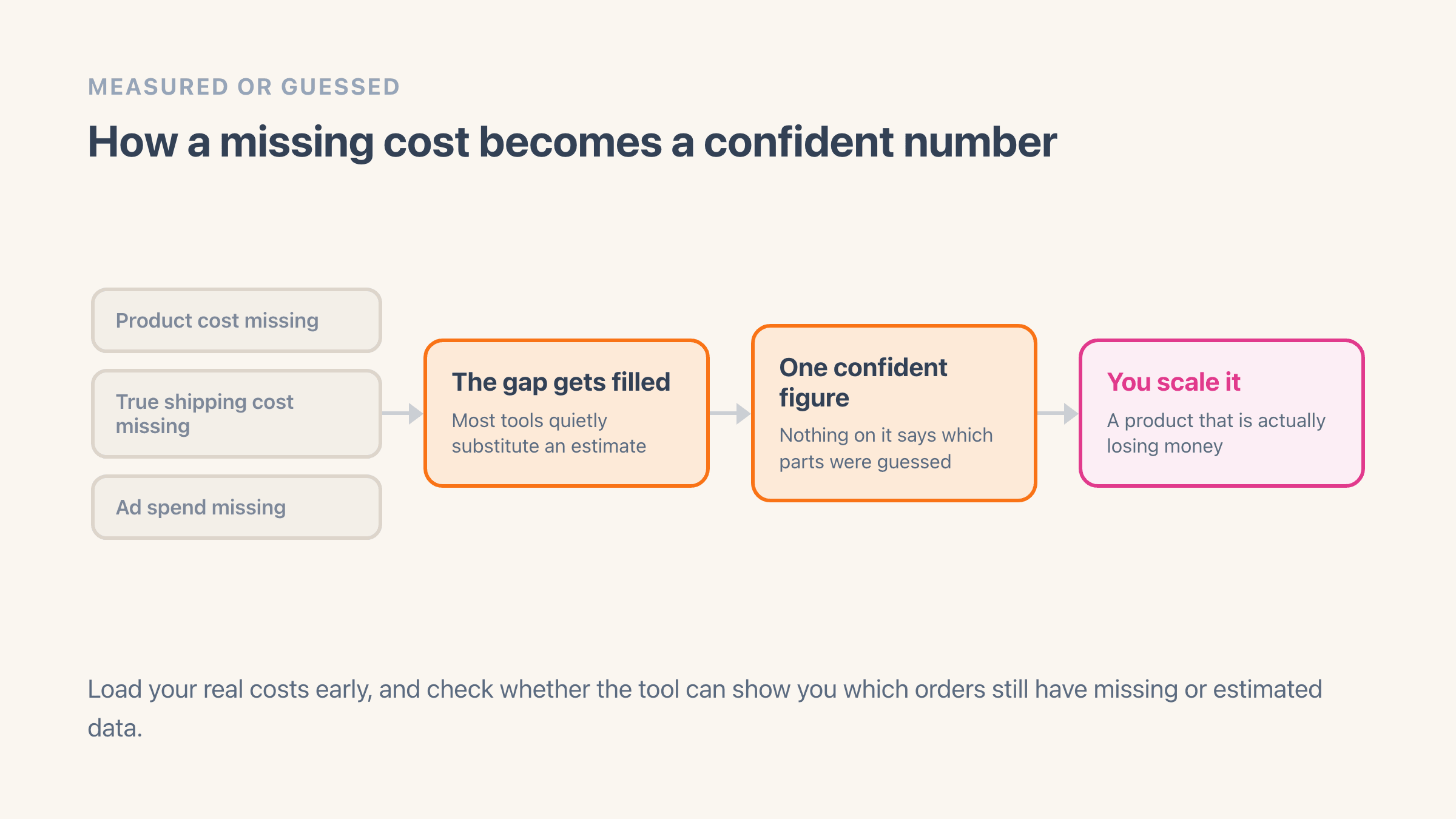
You look at what the app did with the costs it did not have. When product cost, real shipping cost or ad spend is missing, most tools quietly fill the gap with an estimate and show one confident figure, with nothing on screen marking the guess. That is how a store ends up putting more money behind a product it is losing money on.
Whichever app you pick, load your real costs early and check whether it can show you which orders still have missing or estimated numbers. That one habit does more for the accuracy of your reporting than any feature on this list.
What should you have ready before you install one?
Three things, and none of them take long. The cost of the products you sell most, last month's carrier invoice, and last month's ad spend for each channel you buy traffic on. Every app on this list is only as good as those three inputs, and installing before you have them is how merchants end up deciding a profit app "does not work".
The product cost is the one people skip. It sits in the Cost per item box on each variant, on the product page in your Shopify admin, and it is empty until someone fills it in, so a store that has never touched it will read every order as pure profit on day one. If you sell hundreds of products, do the fifty that make most of your revenue first. That gets you a usable number in an afternoon rather than turning into a project you abandon.
The other two are checks rather than data entry. Put what your customers paid for shipping last month next to what the carrier actually billed you, because the gap is normally wider than merchants expect and no app can see it for you until you tell it your real rates. Then write down what each ad channel cost you. Every app syncs some channels and not others, so knowing which of your channels you will be typing in by hand is worth finding out before you pay, not after.
If you already track the money going out, two related numbers are worth having next to it: what your unsold stock is worth, which our guide to finding your Shopify inventory value covers, and what you lose to chargebacks, which none of these apps can pull from Shopify on their own.
Which two apps do merchants compare most often?
TrueProfit and BeProfit, by a distance, because they are the two with the biggest marketing budgets and they read as near-identical from the outside. They are not. TrueProfit is rated 5.0 from 802 reviews against BeProfit's 4.3 from 172, it starts at $35 rather than $49, and it syncs six ad networks to BeProfit's four. BeProfit's answer is consolidation across shops and marketplaces, which TrueProfit does at the dashboard level rather than the reporting level.
We wrote that one up separately, because the decision turns on details neither listing puts up front: TrueProfit vs BeProfit. The short version is that TrueProfit wins on price, rating and ad coverage, and BeProfit earns its price only if you genuinely sell in several places.