Definition
Where does Shopify get the cost in its gross profit number?
From one field: Cost per item, set per variant on the product page in your admin. That box is where your cost of goods sold has to end up before any of this works.
Shopify describes it as what the product costs you, and its own example is the price you paid the manufacturer, before tax, shipping or anything else you spent getting it onto the shelf.
The box holds one amount and nothing around it - no supplier, no date, no history. Leave it blank and that variant has no cost as far as Shopify is concerned.
Two things about that field catch people out. Access to it is controlled on its own, so a staff member needs the "View product costs" permission before the box is visible to them once granular product permissions are turned on, and two people can open the same report and see different numbers. And because it stores one current amount, editing it after a supplier price change replaces the only cost your store has on record for that variant. Anything that needs to know what a product cost you last March has to have written that down at the time.
Why your Shopify gross margin reads higher than it is
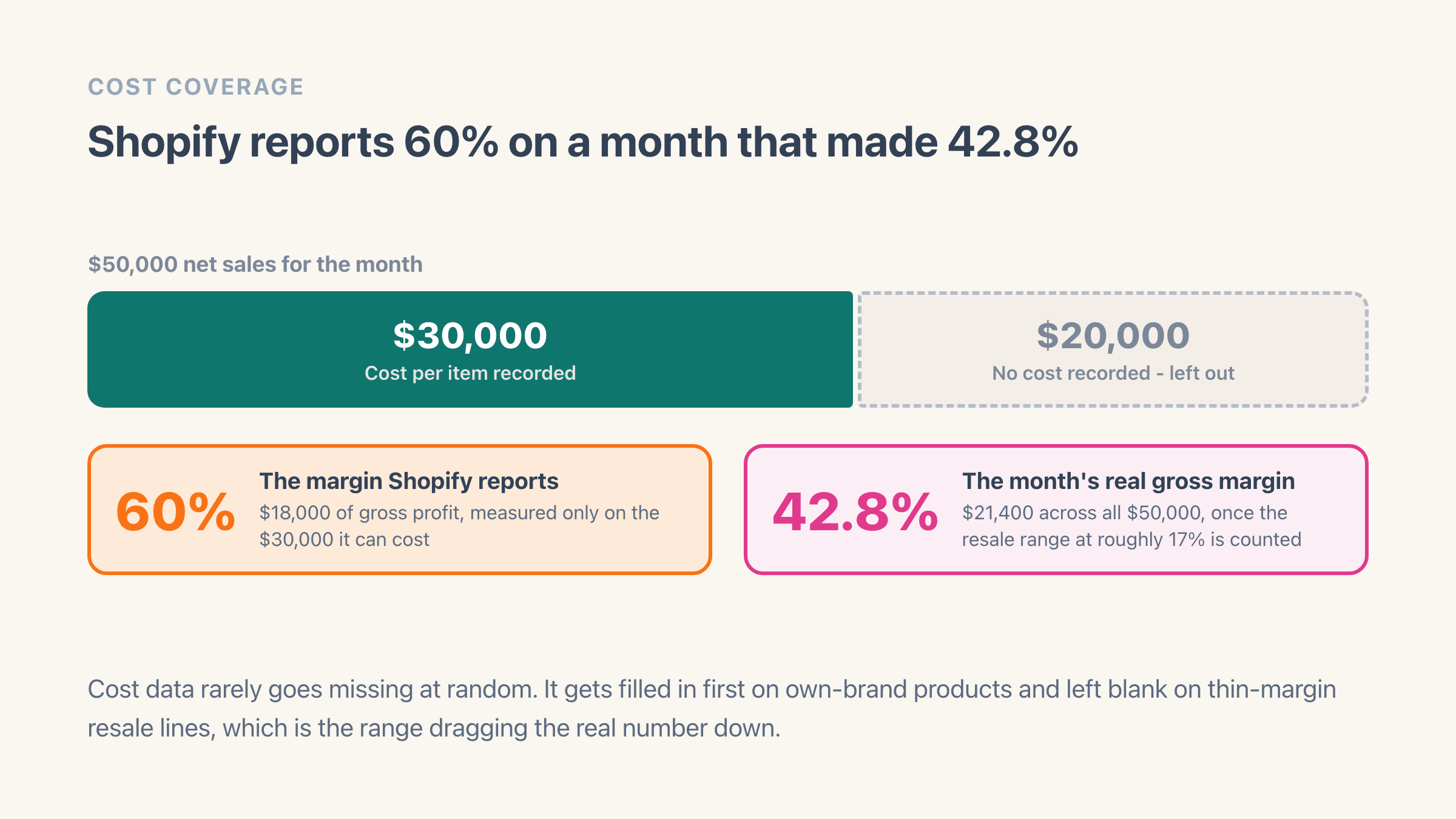
Shopify says so itself. Its profit reports documentation puts it in one sentence: "Profit is reported only for products and variants that had cost recorded at the time they were sold." Sales with a blank Cost per item are left out of the calculation rather than counted at zero cost.
Read the timing in that sentence twice. A cost you fill in this afternoon applies to what you sell from this afternoon on. Last month keeps the cost it had at the time, which was none, and tidying the catalogue now will not move a margin you have already reported.
Correct maths, misleading impression. Cost data almost never goes missing at random. It gets filled in first on the own-brand products you set up carefully, and stays blank on the resale lines you added in a hurry at a thin markup, which is exactly the range dragging the real number down. What you are reading is your best products' margin, presented as the store's.
The coverage check costs you one export. Send your products to CSV, which carries a Cost per item column for every variant, and sort that column so the blanks group together. Then hold those blank rows up against last month's best sellers. If the products Shopify has no cost for are the ones that actually sold, the margin on your report is describing a different store from the one you run, and the cost data gets fixed before you draw a single conclusion from it.
What Shopify's gross profit takes out, and what it leaves in
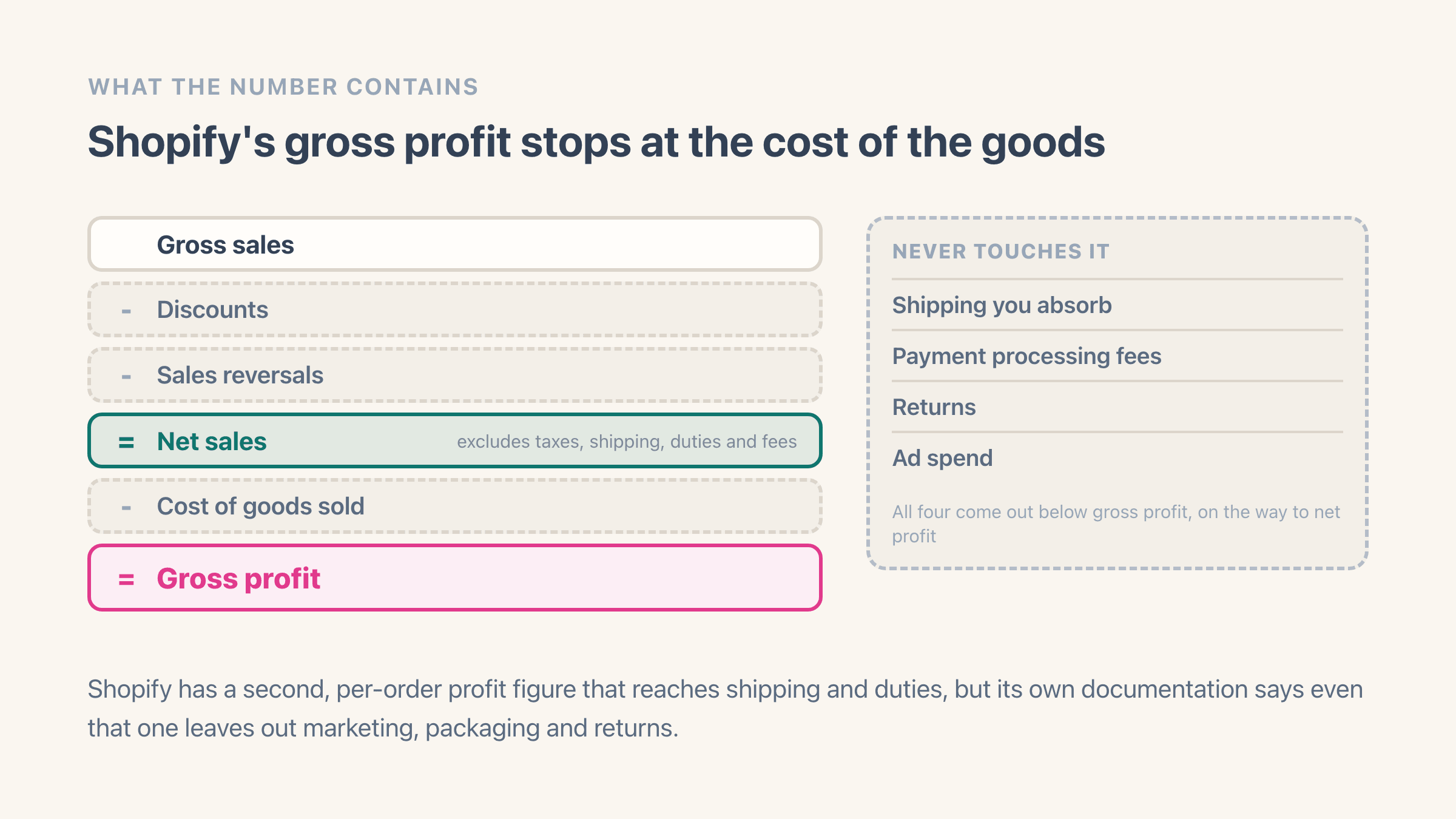
It takes out discounts and the cost of the goods. It leaves in every cost of actually getting the order to the customer.
The definitions are worth reading literally. Net sales is gross sales minus discounts minus sales reversals, and Shopify's own note says it excludes taxes, shipping, duties and fees. Gross profit is then net sales minus cost of goods sold. So a discount code moves your gross margin, and the shipping label you paid for does not.
Shopify does have a second, deeper profit figure that works order by order and reaches shipping, duties and import taxes on top of the product cost. Its own documentation is unusually frank about the gaps that survive even there: that profit "excludes marketing costs, packaging costs, and returns", and the whole thing is "measured before any returns are settled". Neither of Shopify's figures claims to be net profit, and neither should be read as one.
The duties in that second figure are only as accurate as the classification code on the product, and most catalogues have that box empty. It is worth checking what is in yours before reading a cross-border margin off either number.
How to see gross margin per product, collection or vendor
Per product and per variant, Shopify already built the report. Go to Analytics, then Reports, and filter to the Profit margin category. Gross profit by product and Gross profit by product variant both hand you the same five columns - net quantity, net sales, cost, gross margin and gross profit - so the margin is sitting there on every row with no arithmetic from you. The variant version is the one to open when a single size or colour is dragging a product down.
Per collection, per product type and per vendor, Shopify has nothing ready-made. None of the five profit reports group that way. Two of them do cut the same numbers in a different direction: Gross profit by POS location splits margin across your physical shops, and Average profit margin by market splits it across the countries you sell into.
- Collection is the cut that usually changes a buying decision, and the one Shopify will not give you. Export the product report and add collections in a spreadsheet, or let an app do the grouping.
- Product type and vendor are the same story: on every product, in no margin report.
- A rename does not split a product in two. Shopify keeps the name a product had when it sold as well as its current one.
- Discounted and full-price sales of one product are two different margins, and averaging them hides whichever is losing money.
- Check which rows have a real cost behind them first. Every margin above is only as good as that answer.
Does a discount code lower the gross margin Shopify shows?
Yes, and by the full amount of the discount. Net sales is measured after discounts while the cost of goods stays exactly where it was, so the whole reduction lands on gross profit.
Shopify's own worked example is the clearest version of this. A T-shirt priced at $20 with a $10 cost shows a 50% margin on its product page. Discount it 25% to sell at $15 during the month and the same shirt reads 33% on the Gross profit by product report. Nothing about the shirt changed. One screen is showing you the margin at list price and the other is showing the margin you actually got.
Shopify also counts the two kinds of discount apart - one applied to a single line, one applied across the whole order - and the order-wide ones still land on individual products, because Shopify spreads them down onto the lines they cover. That is how a 15%-off-everything code turns up inside one product's margin, and why a product can look healthy at list price and lose money in every promotion it appears in. How discounts affect your Shopify profit works through the arithmetic.
How gross margin works on a Shopify bundle
Shopify prices a bundle on the parent product and calculates its inventory from the components. That split is the thing to watch. The customer buys the parent, the goods that left your warehouse are the components, and which of the two carries a recorded cost decides whether the bundle's margin means anything at all.
Shopify does know a bundle when it sees one, at least. Its sales reporting marks the sale as a bundle rather than a plain product, keeps the bundle name as it read on the day you built it, counts how many bundles went out, and ties the separate pieces of one bundle sale back to each other. What it will not do is warn you that a cost is missing. Check the components carry a Cost per item of their own before you believe anything a bundle's margin tells you.
One quirk is worth knowing. The saving in a bundle is normally built into the parent price rather than applied as a discount, so it never appears in your discount totals. A bundle can be the most heavily discounted thing you sell and show up nowhere in a discount report. The only place it shows is margin.
Can a store with a healthy gross margin still lose money?
Routinely. Gross margin stops at the cost of the product, and most of what decides whether a Shopify store makes money sits underneath it: the gap between what the customer paid for shipping and what the carrier charged you, the percentage plus fixed fee on every transaction, returns that settle weeks after the sale, and the ad spend that bought the order in the first place.
The relationship worth understanding is between your gross margin and how much of your demand you buy. A store whose orders arrive from search and repeat customers keeps most of its gross margin. A store buying every order on paid social can hand nearly all of it back, and the gross margin on the report will not move an inch while that happens. No benchmark percentage tells you which one you are. Only your own costs do, and profit margin goes into what counts as good.
The number that decides whether the paid half pays for itself is break-even ROAS, which is 1 divided by the margin left before the ad. Feed gross margin into it and the floor lands far too low, which is the specific way a healthy-looking report and a losing month sit on the same screen. Whether your store is profitable at all is the month-level version of the same check.
Gross margin answers a product question - is this worth selling at this price. Whether the business works is a separate question with net profit behind it, and contribution margin is the step between the two.
If you do one thing after reading this, do the coverage check from earlier. Export the catalogue, find every variant sitting on a blank Cost per item, and see which of them sold last month. That is how much of the month Shopify could put a cost against at all, and every margin number above is only as good as that share.
Example
A store does $50,000 in net sales for the month. Cost per item is filled in on $30,000 of it, which returns $18,000 of gross profit - a 60% margin, and the figure Shopify reports. The other $20,000 is a resale range running at roughly 17% margin, worth $3,400. Count all of it and the month's real gross margin is 42.8%.
Where it lives in your Shopify admin
Analytics > Reports, where Shopify's profit reports live. Gross profit by product and Gross profit by product variant both give net quantity, net sales, cost, gross margin and gross profit per row. The cost they use comes from Products > open a product > Pricing > Cost per item, and staff need the View product costs permission to see it.
Commonly confused with
- Net profit
- Gross profit stops at the cost of the goods. Net profit carries on through payment fees, shipping you absorb, returns, ad spend and the monthly bills.
- Gross margin
- Gross profit is an amount of money. Gross margin is that amount as a percentage of net sales, and Shopify puts both on the same report row.
- Net sales
- Net sales is your sales after discounts and returns, and it already excludes tax, shipping and duties. Gross profit is what is left once the cost of goods comes off that.