Definition
What this page covers
This page is about one number: what the goods you sold actually cost you, and how to get that number into Shopify and keep it true. So it covers the per-unit calculation, volume discounts, freight and duty, the Cost per item box and what Shopify does with it, dropshipping, filling in hundreds of variants at once, and the mistakes that quietly move the figure.
If you already have your cost figure and only want the arithmetic, the free profit margin calculator turns a price and a cost into gross margin, net margin, markup and the break-even ROAS for that item. If you are weighing up tools instead of building the habit, our TrueProfit comparison and Sellerboard comparison both cover how each one handles per-product cost.
What the other profit pages cover
Everything that happens below COGS has a page of its own, because each one answers a different decision:
- Shopify gross profit is what Shopify reports once a cost is recorded, and covers why that report reads high when the cost data is patchy.
- Net profit carries on through fees, shipping, returns, ads and the monthly bills.
- Contribution margin is the per-order version, and it is the pot an ad gets paid out of.
- Profit margin turns any of those into a percentage and asks what counts as good.
- Break-even ROAS turns your margin into the return a campaign has to clear.
- ROAS against profit explains why the number in your ad account measures something else.
What counts as COGS for a Shopify store, and what does not
The test is per-unit. If selling one more unit makes a cost go up, it belongs in COGS. If the cost would be identical whether you shipped 10 orders or 1,000, it sits outside and comes off later, when you work out net profit.
For most Shopify stores the inside list is short:
- The supplier or manufacturing price per unit, at the price you actually paid on that purchase order.
- Inbound freight and customs duty to get the stock into your warehouse.
- Per-unit packaging: the mailer, the box, the tissue paper, the printed insert.
- Per-unit work done before it ships: printing, embroidery, engraving, kitting.
- Per-unit fees your supplier charges you, such as a print-on-demand base fee.
Which costs stay out of COGS
Your Shopify plan and app subscriptions, rent, salaries, ad spend, payment processing fees and the shipping label you buy to send the parcel. None of those change because you sold one more unit, so they belong below gross profit in the P&L.
One nuance comes from Shopify's profit reports documentation. If you make what you sell, the labour and materials that go into each unit are meant to be worked into the Cost per item value itself, because Shopify has nowhere else to put them. A candle maker who leaves wax and wick out of that field is telling Shopify the candles cost nothing.
How do you calculate COGS per unit?
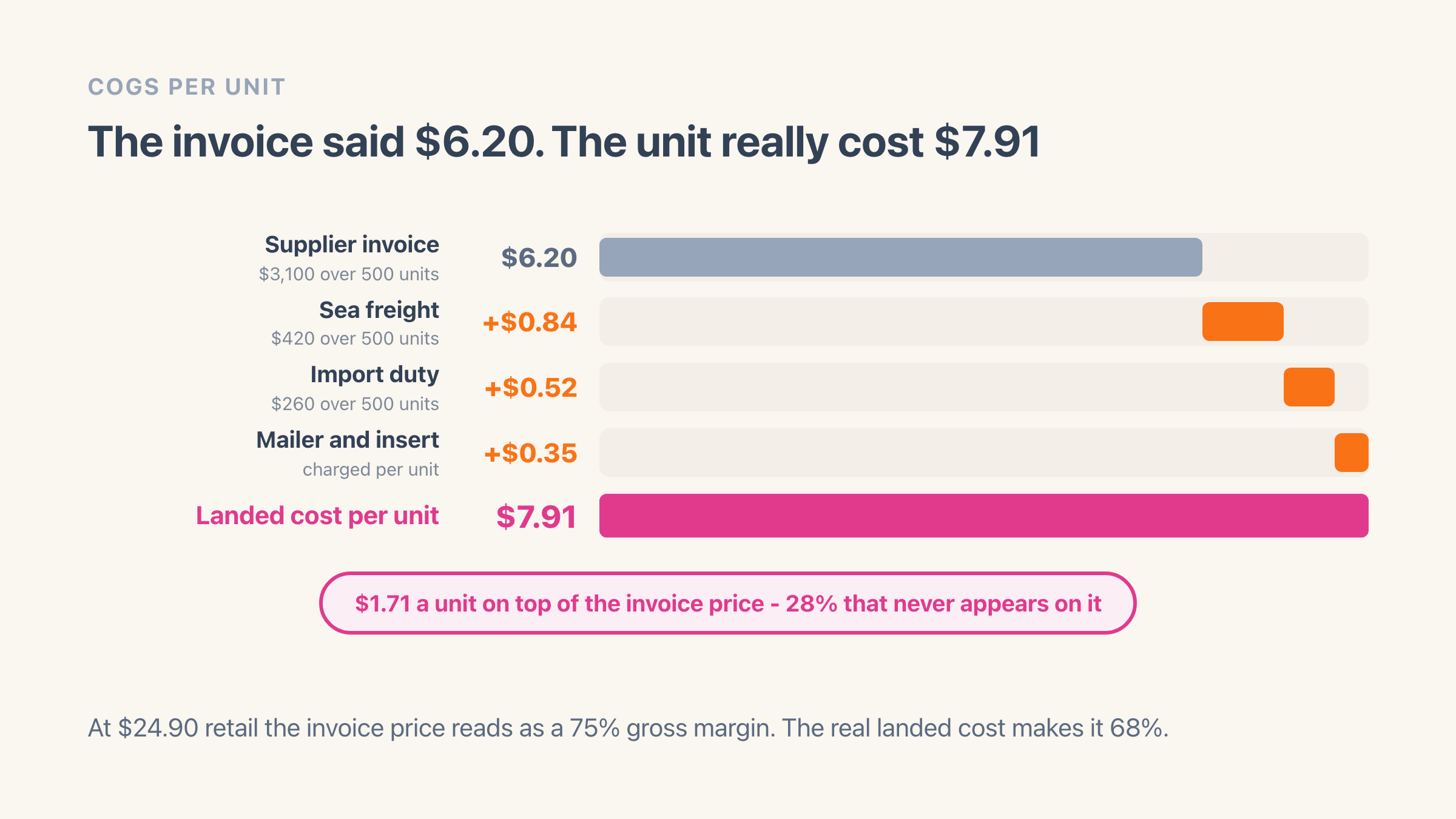
Add up every direct cost attached to a batch of stock and divide by the units in that batch. The supplier invoice is where the sum starts. Freight, duty, broker fees and per-unit packaging land on top of it, and in the worked example below they add $1.71 to a $6.20 invoice line - 28% that never appears on the invoice.
Using the invoice line as your COGS is the most common way this goes wrong, and it flatters the margin on every product you import. At $24.90 retail a $6.20 cost reads as a 75% gross margin. The real $7.91 cost makes it 68%. Seven points of margin is the difference between a product you put budget behind and one you quietly drop.
Two batches of the same SKU bought six months apart rarely cost the same, and Shopify holds a single Cost per item value per variant, so whatever you type there becomes the cost for every unit sold from that moment on. You are keeping a weighted average whether you meant to or not. If your accountant wants FIFO, that record has to live somewhere other than Shopify.
What is your per-unit cost when the supplier gives you a volume discount?
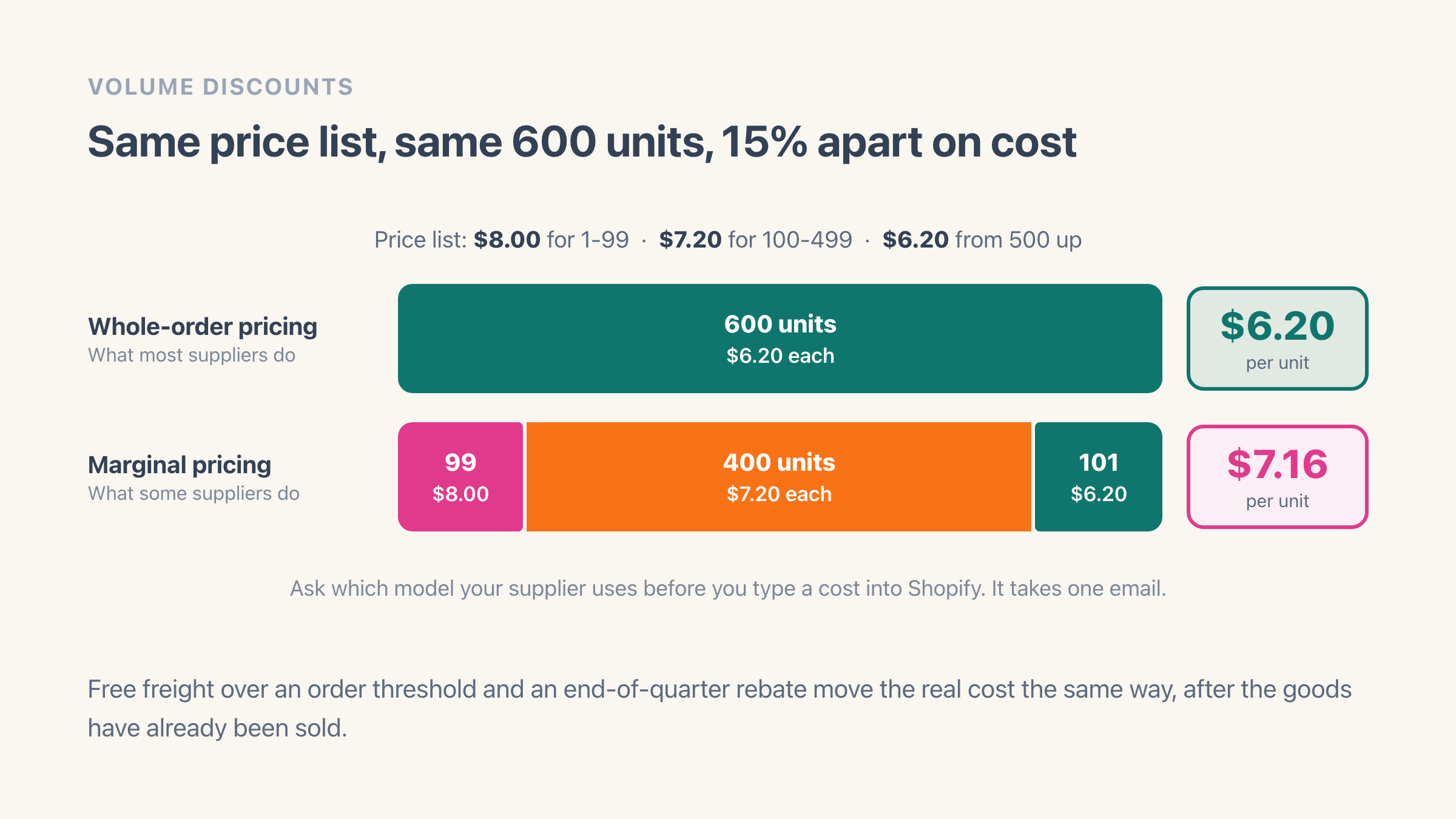
It is the price you actually paid on that purchase order, spread across the units it delivered. That sounds obvious until you check how the tier got applied, because two suppliers with identical price lists can bill you differently for the same 600 units.
Say the list runs $8.00 for 1 to 99 units, $7.20 for 100 to 499 and $6.20 from 500 up. Most suppliers price the whole order at the tier you reach, so 600 units cost $6.20 each. Some price marginally instead: the first 99 at $8.00, the next 400 at $7.20 and the last 101 at $6.20, which averages $7.16. Same price list, same order, 15% apart on cost.
Free freight over an order threshold does the same thing from the other side, and so does a rebate your supplier pays at the end of the quarter. Both change the real cost of goods you have already sold. Ask which model your supplier uses before you type anything into Shopify. It takes one email.
We built purchase-discount rules into Easy Profit Calculator for exactly this, because one cost field per variant cannot hold a cost that moves with every purchase order.
Do freight and import duty belong in COGS?
Both do, and so do the fees that travel with them. What lands in the per-unit cost, and what does not:
- Inbound freight does.
- Customs duty does.
- Broker and clearance fees do.
- The shipping label you buy to send the parcel to a customer stays out, because that is a cost of fulfilling the order rather than a cost of the goods.
- Import VAT usually stays out too, since a VAT-registered business reclaims it. Duty is the part you never get back.
How do you turn freight and duty into a per-unit cost?
The per-unit number after freight, duty and fees is your landed cost, and that is what belongs in Cost per item. Allocating it is the step people rush.
Splitting a container evenly across units is fine when the units are similar and badly wrong when one SKU weighs 4kg and another weighs 400g. Allocate freight by weight and duty by declared value, and your cheap-looking products stop looking cheap.
The rate itself comes off a classification code, and the same code system follows the product back out again when you sell it abroad. Where it lives on the way out is a box on the Shopify product page.
Shopify holds that number in your store's default currency and only that one. Pay your supplier in USD while you sell in EUR and whatever you type has already been converted at some rate on some day.
Rates move. The cost sitting in Shopify does not, and nothing in the admin will tell you it has drifted.
What is your COGS if you dropship?
Whatever your supplier bills you for that order: the item price plus what they charge you to ship it. You never hold stock, so there is no inbound freight to allocate and no landed cost to work out. Dropship COGS is the easiest kind to calculate and the hardest kind to keep true.
Supplier prices move without warning. A cost you typed in January is still sitting in the field in July, quietly wrong, and nothing in the admin flags it. Print-on-demand behaves the same way, where the base cost plus the print fee is your COGS and both get repriced on the platform's schedule.
Shipping is the other half. Most dropship and POD suppliers bill per order or per shipment rather than evenly per item, so a three-item order does not cost you three times the single-item shipping. Put the item cost in Cost per item, hold supplier shipping as a per-order cost in whatever tool you use for profit, and re-check the price list monthly. A calendar reminder is genuinely the fix here.
Where is the Cost per item field in Shopify?
On the product itself, in the pricing details, one value per variant. Shopify groups it with unit pricing and compare-at pricing as an additional pricing detail you can add. A product with five variants has five costs to fill in, because the value attaches to each variant and not to the product record.
There is one Cost per item box per variant, and every route into it ends in the same box. Type the number yourself, import it from a spreadsheet, or let an app fill it in, and it lands in the same place and replaces whatever was there before. That matters when you are choosing an app. Two apps both pushing cost into Shopify are pushing into the same box, so whichever one ran last is the cost your reports use.
The field holds one current value. There is nowhere in it for a cost that used to be $6.20 and is now $7.91, which matters a lot for what Shopify does next.
What does Shopify actually do with Cost per item?
It feeds the profit reports and stops there. Five reports use it: gross profit by product, gross profit by product variant, gross profit by POS location, profit margin by order and average profit margin by market. The maths is net sales minus cost.
Those reports leave out the entire second half of your P&L. Shopify's documentation says the calculation excludes taxes and shipping costs, other than shipping you charged the customer. Payment processing, ad spend, refunds, app subscriptions and your own salary are absent too, because Shopify does not know any of those numbers. It stops at gross profit, which is a long way above what you keep.
One line from those docs is worth reading twice: "Profit is reported only for products and variants that had cost recorded at the time they were sold." Cost is captured onto the sale as it happens. Fill in Cost per item today and last quarter's report does not improve. If products are missing from your gross profit report, Shopify's own answer is that those variants had no cost information when they sold.
That is why COGS accuracy compounds. Gross margin comes off it. Your break-even ROAS is one divided by that margin, so a cost that is 20% low hands you an ad target you were never going to hit. The discount you decided you could afford, the vendor you reordered from, the product you scaled - every one of those sat on top of a number you typed once. Get it wrong and everything below it is wrong in the same direction, which is the worst kind of wrong, because nothing looks broken.
Which mistakes make a COGS number wrong?
Five, and they all push the recorded cost the same way, which is down. A cost that reads too low makes every margin underneath it look better than it is, and nothing on the screen looks broken while that happens.
The one to check first is whether a cost is there at all. Export the catalogue, find the variants sitting on a blank Cost per item, and see which of them actually sold last month. That same figure is what values your stock, so it turns up again in what your inventory is worth.
- Using the invoice line as the cost. Freight, duty and per-unit packaging are the $1.71 sitting on top of a $6.20 invoice in the example above, and none of it is printed on the invoice.
- Splitting freight evenly across a container. Allocate freight by weight and duty by declared value, or your 4kg products keep hiding inside your 400g ones.
- Leaving Cost per item blank on the lines that sell hardest. Shopify drops those sales out of its margin reports rather than counting them at zero cost, which is the gap Shopify gross profit works through.
- Letting a supplier price go stale. Whatever you typed in January is still sitting there in July, and dropship and print-on-demand catalogues drift fastest of all.
- Reading gross margin as the margin an ad is paid from. Ads come out of what survives the payment fee, the shipping and the returns as well, which is contribution margin.
How do you add cost to hundreds of products at once?
Use the product CSV. Shopify's import file has a Cost per item column, documented as how much it costs you to make or acquire the product or variant, and it wants the bare number with no currency symbol.
Export before you build anything by hand. The export already has one row per variant with the handle and option values filled in, so the only column you touch is Cost per item. Shopify's documentation notes that when you update products by CSV the only required columns are URL handle and Title, so the file can be stripped right down. Keep the option columns if your products have variants, so every row still points at the variant it belongs to.
A cost app does the same job without the spreadsheet. It fills in the same Cost per item boxes you would type into by hand, hundreds of variants at a time, which is what you are paying it for once the catalogue is too big to keep exporting and re-importing every time a supplier reprices.
Easy Profit Calculator imports product costs from CSV and layers cost rules on top, then labels every cost on every order by where it came from - exact, from Shopify, from your CSV, from a rule, or estimated - and scores how much of your cost data is real rather than assumed. That last part matters more than it sounds. A profit number is only as trustworthy as the share of it that came from a measured cost, and being shown which SKUs are still guesses is what lets you go and fix them.
Example
A 500-unit purchase order: $3,100 to the supplier, $420 sea freight, $260 duty and $0.35 a unit for the mailer and insert. COGS per unit is ($3,100 + $420 + $260) / 500 + $0.35 = $7.91. Put $6.20 in Cost per item because that is what the invoice said, and a $24.90 product reports a 75% gross margin instead of its real 68%.
Where it lives in your Shopify admin
Products > open a product > the Pricing section, where Cost per item sits as one box per variant. Products > Export puts the same value in a Cost per item column for the whole catalogue, and re-importing that file is how you fill in hundreds at once.
Commonly confused with
- Cost per item
- Cost per item is the one box Shopify gives you to hold COGS. It stores a single current amount per variant, so it is somewhere to put the number rather than the number itself.
- Landed cost
- Landed cost is the per-unit figure after freight, duty and clearance fees, and for a store that imports stock it is exactly what belongs in COGS. The two only match on the nose when you buy domestically with delivery in the price.
- Gross profit
- COGS is the cost you subtract. Gross profit is what is left after subtracting it, and Shopify calculates the second one from the first.