Short answer
How they compare
| Feature | This appEasy Profit CalculatorFree, then from $19/mo | BeProfitFrom $49/mo, trial only |
|---|---|---|
| Net profit per order | Yes | Yes |
| Genuine free planNot just a time-limited trial | Yes - 100 orders/mo | No - 14-day trial |
| Starting paid price | $19/mo | $49/mo |
| Labels each cost exact vs estimatedSo you know which numbers to trust | Yes | No |
| Data-quality score for the whole store | Yes | No |
| Google Ads profit ROAS | Yes | Yes |
| Break-even ROAS target per campaign | Yes | Limited |
| Product cost rules with purchase-discount tiers | Yes | No |
| Payment-fee rules by card type and gateway | Yes | No |
| Below-cost and suspicious-discount alerts | Yes | No |
| Combined multi-store and marketplace viewAmazon plus several stores in one rollup | Shopify-focused | Yes |
| Analyses Shopify POS orders | Yes | Yes |
Why merchants look for a BeProfit alternative
BeProfit is one of the established profit-analytics apps on Shopify, rated 4.3 from around 170 reviews, and for a lot of stores it does the core job. The searches for an alternative usually come down to three things: whether the numbers can be trusted, what the app costs as a store grows, and whether there is a real free plan to start on.
On price, BeProfit runs from $49 a month with a 14-day trial and no free tier, so you commit before you have lived with the numbers. In its recent one-star reviews on the App Store (mid-2026), the themes users raise most often are billing and cancellation friction and totals that do not line up with Shopify. Those are worth reading before you pick a tool you will trust with pricing decisions.
The trust question is the one that matters most. A profit dashboard is only useful if you know which figures are measured and which are guessed. When product costs, real shipping cost, or ad spend are missing, most tools quietly fill the gap with an estimate and show one confident-looking number. That is where a wrong decision starts.
What Easy Profit Calculator does differently
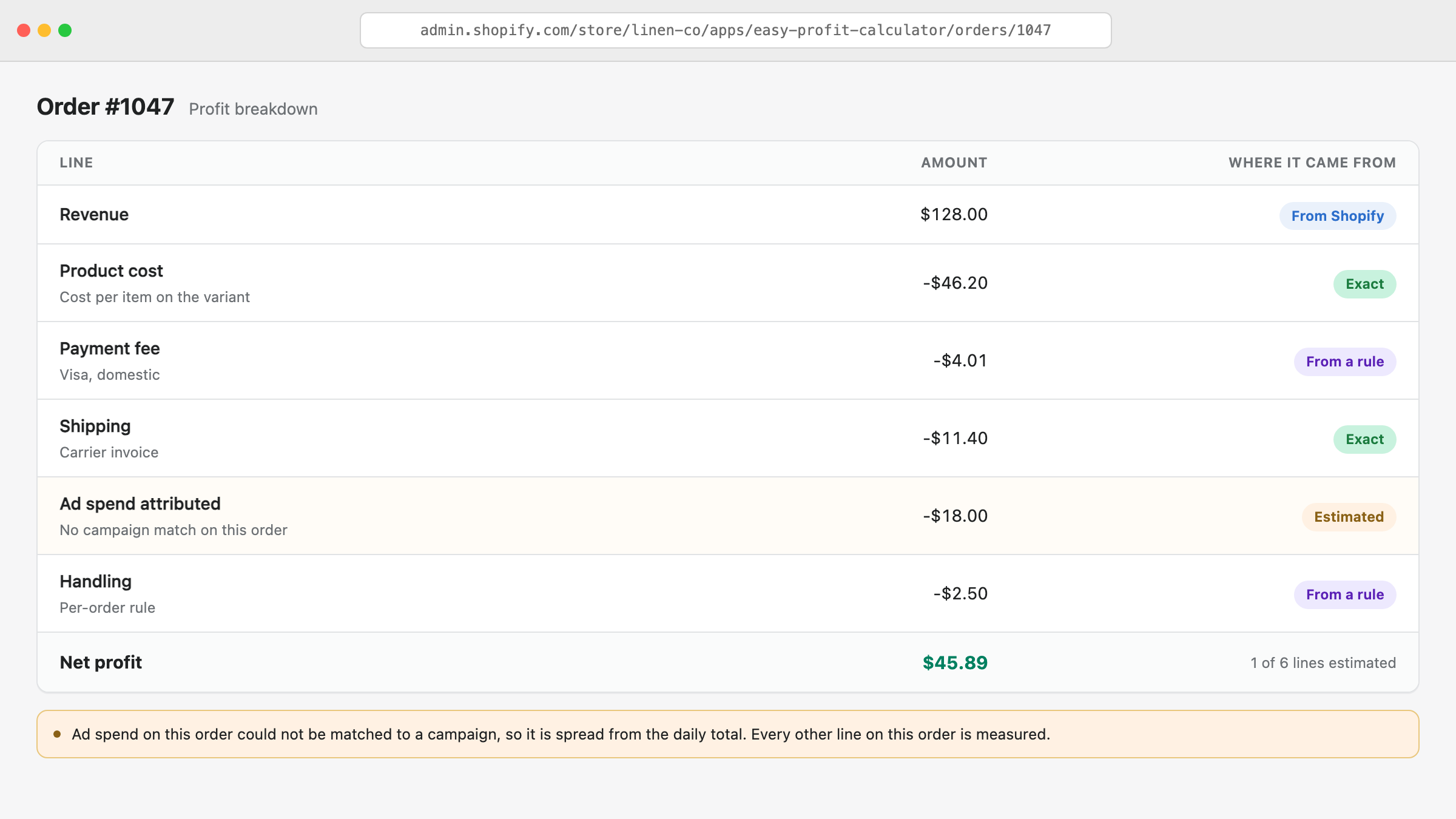
Easy Profit Calculator builds profit per order from your Shopify sales plus your costs: product cost, payment fees, shipping, returns, taxes and ad spend. The difference is that every cost carries a source label - exact, pulled from Shopify, from an ad platform, from a rule you set, or estimated - so you can see which orders have trustworthy math and which are missing data.
A data-quality score turns that into one number per store, and the app points at the exact products or orders dragging it down. You fix the input, the profit figure corrects itself, and you stop making calls on numbers that were quietly estimated.
- A source label and confidence flag on every cost, on every order
- Break-even ROAS per campaign, using your real margins
- Product cost rules with purchase-discount tiers for bulk buys
- Payment-fee rules down to the card type and gateway
- Alerts for below-cost orders and suspicious staff discounts
- A free plan to start, then flat monthly pricing from $19
Where BeProfit might be the better fit
No single app wins on everything, and it is worth being straight about that. BeProfit is built for multichannel brands: if you sell across several Shopify stores plus marketplaces like Amazon and want one combined profit rollup, plus cohort and lifetime-value analysis on its higher plans, that is its strength and Easy Profit Calculator does not try to match it.
Easy Profit Calculator is focused on one Shopify store, on making the accuracy of each number visible, and on starting free. The honest way to choose is to run it alongside whatever you use today and compare the two on your own orders.
BeProfit is rarely the only name on the shortlist either. We put the same app against Sellerboard, Lifetimely and TrueProfit on separate pages, so pick whichever of those is also open in another tab.
What should you check in your own store before picking a profit app?
Four numbers, and all four are already sitting in your Shopify admin. They decide which app fits and roughly what you will pay for it, so an hour spent on them saves you a trial you did not need and a subscription you outgrow in March. If you are not yet sure the store clears a profit at all, work out whether your Shopify store is profitable first, because that answer comes from a spreadsheet rather than a subscription.
Start with the number of orders in your busiest month rather than your average one. Profit apps in this category price by orders a month, the allowance resets with the calendar month, and a store averaging 400 orders with a 900-order November is a 900-order store as far as pricing is concerned. Open Analytics in your admin, look at sales by month across the last twelve months, and take the tallest bar. Price every app you are considering against that number, then read what each one does once you pass it.
Second, count how many of your variants have anything in the Cost per item box. Shopify only counts a sale in its own gross profit figure when the variant had a cost recorded at the moment it sold, so a catalogue that is half blank is already reporting a margin that is too high. Export your products to a spreadsheet and count the empty rows in that column. If the number is large, the afternoon you spend filling it in will change your reported margin more than any app you install.
Third, where the ad money goes. One Google account is a different problem from a budget split across Meta, TikTok and a couple of affiliate deals, because live syncing only exists for the networks a given app supports. Spend from anywhere else gets typed in as a monthly figure, and a monthly figure cannot be pinned to the order it produced.
Fourth, whether your prices include tax. Open any product: if the price a German or Danish shopper sees already has VAT inside it, your Shopify order totals carry that VAT too, and it was never your money.
What does VAT do to your profit number?
On a store charging 25% VAT, a €100 order is €80 of revenue and €20 you are holding for the tax office. Take €40 of product cost off the €100 and the margin reads 60%; take it off the €80 and the real margin is 50%.
Ask any profit tool you try what it does with that, and check one order by hand before you trust a dashboard full of them. Easy Profit Calculator strips the tax out of order revenue by default on tax-inclusive stores and shows it as its own line in the profit breakdown, so you can see exactly what came out.
How the profit number is actually calculated
Each order starts from its Shopify revenue, then subtracts product cost, the real payment fee for that gateway and card type, shipping, any return, tax, and a share of ad spend attributed to the order. Fixed costs and salaries are spread across the period so the monthly profit and loss reconciles. What comes out is net profit rather than the gross-profit figure Shopify reports, and the distance between those two is most of why a store can look healthy in the built-in reports and still not pay anyone.
You can read the full method in the Easy Profit Calculator docs, or test the basic margin math in your browser with the free profit margin calculator before installing anything.
Choose Easy Profit Calculator if
you want to see which profit numbers are exact versus estimated, you want to start free while you load your costs, and you run a single Shopify store.
Choose BeProfit if
you sell across multiple stores and marketplaces and want one combined profit, LTV and cohort view, and you are comfortable starting on a trial from $49 a month.