Short answer
How do you set a safety-stock level?
Work out the number for one product
Multiply what it sells in a day by the days a reorder takes to reach your shelf. Four a day with a five-day restock lands on twenty. Fast movers need a bigger number than slow ones.
If it does not work
You use the lead time your supplier quotes rather than the one you actually get, and the buffer runs dry mid-restock. Count from the day you send the order to the day the boxes are open and counted in, which on most suppliers is a few days longer than the number on the email.
Set it on the variant, or across the shop
Type a number on a single variant, or set one shop-wide default that covers everything you have not set by hand. On Pro you can also set numbers in bulk by collection, tag or product type.
If it does not work
A shop-wide default sweeps up the products that were never meant to have one. Preorder and made-to-order lines are the ones to watch, because a floor blocks the exact sale you were trying to take. Variants with Track quantity switched off are skipped for you, so those are not the problem.
How to undo it
Clear or lower the number on that variant and the next checkout uses the new figure straight away. Nothing about your Shopify inventory count changed while it was set, so there is nothing to put back.
The store stops selling at that number
Once stock is down to the number you set, the product stops selling. Shoppers see a message in your own wording, and selling resumes on its own when you restock.
If it does not work
Stock walks straight past the number and nothing stops. Almost always this is the one manual step: the rule has to be switched on once in your Shopify admin under Settings, then Checkout, and until it is, the floors you set do nothing at all.
How to undo it
On Pro, pause every floor for 1, 6 or 24 hours in a click and let the pause expire on its own. On the free plan, lower or clear the number on the product you need to sell today.
Or let it suggest the numbers
On Pro, Easy Stock Buffer reads how fast each product has been selling and suggests a number for it, so you are not working through a catalogue by hand.
If it does not work
On a fresh install the suggestions are thin or missing, because they are built from stock movements watched since you installed it. Products with fewer than three sales in the window are flagged rather than hidden, which is the app telling you the number is a guess with a decimal point on it.
How to undo it
A suggestion is a proposal until you apply it, and an applied number is edited or cleared like any other.
What you get
- A number per variant, plus one shop-wide default
- Numbers set in bulk by collection, tag or product type on Pro
- A separate number per location on Pro
- Suggested numbers from how fast each product sells, on Pro
- The stop holds at checkout, including Shop Pay and express buttons
- Low-stock emails, 10 a month free and unlimited on Pro
- A one-click pause for 1, 6 or 24 hours on Pro
What is a safety stock level?
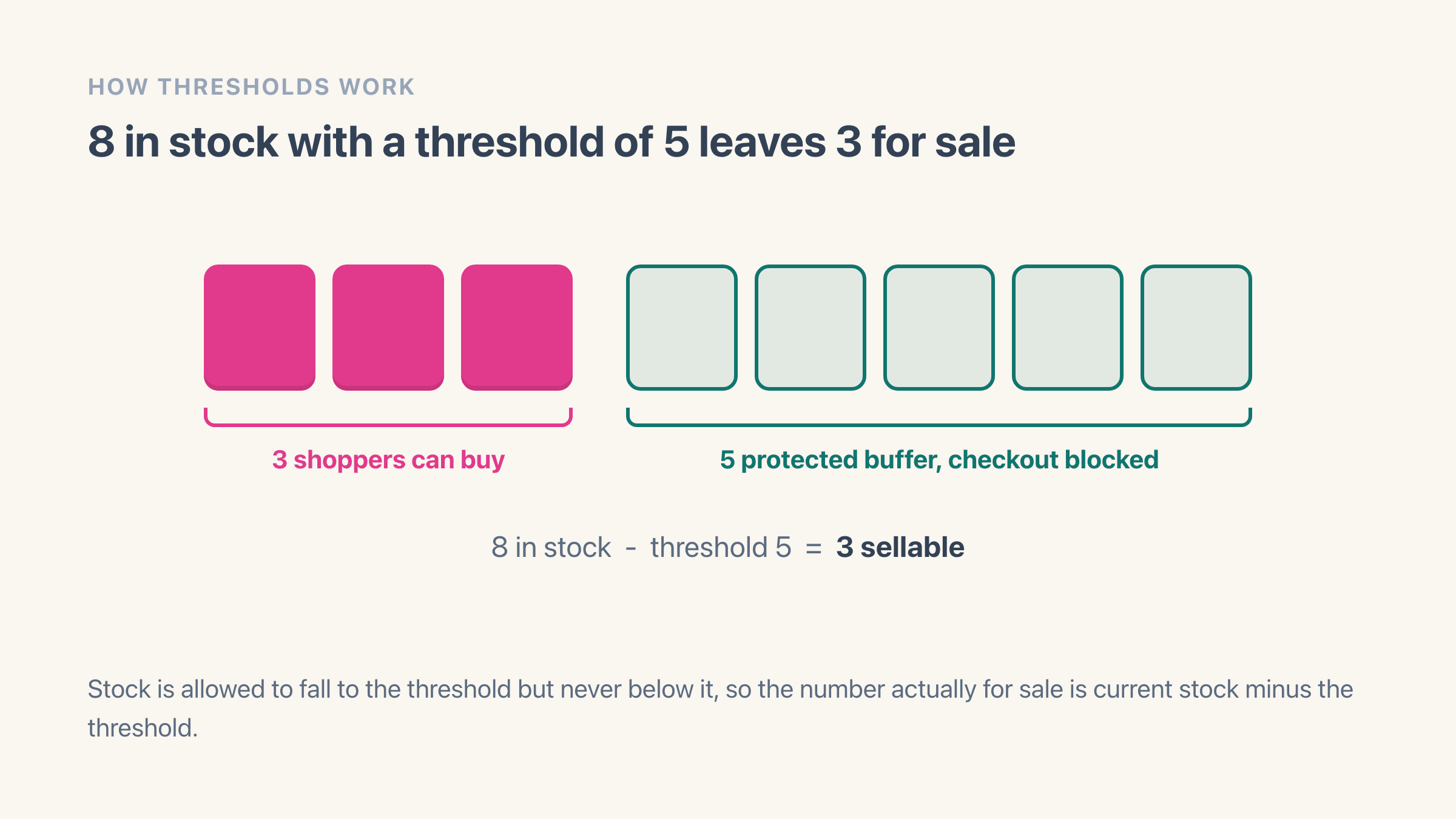
It is the number you refuse to sell past. Safety stock is stock you physically hold and deliberately keep back, so that the things you cannot predict land on the buffer instead of on a customer: a delivery that slips a week, a product that suddenly sells five times its usual rate, two shoppers checking out the last unit within the same few seconds. That last one is overselling in its purest form, and it is the failure a floor exists to absorb.
It costs you something, and it is worth being honest about that. Twenty units held back on a $40 product is $800 of stock you cannot turn into money today. What you buy with it is the expensive problem going away. A sale you never took costs you that margin once. A sale you took and could not ship costs you the refund, the apology thread, and often the customer.
How do you work out the right number for a product?
Multiply what it sells in a day by the number of days a reorder takes to reach your shelf. That is the whole starting formula, and it works because the buffer only has to keep you selling while the replacement is in transit. A product shifting four a day with a five-day restock lands on twenty.
Both figures come out of your own admin. For daily sales, open Analytics, then Reports, then Sales by product, set the range to the last 30 days and divide the units sold by 30. For restock days, count from the day you send the order to your supplier to the day the boxes are open and counted in, which is nearly always longer than the number the supplier quotes.
Then adjust for how much it hurts to get it wrong. Push the number up on anything where the supplier misses dates, where demand spikes without warning, or where the product is the reason people came to your store in the first place. Pull it down on anything you can reorder in two days from someone local.
Run it end to end on one product. A candle selling 62 units in 30 days is a shade over two a day, and a supplier who is reliable at ten working days is really fourteen calendar days, so two times fourteen gives 28. Against a shelf of 40 that feels steep, so 15 is a sane place to start and raise later. Starting low and raising is the right direction to be wrong in, because a number set too high parks stock you could have sold, while a number set too low quietly does nothing at all.
Can the app work the number out for you?
If you would rather not do this product by product, Easy Stock Buffer works it out for you on Pro. It reads how much each product has sold over a window you pick, 30 days by default, multiplies the daily rate by how many days of cover you want, 3 by default, and rounds up. Set cover to 14 and you get the lead-time answer above.
Products with fewer than three sales in the window still appear, flagged as a thin read rather than a confident one, because a suggestion built on two sales is a guess with a decimal point on it.
One caveat before you trust the suggestions on day one. They are built from stock movements the app has watched since you installed it, so a fresh install has nothing to go on and says so. Give it a fortnight of trading and the numbers are worth taking.
Does the buffer hide stock from my own reports?
No. Your Shopify inventory count does not move. Easy Stock Buffer never writes to your quantities, so a product holding 100 still reads 100 in your admin, in a CSV export, in a stock count and to whoever syncs your warehouse. The only thing your number changes is how far down the storefront is allowed to sell.
That is the difference between a buffer and the two workarounds most people try first. Editing the count down to 80 to fake a reserve hides the stock from you as well, and the next sync from a fulfilment partner writes 100 straight back over the top of it. Shopify's own Safety stock state genuinely moves the units, so they show as Unavailable and your available count drops, which is fine as a one-off split of a shelf and useless as a rule, because nothing recalculates it as your sales rate changes.
Inside the app you see both figures next to each other. The Thresholds screen has a column for the number you set and a column for what the product currently holds, plus a status telling you whether it is sitting on the line right now. Pro adds a Reports screen that counts how many products are protected, how many are at their number today, and how many low-stock emails went out over the last 30 days.
Which number wins when a product is covered twice?
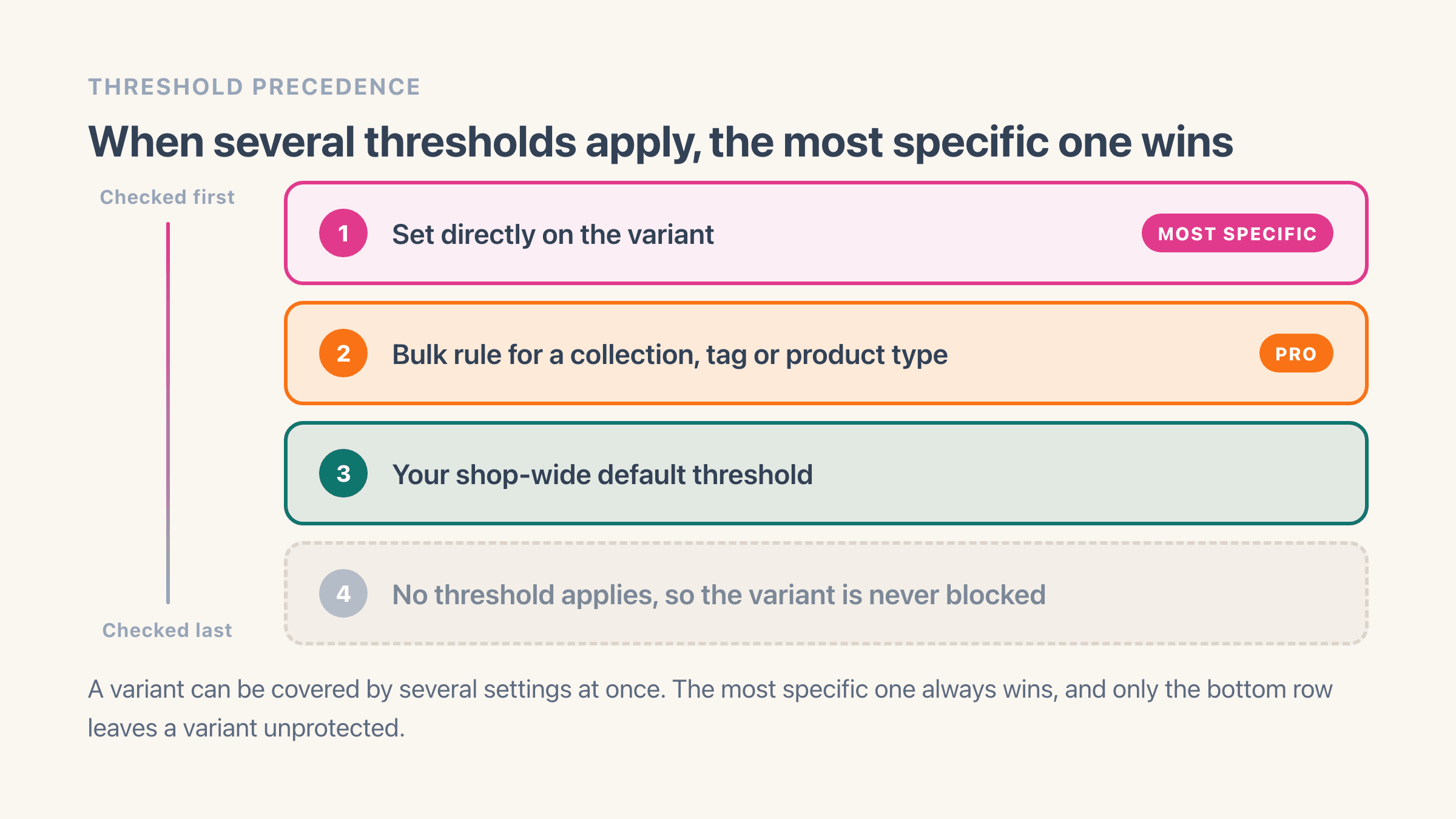
The most specific one. A number typed onto the variant itself beats a bulk rule covering its collection, tag or product type, and that in turn beats your shop-wide default. A product matched by none of the three is simply not held back.
This is what makes a shop-wide default safe to switch on. Put 3 under the whole catalogue, add bulk rules where a category needs more, then override the ten products that need their own answer. You are never fighting a rule you set last month, because the narrower setting always wins the argument.
The shop-wide default is on the free plan. Bulk rules by collection, tag or product type are Pro, as is importing numbers from a spreadsheet, which takes up to 5,000 rows in one go.
What happens to a shopper who already has the item in their cart?
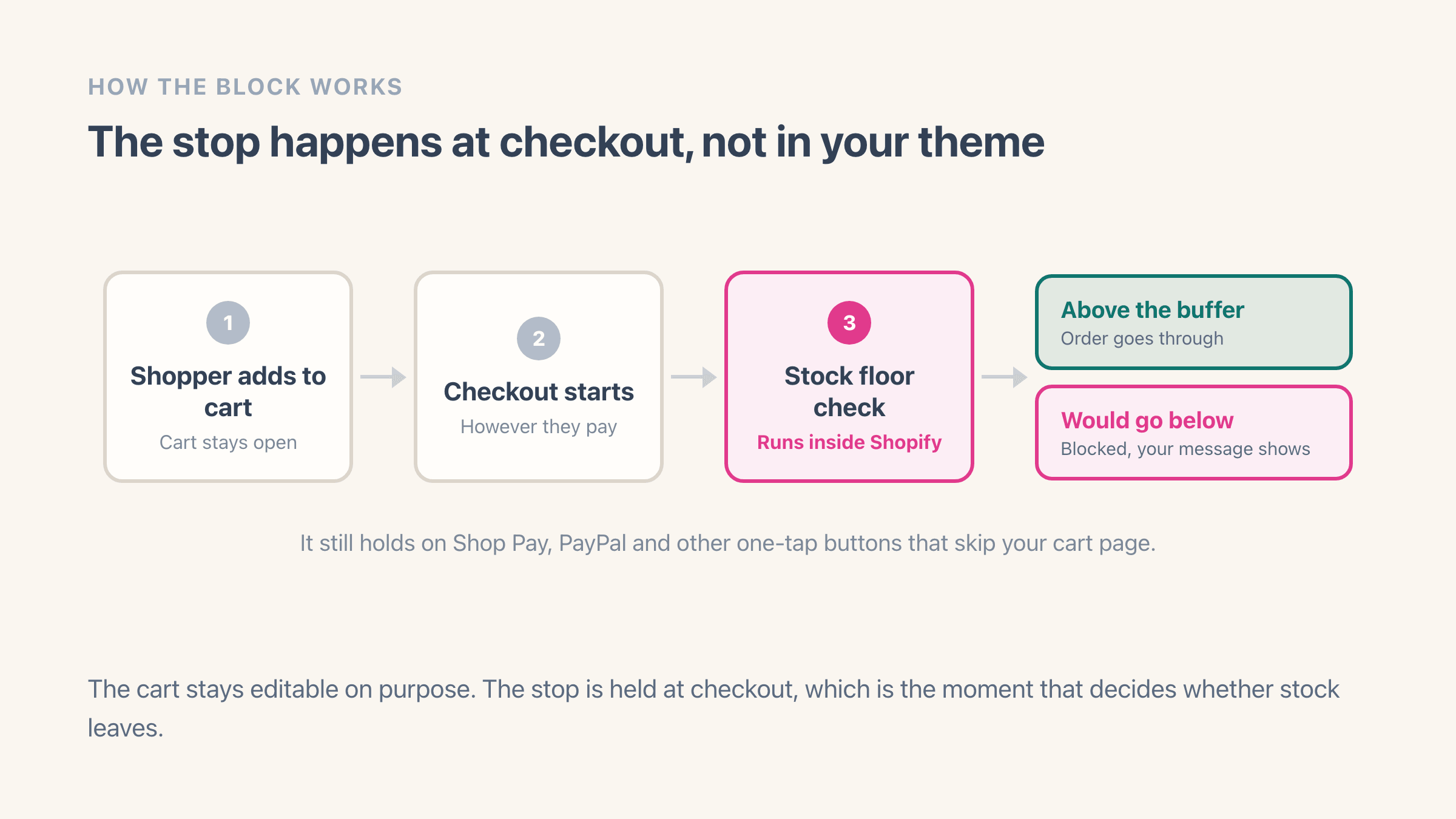
They keep their cart and they cannot finish the order. Stock can fall below your number while somebody is still browsing, so the cart is deliberately left alone: on the cart page and in the cart drawer they get a message telling them the item is being held back, and they can edit the basket rather than being thrown out of it. The order stops at checkout.
If part of what they asked for is still above your number, they are told how many they can have instead of being refused outright. A cart asking for four when two sit above the line gets "Only 2 of Blue Hoodie can be ordered right now". Both that wording and the fully-held-back version are yours to rewrite under Settings, then Customer messages, in your own voice and in every language you sell in.
The Add to cart button stops at your number as well, which catches most shoppers before they have built a basket at all. That stop and the cart message both live in your theme, so both need the app switched on in your theme editor, and both are included on the free plan.
Does it work with Shop Pay, PayPal and express checkout buttons?
Yes, and that is exactly why the stop happens at checkout rather than only in your theme. Express buttons skip your product page and your cart, so anything hidden with theme code is advice a shopper can walk straight past. This check sits inside Shopify's own checkout, so it holds whichever button they pressed, including Shop Pay, PayPal, the Shop app and a saved checkout link someone bookmarked.
One step is manual and it is the one people miss. The rule has to be switched on once in your Shopify admin under Settings, then Checkout, and until it is, nothing stops. The app says so on its home screen while it is still off, and turning on checkout blocking walks through the clicks.
When is a stock buffer the wrong tool?
On slow movers it mostly parks money. A product selling one unit every six weeks does not need three held back, because a low-stock email will reach you long before anyone races you for the last one. Leave the number off those and let the alert do the work.
On anything made to order, printed on demand or sold as a preorder, a number blocks the exact sale you are trying to take. Leave those alone, along with any product where you have deliberately switched on Continue selling when out of stock, since the two settings want opposite things. That deliberate case has its own page: how to set up backorders on Shopify.
Variants with Track quantity switched off are skipped automatically, and this is worth knowing before you wonder why. Shopify reports a quantity of zero for an untracked variant, so a number on one would block it permanently instead of protecting anything. The app leaves them out by default and the switch controlling that sits under Settings, then Enforcement.
It is also the wrong tool when what you want is a cap on how much of something one customer can buy. That is a different job with a different setting, and order limits against safety stock sets the two side by side, because they get mistaken for each other constantly.
There is also a version of this where you need no app at all. If your counts only ever go wrong because a handful of variants still have Continue selling when out of stock switched on from a launch, fix those and stop there. A buffer earns its keep on the gap between what Shopify thinks you hold and what is physically on the shelf. No gap, no reason to pay for one.
What do you do the day it blocks a sale it should not have?
Unblock the sale first and diagnose afterwards. Pro has a pause that switches every number off for one, six or twenty-four hours in a single click, which is what you want when a delivery has physically landed and nobody has counted it in yet. It expires on its own, so there is no setting left quietly switched off next month.
On the free plan the equivalent is opening that product and lowering its number, or clearing it. Either way the next checkout uses the new figure immediately, and putting the old one back is the same two clicks.
Then find the cause, because it is nearly always one of three. Your shelf and your count disagree, so recount and set the on-hand figure from what is physically there. Or the number is too high for the way that product sells now, which the suggestion screen will tell you in seconds. Or the stock is sitting at a location that does not serve your website, which needs a per-location number on Pro and is covered in how to prevent overselling on Shopify.
Alerts are the early-warning half of all this, and they are what stop the day happening in the first place. Every product that reaches its number can email you, ten a month on the free plan and unlimited on Pro, where you can take one daily or weekly summary instead if per-product emails turn into noise.