Definition
Why does Shopify let two people buy the same last unit?
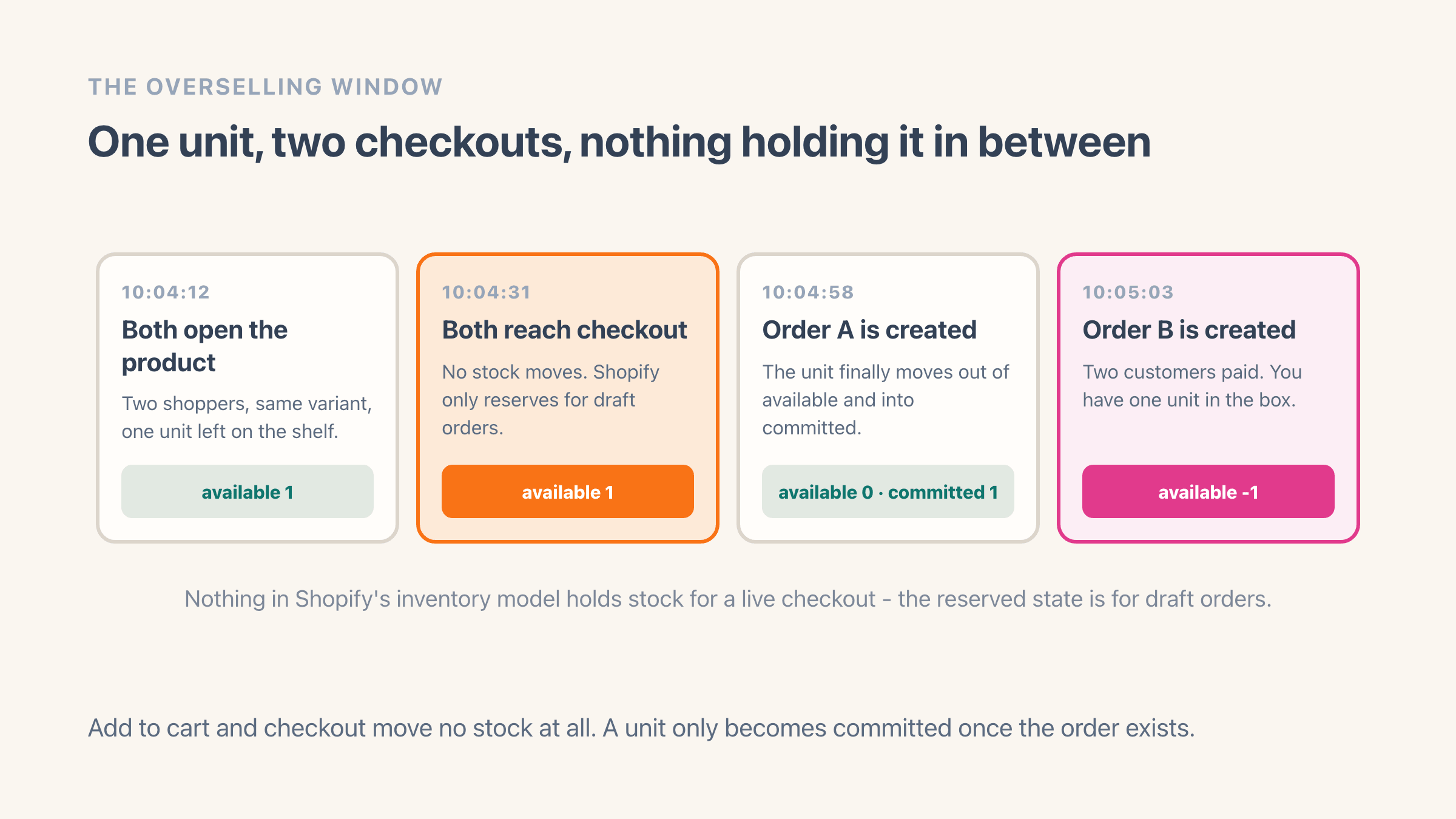
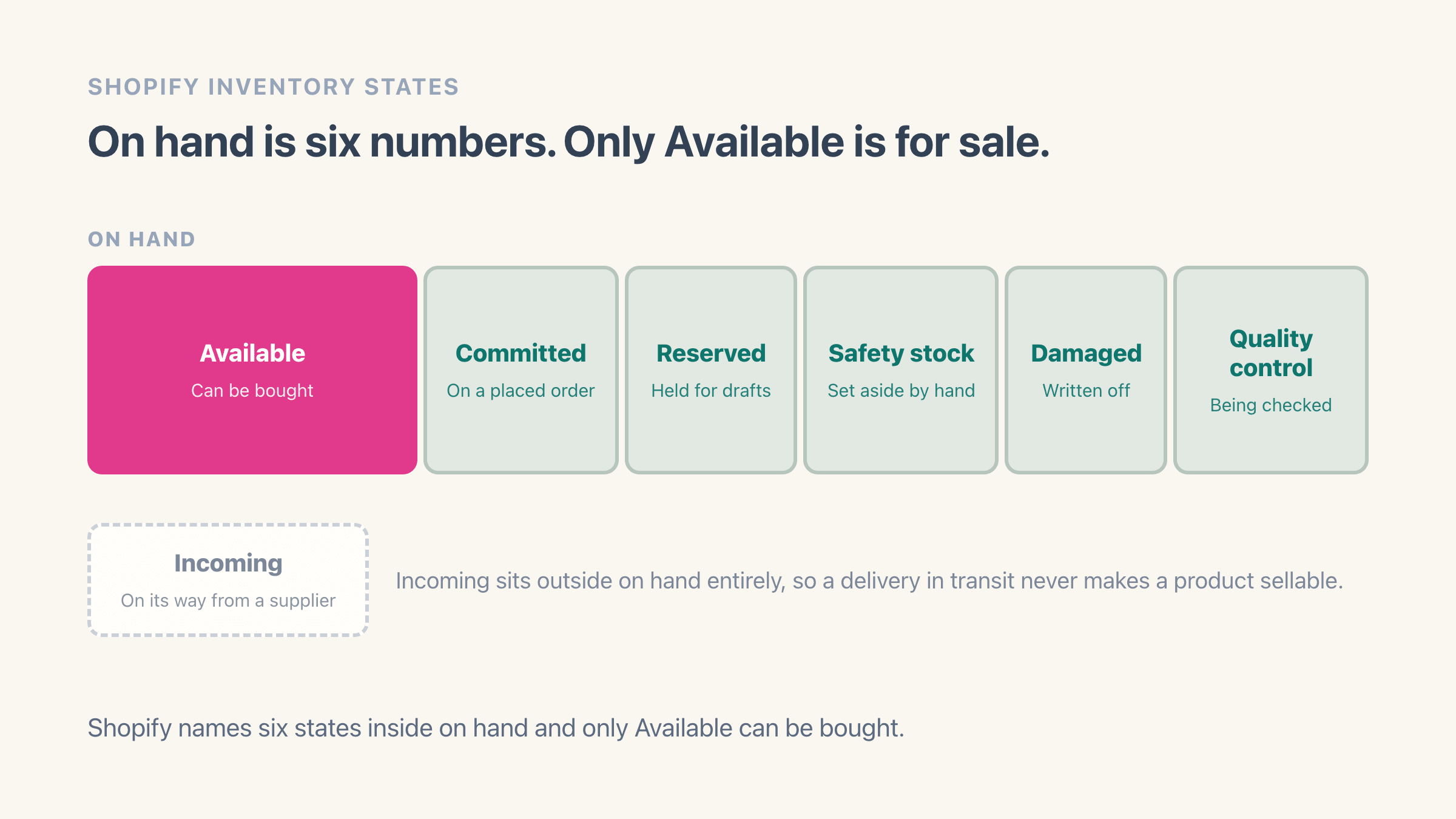
Because nothing puts a hold on that unit while someone is checking out. Your admin splits the stock at each location into groups - Available, Committed, and an Unavailable group covering safety stock, damage and units held for inspection. The one that sounds like a checkout hold is the reserve Shopify offers on draft orders, which are the quotes you build by hand in the admin. A shopper sitting in a live checkout has nothing set aside for them.
A unit leaves Available and lands in Committed at the moment the order is created, which is later than most merchants assume: after the cart, after the shipping step, after the card details have been typed in. It then sits in Committed, still physically on your shelf but no longer sellable, until you ship it. Two shoppers can both be looking at a page that says one left, both be paying, and both be working from the same number.
The window is seconds wide and it only ever opens on the final units of a variant. That is why this lands on your hero product during a drop and almost never on the long tail, and why it feels like something broke the week it first happens. Nothing broke. The traffic just found a gap that was always there.
Why does your inventory count say you have stock when you do not?
Because the number in your admin is a record of what some system last told Shopify, and several systems are allowed to tell it different things. This is the bigger of the two causes and the one merchants spend months chasing.
A warehouse or a 3PL set up to manage its own stock in Shopify becomes the authority on its own numbers. Shopify asks that service for its levels on a schedule and takes back whatever it sends. Your hand-typed correction from Tuesday is gone by Wednesday and nothing announces it.
Two systems writing the same figure is a hazard Shopify designed against and integrations routinely skip. When something updates a stock number, it can first tell Shopify the figure it expects to find, and Shopify refuses the update if the count moved in the meantime. That check is optional. Plenty of integrations leave it off, and the result is a warehouse confidently overwriting a count that had already changed underneath it.
Then there is the total. The stock figure you see on the product list adds up every location that stocks the variant, and the number your website can actually sell from is a different one, because a location that does not ship web orders still counts towards the total. Fourteen units across three warehouses when one of them ships web orders is not fourteen sellable units. How to prevent overselling on Shopify walks through each of these with the admin screens.
Overselling vs backorders vs preorders: what is the difference?
Consent, and nothing else. All three take money for a unit you do not currently hold. Two of them tell the customer first.
The mechanism underneath is identical. Every variant has a "Continue selling when out of stock" tick box in your admin, and while it is ticked the count keeps dropping past zero as customers keep buying. A preorder is that box ticked plus a ship date on the product page. A backorder is that box ticked plus an email that arrives before the customer starts wondering. Overselling is the same box, or a count that was already wrong, plus silence.
That is why the same setting is right on one product and a liability on the next. Made-to-order and print-on-demand items should keep selling past zero, since there is no finite pile to protect. Anything you pick off a shelf wants that box unticked, with a floor sitting above zero to absorb the checkout window.
Events sit at the strict end of that range. A room holds the number of people it holds, so a ticket sold past capacity cannot be back-ordered, substituted or shipped late, and the only repair available is a refund and an apology.
The difference shows up in your refund rate rather than your fulfilment queue. A customer who agreed to a three-week wait waits three weeks. A customer who works out they are waiting from a delivery-delay notice opens a dispute. If the version you want is the one where they agreed, how to set up backorders on Shopify walks the admin side of it.
What does one oversold order actually cost you?
More than the margin on it, and the bill arrives in instalments. The refund is the cheap part. Then the support thread, which on our own store usually runs three or four messages before it settles. Then whichever of these the customer picks: never coming back, a one-star review, or a chargeback.
The chargeback is worth naming precisely, because Shopify already has a category for exactly this outcome. When a customer disputes a payment, one of the reasons on offer is that the product never arrived, and another covers a refund you promised and never sent. An oversold order that goes quiet turns into one of those two. A chargeback costs the order value, the dispute fee and the hour you spend gathering evidence for a case you will probably lose, since you genuinely did not ship the thing.
Running a store doing around $5M a year, the part that surprises people is where the damage concentrates. Overselling clusters on your best sellers, because those are the products that actually reach zero. So the customers you disappoint are the ones who came specifically for the thing you are known for, and they are the ones whose reviews other people read.
Does Shopify have a setting that stops overselling?
Half of one, and the half it has is better than most articles admit. Shopify does have a real safety stock group, one of several that show up under Unavailable in your admin next to damaged units and anything held for inspection. Units parked in it still count towards your On hand total for that location, and they drop out of what the store is allowed to sell.
What Shopify does not give you is a rule. Moving five units into safety stock is a one-time manual split, done per variant and per location. Nothing recalculates it when the product starts selling three times faster, nothing returns the units when a delivery lands, and nothing tells you the buffer has gone stale. You are doing arithmetic by hand in a supported place, which beats the usual workaround of typing a smaller number into the Available box and watching a warehouse sync overwrite it.
The other lever Shopify gives you is that tick box. Unticking "Continue selling when out of stock" on every physical variant stops the count going negative, which closes one cause and leaves the other wide open, since a count that says four when the shelf holds one will happily sell four.
What does a stock floor do that safety stock cannot?
A floor is the rule version of the same idea, and it has to be enforced somewhere a shopper cannot route around. Shopify has one place a check like this can run so that it still applies when someone pays through Shop Pay, PayPal, Google Pay or Apple Pay rather than the normal checkout, and Easy Stock Buffer runs there.
You set a floor per variant, your real count stays untouched, and selling stops once Available reaches that floor. The free plan covers 10 variants, a shop-wide default and 10 low-stock email alerts a month, with the checkout blocking included rather than held back for Pro at $7 a month.
How do you tell whether your store is overselling right now?
Five checks, all doable in an afternoon with nothing installed. Start with the export, because the product CSV carries a "Continue selling when out of stock" column for every variant, and sorting that column in a spreadsheet shows you the whole catalogue at once. On most stores it is a handful of rows left over from a launch, plus whatever an old import quietly set.
Negative inventory numbers are the honest ones, and everything else on the list below is a near miss you got away with. Near misses are the better signal: a variant that touched zero four times last quarter will touch it again on the next drop, and next time two people might be in checkout. Sizing the buffer that absorbs it is arithmetic on lead time and daily sales, which safety stock works through, and the setup itself lives in how to prevent overselling on Shopify.
- Sort the product CSV by the continue-selling column. Every row set to continue can go negative.
- Filter variants for inventory below zero. Those are oversells that already happened.
- Filter your cancelled orders for the inventory reason, which Shopify logs as insufficient inventory.
- Check each variant total against the one location that actually ships your web orders.
- Count refunds you issued with restocking left on for units that never physically existed.
Where it lives in your Shopify admin
Products > open a product > the Inventory card, which carries the Available count per location and the "Continue selling when out of stock" tick box for each variant. The same tick box has a column in Products > Export, which is the fastest way to see the whole catalogue at once.
Commonly confused with
- Backorder
- A backorder gives the customer a ship date before they pay. Overselling gives it to them afterwards, usually when they email asking where the parcel is.
- Stockout
- A stockout is running out and showing sold out, which costs you the sale. Overselling is running out and carrying on selling, which costs the sale plus a refund, a support thread and often the customer.
- Safety stock
- Overselling is the failure. Safety stock is the buffer above zero you hold so the checkout window has something to eat into.
See also