Short answer
Which fix do you actually need?
This page is the whole picture in one place: why Shopify lets an order through when the shelf is empty, and every lever that stops it. The setting sitting on the variant, the warehouse sync writing over your counts, the one location that actually serves your website, preorders, and what to do about an order that has already gone wrong. If you are not yet sure which of those is happening to you, read it end to end - the causes look identical from the outside and the fixes are completely different.
The pieces that need working through properly have pages of their own. Overselling, defined is the two-minute version if you have just met the word. Picking the number to hold back is arithmetic rather than a setting, so how to set a safety stock level takes a real product through it, and the safety stock definition carries the formulas and service levels underneath.
If you are choosing between tools rather than diagnosing a problem, order limits against safety stock sets out which of the two you need, and what to use now that Stocky is shutting down is for merchants arriving here from Shopify's own tool. And when the thing you are chasing is a count that disagrees with the shelf, the trail runs cold at 90 days, which we covered in seeing inventory history past that limit.
One thing this page deliberately leaves alone is what shoppers see once a product has already sold out, and what your store does about it: the sold-out page, the collection listing, hiding, redirects and restock capture. What happens when a Shopify product goes out of stock covers that side.
Why does Shopify oversell when inventory tracking is on?
Because tracking is a count and it is not a lock. Shopify sorts the stock at each location into a few buckets. The two that matter here are available, meaning units a shopper can still buy, and committed, meaning units that belong to an order somebody has already placed but you have not shipped yet. A unit only moves from available to committed at the moment the order is created. Not when someone adds it to a cart, and not while they are typing in their card details.
So two people can be paying for the same last unit at the same moment, both working from an available count of one, and both orders land. The window is short. It only ever matters on the final few units of a variant, which is why this shows up on your best sellers and during a flash sale and almost never on the long tail.
What happens after checkout does not help either. Once the order exists, Shopify works out which of your locations should ship each line and queues the work for whoever picks it. Nothing in that sequence stops to ask whether the units are actually on the shelf.
Is "Continue selling when out of stock" the reason?
It is the first thing to check, and on plenty of stores it is the whole answer. The setting lives in the Inventory section of a product or variant in your Shopify admin, and it does what it says: with it on, customers keep buying after the count reaches zero and the number goes negative. Shopify's guidance on selling when out of stock notes it only works when inventory is tracked in the first place.
Off is what a new variant starts with, and off is what almost every physical product wants, because switching it off is the one change that stops the sale on its own. Leave it on for pre-orders, made-to-order goods and anything a supplier ships for you, where there is no finite pile of stock to protect in the first place.
Auditing this one product at a time is miserable, so export your catalogue to CSV instead. The product CSV carries a column named "Continue selling when out of stock" holding deny or continue for every variant, which means you can sort the whole store in a spreadsheet and see what is unprotected in about a minute. It is usually a handful left over from a launch, plus whatever an old import quietly set.
Why your 3PL keeps undoing your inventory edits
The workaround everyone tries first is under-counting. Tell Shopify you hold 80 when you really hold 100, and the 20 you kept back becomes an invisible buffer. It works until the next sync, and then it is gone without telling you.
A warehouse or 3PL that keeps its own stock records is the authority on those numbers, and Shopify treats it that way. Its figures get written over yours on a timetable you do not control, your hand-edited 80 turns back into 100, and the product carries on selling down to a zero that was never real.
Two systems writing the same number is a problem in its own right, and Shopify documents how it goes wrong.
A warehouse tool reads 100 units. Twenty sell underneath it while it works. It then writes back 90, having only subtracted the ten it knew about, when the true figure was 70.
Twenty units appear out of nowhere and your store sells every one of them. There is a safeguard that makes the update fail when the count has moved since it was read, and not every connection bothers to use it.
A floor behaves differently because it never touches your count. Your 100 stays 100, every sync agrees with every report, and the rule sits on top saying stop at 20.
Why one location can oversell while another has stock
Multi-location is where the aggregate number starts lying to you. Only locations that fulfil online orders make stock sellable online, and Shopify's help docs are explicit that an item shows as out of stock when the location fulfilling online orders sits at zero or below, even while another location has plenty on the shelf.
Read that the other way round and you have the overselling version of it. Your dashboard says 14 units across three locations and the store keeps selling, while the one location that actually serves the website is down to its last two. A shop-wide buffer of three does nothing here, because it is being measured against a total you cannot ship from.
Easy Stock Buffer handles this with per-location thresholds on Pro. You set a minimum per location for a variant, and by default those minimums are added up into one number. Switch to strict counting in Settings and selling stops as soon as any single location with a minimum runs down to it, which is what you want when one warehouse is the only one shipping to customers.
Are preorders and backorders the same thing as overselling?
Mechanically yes, commercially no. A preorder runs on the same Continue selling setting that causes the accidental kind. The difference is whether the customer agreed to wait before they paid.
Separate the two deliberately. Products you can genuinely make or reorder keep continue-selling on, with the ship date on the product page and repeated in the confirmation email. Everything else has it switched off. And leave preorder variants without a stock floor, because a floor would block the exact sale you are trying to take.
Backorders sit in between and they are fine when the date is real and stated up front. The version that generates chargebacks is the one where a customer works out they are waiting from a shipping delay notice three weeks later. Running one on purpose takes a walkthrough of its own, and how to set up backorders on Shopify covers the payment timing and the fulfillment hold that stops an empty box shipping.
An order already oversold. What do you do now?
Tell the customer the day you find out. Running our own store, the pattern is consistent: people told immediately, with a real date and a choice, mostly wait. People who work it out themselves from a silent refund four days later do not come back. Give them three options in that first email, which are waiting for a named restock date, swapping to something you hold, or taking a refund now.
If part of the order is shippable, ship it. Shopify lets you fulfil some lines and leave the rest open, which keeps the order alive instead of turning one apology into a cancellation.
Refunds carry a trap that is worth knowing about before you hit the button. Shopify offers to restock what you refund, and on a line you never shipped, saying yes adds that quantity straight back onto your available count. When the reason you are refunding is that those units never existed, restocking them hands the same phantom unit to the next shopper. Leave the restock option off in that case and correct the real number separately.
- Email the customer the same day, with a real ship date and a choice.
- Ship the lines you can and leave the rest of the order open.
- Refunding stock that never existed? Turn the restock option off.
- Recount the shelf and set on-hand from what is physically there.
- Put a floor on that variant before the next drop.
Does Shopify have a safety stock setting?
There is a Safety stock category, and it is a long way from a setting that stops selling for you. Shopify counts safety stock as one of the unavailable kinds of stock, sitting alongside damaged units and units held for quality checks. Those units are still on your shelf, they show in your admin as unavailable, and nobody can buy them until you move them back.
Useful, and still not a floor. Moving five units into safety stock is a one-off split of stock you physically hold, done per variant and per location. Nothing recalculates it when your sales rate changes, your available count stops matching the shelf, and the storefront reports sold out while five units sit in the back room.
A floor is the rule version of the same idea. Your count stays true at 100, the sale stops when available reaches the number you chose, and it starts again on its own the moment you restock. Picking that number is a separate job: how to set a safety stock level on Shopify has the lead-time maths, and the safety stock definition covers service levels and how the floor differs from a reorder point.
Why a theme-level sold-out hack does not hold
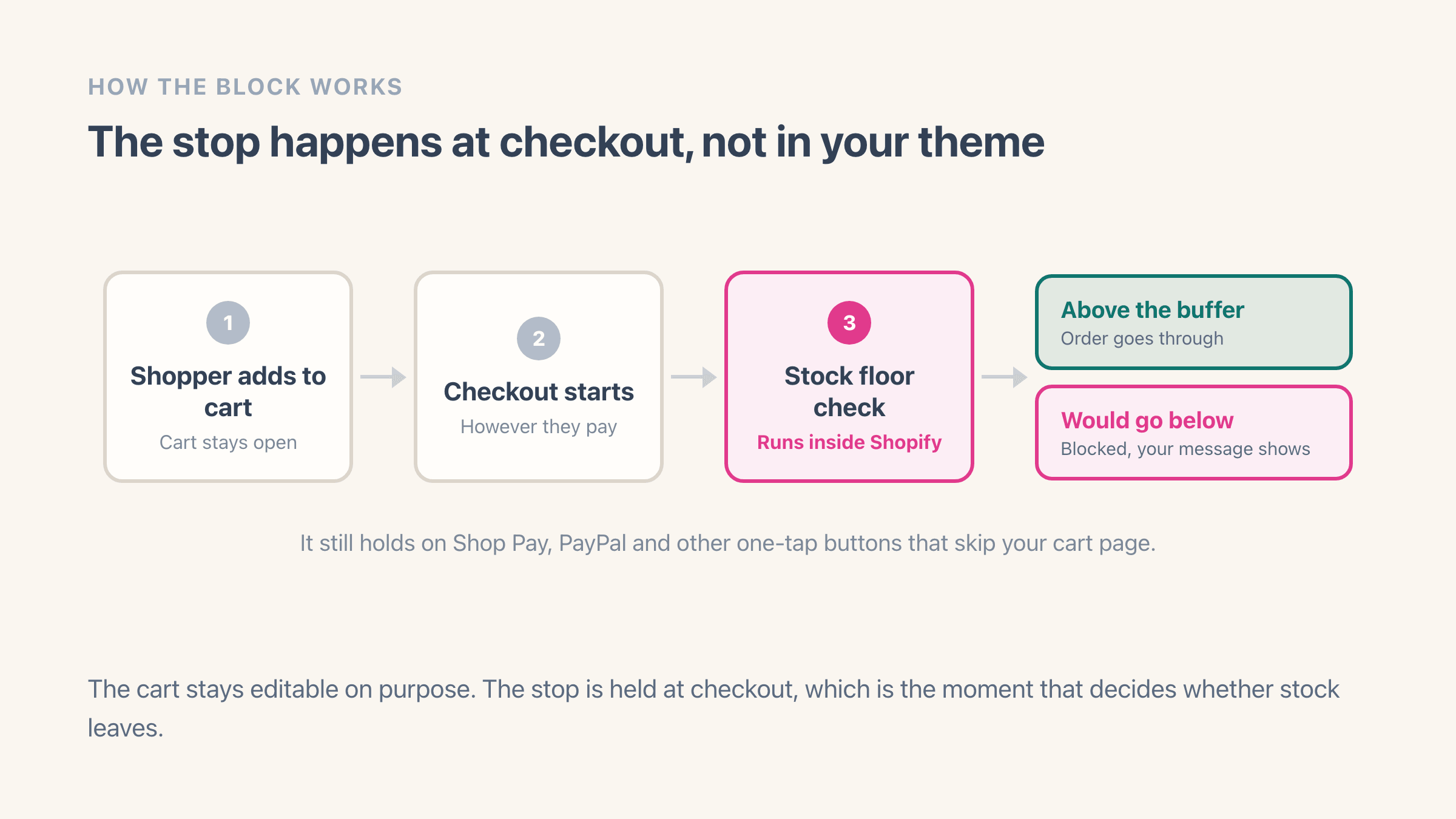
Hiding the Add to cart button with theme code stops the shoppers who use the button. A link that jumps straight to checkout, a cart saved from yesterday, an express payment button, the Shop app and any storefront built outside your theme all skip that code, so hiding a button is advice rather than a rule.
Shopify does have one place a check like this can run inside Shopify itself, where it applies the whole way through checkout and a shopper cannot get around it. That includes express payments, so Shop Pay, PayPal, Google Pay and Apple Pay are all covered. You do not need Shopify Plus for it either, as long as the check comes from an app you installed from the Shopify App Store.
That is where Easy Stock Buffer sits. It keeps a live available count for every protected variant, updated by Shopify each time a count changes, and compares it against the floor, with the most specific rule winning: the variant's own floor first, then a floor it inherits from one of its collections, then your shop-wide default. The block works per unit rather than all or nothing, so a cart asking for four when only two sit above the floor is told that only two can be ordered, and the wording of that message is yours to edit.
One step is manual and it catches people out. The rule has to be switched on once in Settings, then Checkout, and until it is, nothing gets blocked - see activate the checkout rule. The cart page is deliberately permissive as well. It shows the message but still lets shoppers edit their basket, and the block itself is held at checkout.