Definition
Why hold safety stock
Demand and supply are never perfectly predictable. Safety stock absorbs that variability: a sudden rush, a supplier who ships late, or two orders landing on the last unit at once. Without a buffer, those normal events turn into overselling and orders you cannot fulfil.
The trade-off is a little tied-up inventory in exchange for not selling units you cannot ship, which is usually the more expensive mistake. Tied-up is the right way to think about it too, because that buffer is cash sitting on a shelf at your cost of goods sold, and what your stock is worth is the number that tells you how much.
How do you calculate safety stock?
Two formulas, and which one you want depends on how much data you have.
The quick version covers most small stores: multiply your average daily sales by your supplier lead time in days. A product selling four a day with a five-day lead time needs about twenty units of buffer, which keeps you selling for the whole time a reorder is in transit.
The version that accounts for things going wrong uses the spread of your demand rather than the average: safety stock equals Z times the standard deviation of daily demand times the square root of lead time. Z is a service factor you choose, and the point of it is that a product whose sales swing between one and fifteen a day needs a much bigger buffer than one that reliably sells four, even when both average four.
A middle option if standard deviations are more maths than you want: take your worst week rather than your average. Multiply your highest daily sales by your longest observed lead time, then subtract average daily sales times average lead time. It lands close to the statistical answer and you can do it from a sales export.
What service level should you aim for?
The service factor sets how often you are willing to run out. Common values are 1.28 for a 90% service level, 1.65 for 95%, 2.05 for 98% and 2.33 for 99%.
The cost curve is the thing to understand: moving from 95% to 99% roughly doubles the buffer for a four-point gain. That is worth it on a hero product where a stockout loses a customer permanently, and wasteful on a slow-moving accessory where nobody minds waiting.
Set it per product rather than store-wide. Most catalogues want a high level on the top ten sellers and a low one on the long tail.
Safety stock vs reorder point: what is the difference?
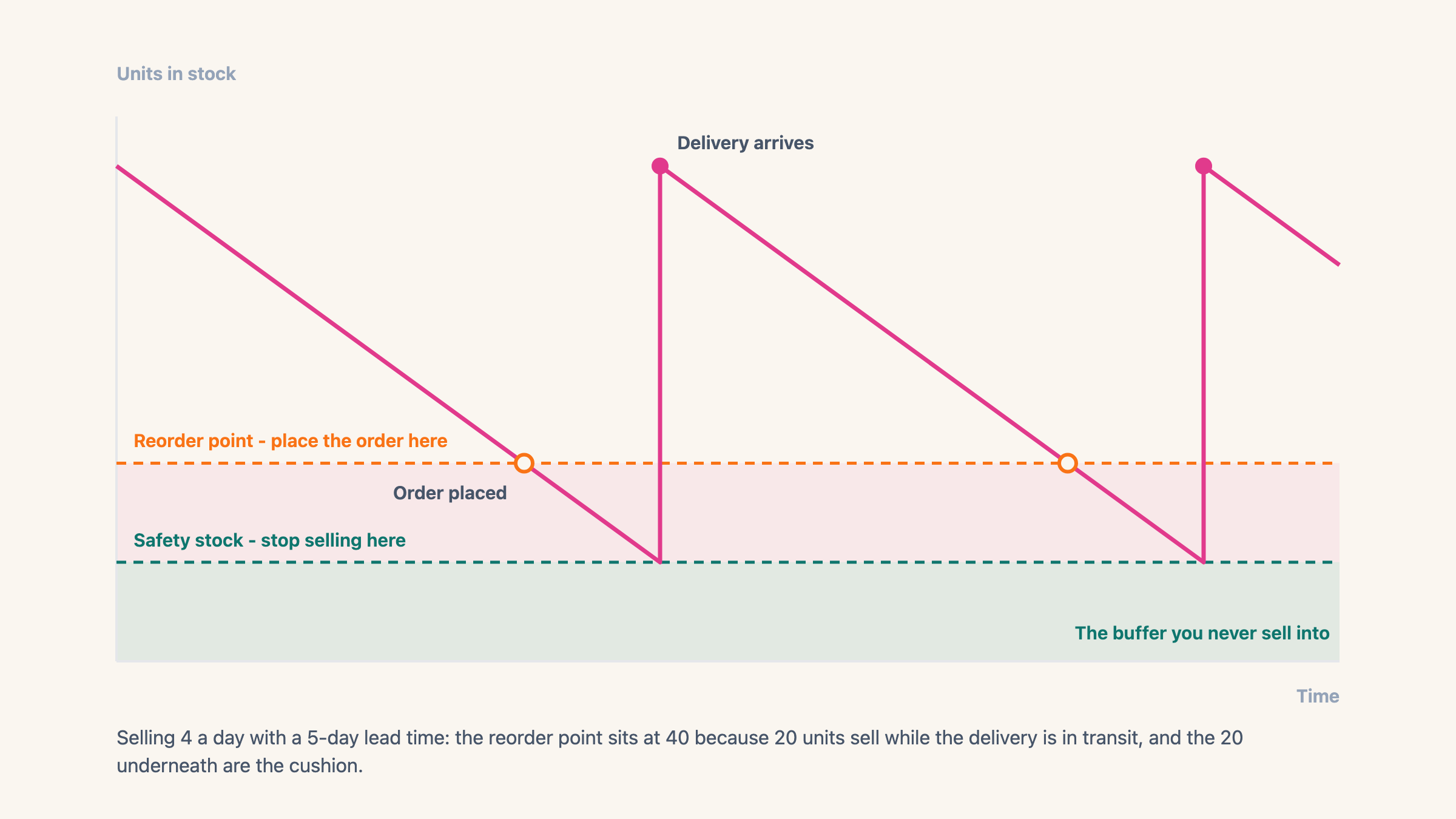
These get used interchangeably and they are not the same thing. Safety stock is the quantity you refuse to sell below. The reorder point is the level at which you place a new order, and it sits higher, because it has to cover the sales that happen while you wait for delivery.
The relationship: reorder point equals expected sales during lead time plus safety stock. Selling four a day with a five-day lead time and twenty units of buffer gives a reorder point of forty, because twenty units get sold while the delivery is in transit and twenty are the cushion underneath.
The practical difference is what each one triggers. Hitting the reorder point should send you to your supplier. Hitting the safety-stock level should stop the store selling, because at that point you are selling units that are already promised to the gap.
How do you set safety stock on Shopify?
Partly, and this is worth getting right because most articles say flatly that it does not. Open a product in your admin and the stock at each location is split into groups. Available is the only one your store can sell from. Beside it sits Committed, which is stock that already belongs to an order you have taken, and an Unavailable group that includes Safety stock along with damaged units and anything held for inspection. Move units from Available into Safety stock and your On hand total does not change, but what the store can sell does.
What that gives you is a parking bucket, not a rule. It is a one-time manual move: nothing recalculates it as stock sells, nothing raises it when a product starts moving faster, and nothing puts units back when a delivery lands. You are doing arithmetic by hand in a supported place, which is better than the usual workaround but is still arithmetic by hand.
The usual workaround is worse. Under-counting, telling Shopify you have 80 when you really have 100, breaks the moment your warehouse, your 3PL or a stock count writes the real number back, and it makes every inventory report wrong in the meantime. At least parking units in Safety stock leaves your On hand figure honest.
The reliable version is an app that holds a floor against your true count. Easy Stock Buffer stops the order at checkout once your Available count reaches the floor you set, so the floor still holds when someone pays through Shop Pay, PayPal or Google Pay instead of the normal checkout. Those buttons jump straight from the product page to payment, which is why a check that only lives in your theme misses them. See how to set a safety stock level on Shopify for the step-by-step.
When safety stock is the wrong answer
It is not free, and there are cases where the buffer costs more than the stockout. Slow movers are the clearest: holding twenty units of something that sells once a month ties up cash for two years to prevent an event nobody would have noticed.
Made-to-order and print-on-demand products do not need it either, because there is no finite pool to protect. Neither do high-value items where a customer will happily wait two weeks for the right thing, and where the buffer would sit as dead capital.
The products that earn a buffer are the ones that sell steadily, get reordered often, and where a stockout sends the customer somewhere else rather than into a waiting list.
A buffer is also the wrong tool for a problem that looks similar. Capping how many units one customer can put in a basket protects a launch from a single buyer clearing the shelf, which is a different job with a different setting, and order limits against safety stock puts the two side by side.
Example
Sell 4 a day with a 5-day lead time: expected sales during lead time are 20, so a safety-stock level around 20 keeps you selling until stock arrives, and your reorder point is 40. If daily sales actually swing between 1 and 15, the average is lying to you and the buffer needs to be bigger than 20.
Where it lives in your Shopify admin
Products > open a product > the Inventory card, where the stock at each location splits into Available, Committed and Unavailable. Shopify's own Safety stock group sits inside Unavailable next to damaged units, and units go into it by hand, per variant and per location.
Commonly confused with
- Reorder point
- Safety stock is the level you refuse to sell below. The reorder point sits higher and is when you place the order, because it also has to cover everything that sells while the delivery is in transit.
- Shopify's Safety stock quantity
- Shopify's Safety stock group is a bucket you move units into by hand, once. A safety-stock level is a rule that keeps holding as stock sells and restocks, and nothing in the admin does that part.
- Overselling
- Overselling is the failure. Safety stock is the buffer you hold above zero so the failure has nothing to land on.
See also