Short answer
How they compare
| Feature | Order limitCap per customer | This appSafety stockFloor for everyone |
|---|---|---|
| Caps how many units one customer can buy | Yes | No |
| Stops selling to everyone at a stock floor | No | Yes |
| Prevents overselling and running out | No | Yes |
| Blocks resellers or sets a minimum order | Yes | No |
| Built for | Resellers, MOQ, wholesale | Never running out |
What an order limit does
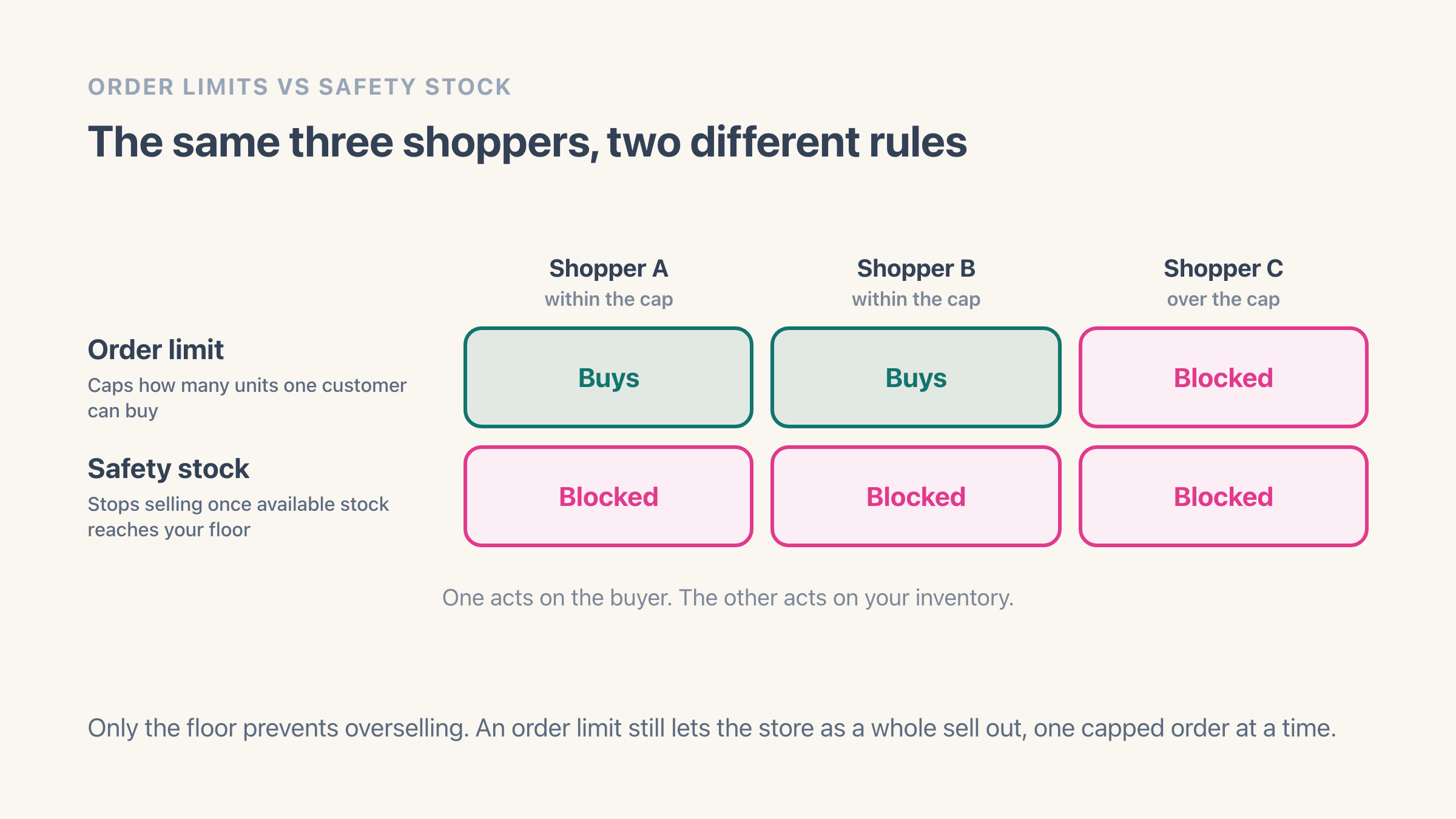
An order limit caps how many units a single customer can buy, usually a minimum or maximum quantity per product, variant, cart or customer. Stores use it to stop resellers clearing stock, to enforce a minimum order for wholesale, or to ration a limited drop fairly.
Order-limit apps like Avada Order Limits or Minmaxify handle this. If your problem is one buyer taking too many, or a minimum order quantity, that is the category you want.
Be clear about what a cap does to your total, though. With 40 units in stock and a maximum of 2 per customer, you have protected nothing; you have decided those 40 units will go to at least 20 people instead of two. On a limited drop that is exactly the point. It is the wrong tool if the reason you are reading this is that you keep selling things you cannot ship.
What safety stock does
Safety stock works the other way round. Instead of limiting one customer, it stops selling a product to everyone once available stock reaches a floor you set, so you keep a buffer and never sell the last units you cannot actually ship. See what safety stock is.
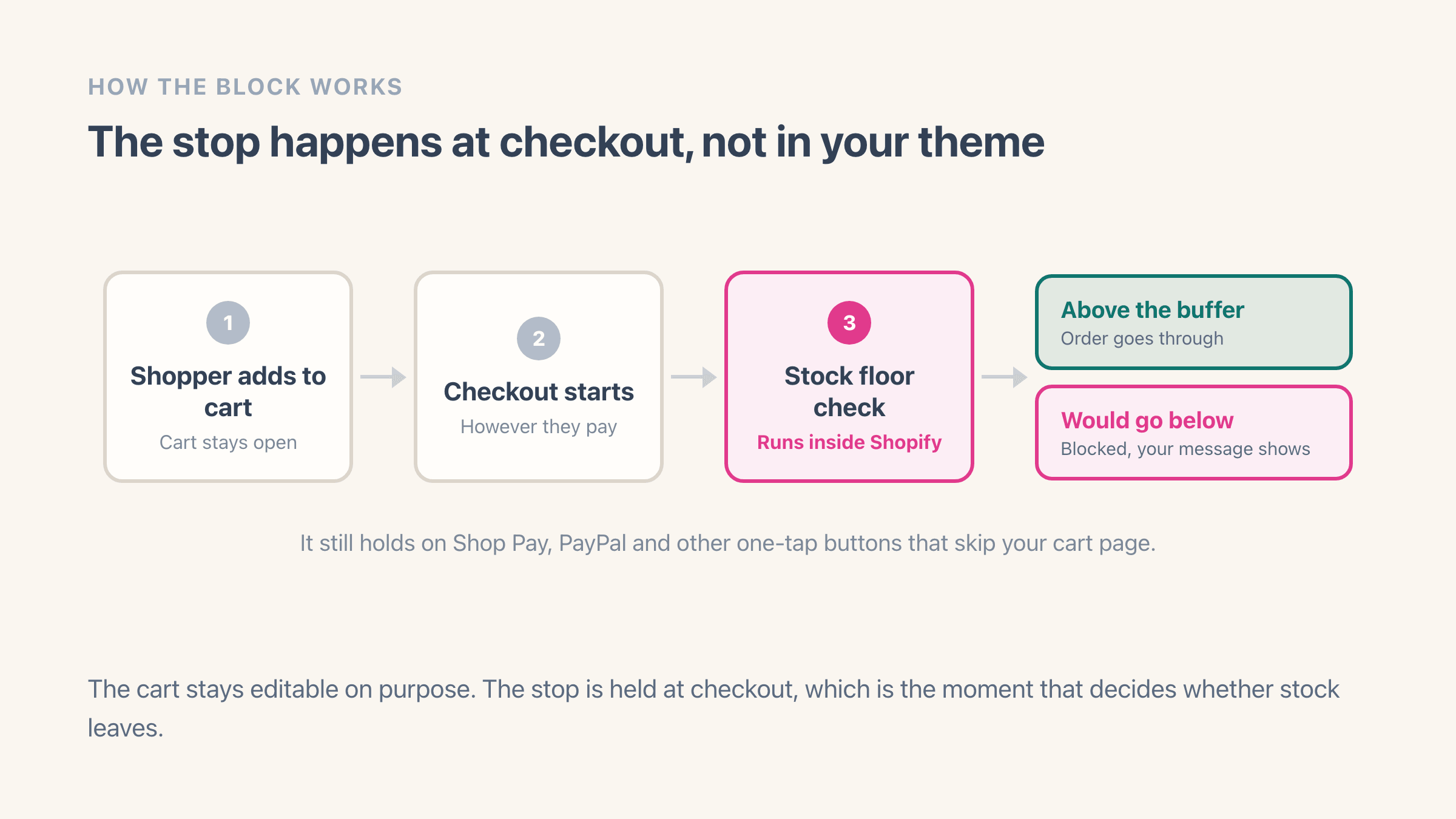
Easy Stock Buffer holds that floor at the checkout itself rather than in your theme, so it still holds when someone pays through Shop Pay or PayPal, or opens a checkout link that skips your product page entirely. If your problem is overselling and running out, that is the tool. Merchants who arrive here because Stocky is shutting down usually want this half of the answer, since low-stock alerting is the piece that leaves with it.
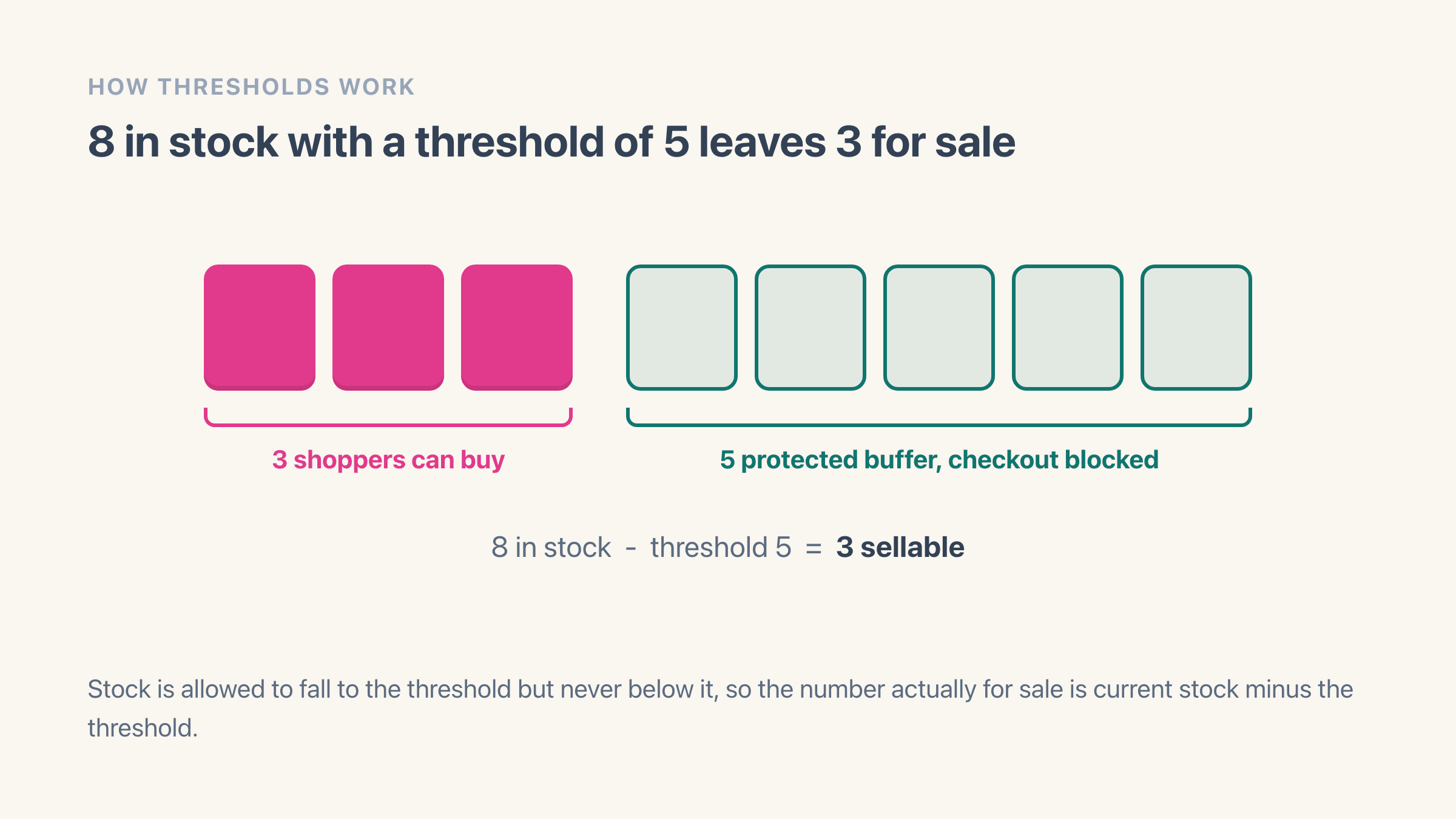
What it protects is the difference between what you own and what you sell. With 8 units in stock and a floor of 5, three are for sale, and the fourth person who wants one is told the item cannot be ordered right now while your stock report still reads 5. That gap is the whole idea. Those 5 are promised to a wholesale order, a market stall or the shop shelf, and the website is not allowed to touch them.
How do you pick the right safety stock number?
Start from how fast the product sells and how long you need to react. Easy Stock Buffer works it out from your own sales: it reads the last 30 days of stock movement, turns that into a daily rate and multiplies it by the days of cover you ask for, which starts at 3.
Say a t-shirt sold 60 units in the last 30 days. That is 2 a day, three days of cover puts the floor at 6, and 6 is what the app suggests. If that shirt takes ten days to restock and being caught short costs you a wholesale customer, ask for 10 days of cover instead and the floor becomes 20. A slow seller that shifted 6 units in the whole month gets a floor of 1 at the same setting, which is the right answer for something you sell once a week.
You do not have to take the suggestion, and on your best sellers you probably should not. The number that matters is how long it takes you to notice and restock, and only you know whether that is a walk to the stockroom or a six-week container.
Set it high for anything you also sell in a physical shop, at a market or over the phone, because those are the sales that never reach Shopify until afterwards. Set it low for anything you can reorder in a day. Setting the level itself takes a few minutes once you have the number.
What does a shopper see when the order is stopped?
On the default setting, a shopper who tries to buy more than is available gets a plain message in the cart and again at checkout, along the lines of "Only 3 of Harbour Wool Jumper can be ordered right now". If nothing at all is left above your floor, it reads that the item is held in reserve and cannot be ordered right now. Both are yours to rewrite in your own words and your own language from the app settings.
There is a second option, which is to have the product show as sold out on the product page instead. The add-to-cart button greys out with your sold-out wording and the shopper never reaches a checkout message at all. That display is part of the paid plan; the checkout message works on every plan, free included.
Which you pick is a genuine decision rather than a detail. A message tells a shopper stock exists and they might come back tomorrow. Sold out is quieter, matches what they already understand, and ends the conversation.
An order limit lands somewhere else in the journey. A cap is a rule about the buyer, so it shows up when they change the quantity, and it needs to name its own number to make sense. "Two per customer" reads as a fair rule. A checkout that stops without explaining itself reads as a broken store. Whichever of the two you use, write the wording before you switch it on.
Can you need both?
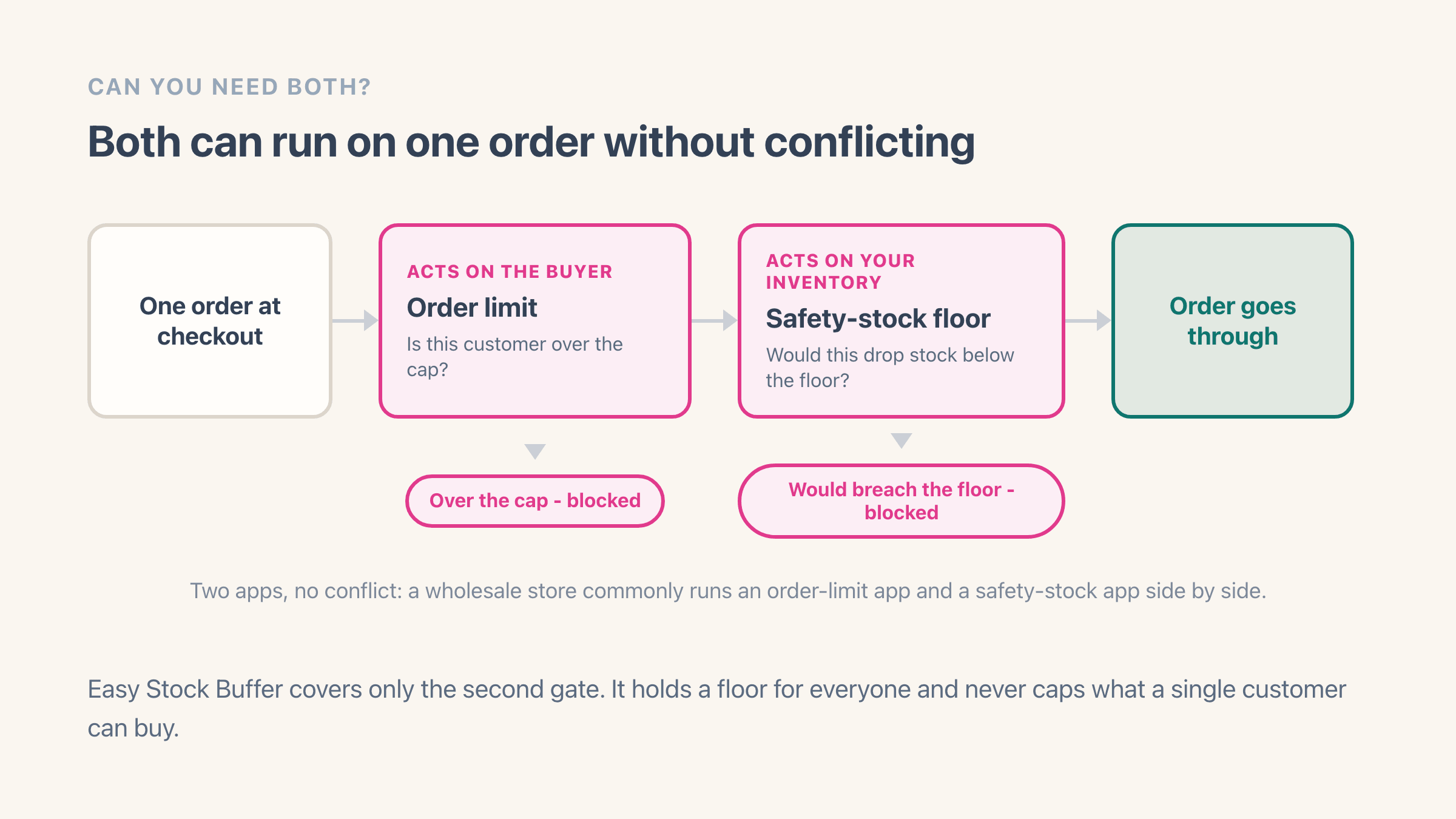
Yes. They are not mutually exclusive. A wholesale store might cap how many units a customer can order and keep a safety-stock buffer at the same time, using an order-limit app and a safety-stock app together.
They do not conflict, because one acts on the buyer and the other acts on your inventory. Pick based on the problem you actually have right now.
Here is the shape of it with numbers. You hand-pour candles and sell the same 200 units wholesale and retail. Wholesale minimum is a dozen, so an order-limit app enforces 12 per order on that product.
You also hold 40 back for a Saturday market, so a safety-stock floor of 40 stops the website eating into them. A retail shopper buying one candle passes both rules. A wholesale buyer taking 170 clears the minimum easily and gets stopped at 160, which is what you actually had to sell.
Do you need an app for either of these?
For safety stock there is a free version of the idea, and plenty of stores run it: lower the inventory number by hand. Hold back 5, type 35 into Shopify when you really have 40, and the store sells out at what is actually 5 units left. It costs nothing and it works on day one.
It stops working quietly. Your inventory count no longer matches your shelf, so every stock report, every reorder decision and the count you do at year end are all out by the amount you hid, and you hid a different amount on every product.
Restocks make it worse, because a delivery of 20 has to be entered as 20 minus the buffer, every time, by whoever happens to be receiving it. One person forgetting once puts that product back to zero protection and nothing tells you.
An app keeps the buffer as its own number so your stock count stays true and your reports stay usable. A hidden buffer also drags down what your stock on hand is worth at month end, and that is a figure your accountant reads.
Before you install anything, check one switch. Open a product in your admin, look at the variant's inventory settings, and see whether "Continue selling when out of stock" is on. If it is, Shopify will keep taking orders past zero and no floor and no cap will save you until you turn it off.
You need safety stock if
you want to stop overselling and hold a buffer, so a product stops selling to everyone once stock hits your floor. Easy Stock Buffer does this, free for your first 10 variants.
You need an order limit if
you want to cap how many units a single customer can buy, for resellers, minimum orders or wholesale rules. An order-limit app like Avada Order Limits or Minmaxify does that.