Short answer
What does setting up a backorder actually involve?
Check what has to be true before you touch anything
Three conditions decide whether the rest works, and all three sit outside the numbered steps in Shopify's own documentation.
The variant needs Inventory tracked switched on, because Shopify states that "You can select the Continue selling when out of stock option only when you turn on the Inventory tracked setting".
You need somewhere on the product page to write a ship date, because there is no field for one. And none of it reaches Shopify POS, where the same page says the setting does not apply.
If it does not work
The tick box is missing, or it is on screen and you cannot tick it. Either way that is the tracking condition rather than a missing feature or a theme problem.
Switch tracking on in the Inventory section of the variant and the option becomes selectable.
Look for the setting rather than the words, because Shopify names that control two ways: the page above calls it Inventory tracked, and Shopify's inventory tracking page calls it Track quantity.
How to undo it
Nothing has changed yet. Close the product without saving.
Tick Continue selling when out of stock, on the variants you can resupply
Products, then the product, then the Inventory section on each variant. Tick it only where you can genuinely get more of the thing.
Shopify's own list of reasons for switching it on includes "You have stock coming soon and you want to continue selling before it arrives", which is a backorder described without the word.
Leave it off everywhere else, because the same tick box is what causes accidental overselling.
If it does not work
The storefront still says sold out after you save. Check you ticked the variant the shopper is picking rather than one of its siblings, and check whether the location that fulfils your online orders is the one at zero.
Preventing overselling on Shopify walks the multi-location version of that.
How to undo it
Untick it. The buy button goes back to sold out on the next page load, and orders already placed are untouched.
Write the wait onto the product page yourself
There is no per-product lead-time field, so the sentence lives in your description, above the fold, in the words you would use on the phone. "Back in stock around 12 September, ships that week" does more than any badge. Put it where the price is, not at the bottom of a spec list.
If it does not work
Support messages asking where the parcel is, starting about a week after the order. That is the product page having said nothing. The wait has to be readable before the buy button, not first mentioned in a delivery-delay notice.
How to undo it
Delete the line from the description. Nothing else on the product depends on it.
Decide when the money moves, before the first order lands
Settings, then Payments, then the section called Payment capture method.
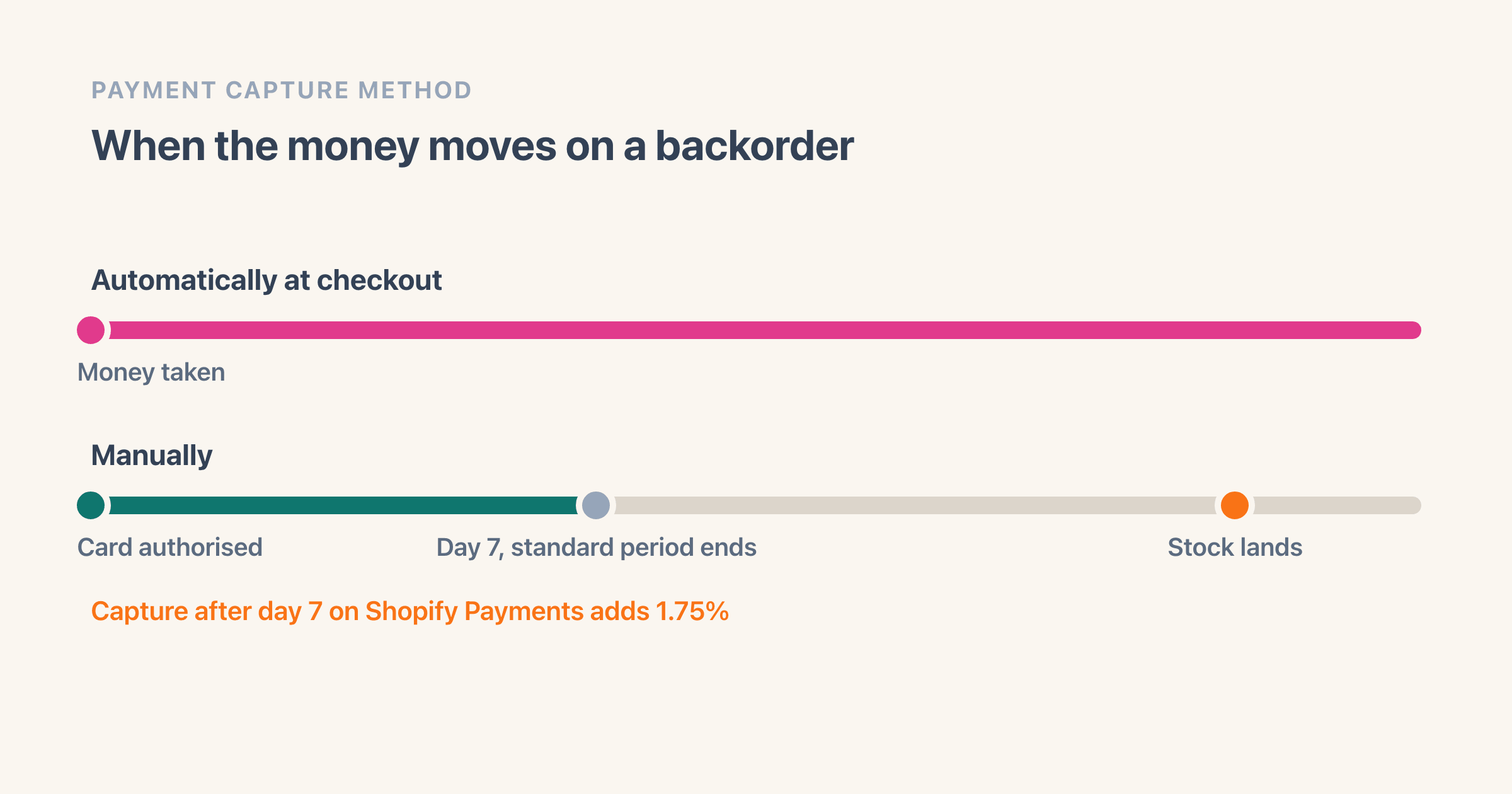
Left alone it takes the payment at checkout, so you are holding money for something you cannot ship yet. The alternative is Manually, which authorises the card and leaves the capture to you.
Read the section below before you change it, because it comes with a clock.
If it does not work
You switch to Manually, the delivery takes a month, and the seven-day authorisation period ran out three weeks before it arrived.
Capturing late is still possible on Shopify Payments and costs 1.75% on top of the normal card fees.
If you would rather not pay that, Shopify's own remedy is to cancel the order and create a new one, which means asking the customer to pay a second time.
How to undo it
Set the same section back to Automatically at checkout and save.
Put the backordered line on hold as the orders arrive
Open the order, find the Unfulfilled section, and pick Mark as on hold from the menu there. Choose a value in the Hold reason menu and confirm.
Shopify describes the effect in one sentence: "Your inventory can be reserved, but fulfillment is blocked until the hold is released."
That is the difference between an order your picker skips and an order that goes out as an empty box.
If it does not work
Half a backordered order ships anyway. A hold applies to the items you select, so on a mixed order you tick the backordered line and leave the rest. The same page caps you at 10 manual holds on one fulfillment.
Know the side effect before you do it: Shopify states that "If an order contains an unfulfilled fulfillment, then the order's status displays as Unfulfilled instead of On hold", so a part-held order will not read as On hold in your orders list.
That is the case the tag in the next section is really for.
How to undo it
Open the order, find the On hold section, and click Release hold. If more than one hold is on it, pick the one you want and click Release.
Count the delivery in, then release the holds
Count the stock in first so the variant sits above zero again, then open each held order, click Release hold and fulfil it. The order goes back to Unfulfilled and behaves like any other.
If you set capture to Manually, this is also the moment to take the money, and the moment you find out whether the wait ran past seven days and put 1.75% on the transaction.
If it does not work
You release the hold and the order still cannot ship, because the delivery was counted into a location your online store does not fulfil from. The count and the fulfilling location are two different things.
How to undo it
If the delivery turns out short, mark the same items as on hold again from the Unfulfilled section and the order goes back to waiting.
Does Shopify have a backorder feature?
No. There is no setting called Backorder anywhere in the admin, and Shopify does not use the word on either of the two help pages that come closest to the job. Those two are the page for the Continue selling when out of stock tick box and the page for pre-orders, both read on 11 August 2026. That is a claim about those two pages, not about the whole help centre.
Pre-orders are the nearest named thing and they are not native either. Shopify's page says "To use pre-orders, you need to install a pre-order app from the Shopify App Store and then manage pre-orders in the Shopify admin", and a caution on the same page adds that "Pre-orders are currently only available to merchants using Shopify Payments or Paypal Express". So the feature with a name carries an app requirement and a payment-provider gate.
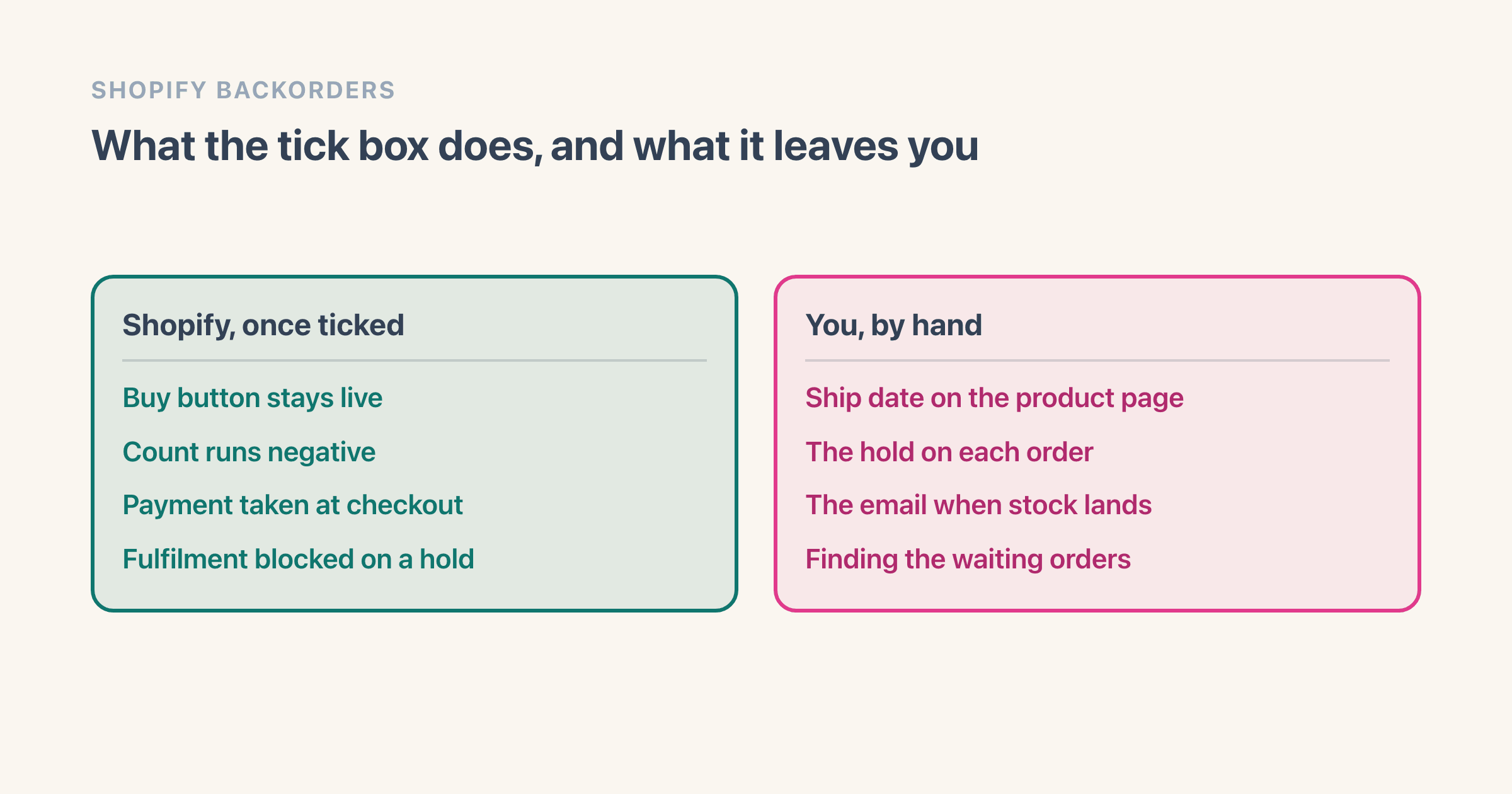
What you have instead is the tick box plus a set of jobs around it. The split is ours rather than Shopify's, sorted by whether anything happens without you, and it leaves out two things on purpose: the sold-out wording a shopper reads, which belongs to your theme, and back-in-stock signup, which belongs to an app.
Payment sits between the two, which is why it gets a section of its own further down. Shopify takes it at checkout without being asked, and changing that is a decision only you can make. These four are yours outright.
- The ship date on the product page. Shopify has no field for one.
- The hold on each order, so nobody ships an empty box.
- The email when the delivery lands.
- Finding the orders that email belongs to.
When does the customer pay for a backordered item?
At checkout, in full, unless you have changed one setting. Shopify states that "Automatic payment capture at checkout is activated by default for new stores", so nobody has to switch this on for the money to move on the day the backorder is placed.
On a card that means the customer is charged at the time of sale. Shopify adds one qualifier worth knowing if you take wallet or bank-style payments: customers using "some additional payment methods are charged when the provider completes processing" instead.
The setting is at Settings, then Payments, in a section called Payment capture method. "Automatically at checkout" takes the money the moment the order is placed. "Manually" authorises the card and leaves the capture to you. Shopify documents two more that key off fulfillment, one of them only on the Shopify Plus plan, and neither of those is a backorder answer.
Can you wait to charge until the stock arrives?
Manually looks like the fix and usually is not, because of the clock on it. Shopify states that "Shopify Payments provides an authorization period of 7 days", and that "When you manually capture a payment after the standard 7 day period, then a 1.75% charge applies to the transaction".
Longer windows exist, and the same page puts two conditions on them. They are "available only to stores on the Shopify Plus plan that use Shopify Payments", and even there the length is set by the card rather than by you. Visa, Mastercard and American Express reach up to 30 days on that page's table, while Diners Club and China Union Pay stay at seven.
Seven days is shorter than most backorders. A merchant put the whole problem in one line on the Shopify Community in June 2024, on a thread titled Allow Backorders But Don't Charge Until Fulfilled: "Looking over all the apps and discussions it appears that backorders with Shopify are really consumer/retail oriented."
One switch on that screen is worth knowing about whichever way you go. Shopify offers "Send a warning 1 day before an authorization expires", which turns a silent expiry into an email you can act on.
Collecting part of the money now, or none of it, is app territory in the same way pre-orders are. Adding made-to-order products on Shopify covers the deposit route and what it costs.
How do you tell a shopper how long they are waiting?
In your own words, in the product description, because Shopify has no per-product lead-time field. That sounds like a limitation and it is also the only part of a backorder you fully control.
Write a date rather than a duration. "Ships week of 12 September" survives the three days a shopper spends thinking about it. "Ships in 3 weeks" starts lying the moment they close the tab.
Shopify does calculate a delivery range at checkout from a shop-wide fulfillment time, and it will not carry a backorder for you. We walked that setting end to end, including the condition that stops the estimate appearing on a variant sitting at zero, in adding made-to-order products on Shopify.
Running our own store, the sentence that cut the messages was never the ship date on its own. It was naming what happens if the date slips, in the same paragraph as the date. People wait for a thing that has a stated fallback and they do not wait for a promise.
How do you stop a backordered order from shipping empty?
Put the line on hold. This is the one part of a backorder Shopify has actually built, it has real controls with real labels, and almost nothing written about Shopify backorders mentions it.
On the order, the Unfulfilled section carries a menu with Mark as on hold in it. You choose the items, pick a value in the Hold reason menu and confirm. The order gains an On hold section, and releasing it is a Release hold button in that section.
Two limits sit on the same help page. You can add up to 10 manual holds to a fulfillment. And Shopify names example reasons in prose, covering fraud, inventory not being available and an order exceeding a value, without listing what is actually in the menu, so read your own dropdown rather than a list copied from anywhere else.
That page also does not mention the customer at all. Read that as the shape of the feature rather than an oversight: a hold is an instruction to whoever picks your orders, and the email is still yours to send.
How do you find the orders that are waiting on stock?
With a filter you save, because there is no backorder view. Shopify's orders documentation says you can "Use filters to narrow results by fulfillment status, payment status, sales channel, date range, or tagged orders", and that you can "Save frequently used filter combinations to quickly access orders that match specific criteria you use regularly".
Two of those five do the work. Fulfillment status separates the fully held orders, because Shopify states that "Orders that are On hold are excluded from the list of Unfulfilled orders in your Shopify admin". A tag records which delivery an order is waiting on, which no status can express.
Status alone loses the mixed ones, and this is the trap. An order where you held the backordered line and shipped the rest still reads as Unfulfilled on Shopify's own wording, so it never turns up in a filter for held orders. The tag is the only thing that finds it.
Tag by what arrives rather than by what is late. A tag naming the supplier and the week gives you a list to work through the morning the pallet lands. A tag reading backorder gives you a pile.
Saved views sit above the orders list, so the morning check becomes a click instead of rebuilding the same filter every time.
What happens when the delivery finally lands?
Three things, and the order of them matters. Count the stock in, release the holds, then email the people who have been waiting.
Counting first is what makes the rest work. A released hold on a variant still at zero is an order your picker cannot fulfil and will come back to you about.
The email is the part with no prompt behind it. Nothing in the admin tells you to send it, which on our own store is exactly why it was the step that slipped. When it does not happen, the shopper finds out from the shipping notification, and that is the version that turns into a refund request.
If you took the money at checkout, this is the moment the promise is finally kept. If you did not, it is the moment you find out whether the authorisation survived the wait.
When is a backorder the wrong answer?
When you cannot name the date. A backorder is a promise with a number in it, and the version that ends in a dispute is the one where the number was a guess.
It is also wrong wherever the wait outruns the patience the category has. Nobody waits five weeks for a phone case. Plenty of people wait five weeks for a sofa. The product decides that, not the setting.
And it is wrong on a fast mover you keep running out of. There the fix sits upstream, in holding a few units back so the shelf is never actually empty, which is arithmetic rather than a setting and is worked through in setting a safety stock level.
Running a store that turns over about $5 million a year, the pattern I keep meeting is the tick box left on after the backorder ended. The delivery lands, the count goes positive, the box stays ticked, and the next time that product sells out it oversells quietly instead of backordering deliberately. Overselling is this same setting with nobody watching it.
If the answer for a given product is that you would rather stop the sale than promise a wait, that is a different tool and it is worth being clear which one you want.