Same name, third parcel refused at the door, and a fourth order lands overnight. You go looking for the Block button in your Shopify admin. There is not one.
Shopify has one control that stops a named person's checkout, and it is a rule in the Fraud Control app, which Shopify makes and gives away free. Whether it is available to you comes down to whether you are on Shopify Payments. The rest of the admin either works on the order once it already exists or shuts out a whole country at a time.
Does Shopify have a block customer button?
No. Its Managing customers page covers tags, deleting a profile and erasing personal data, and says nothing about stopping anyone from buying.
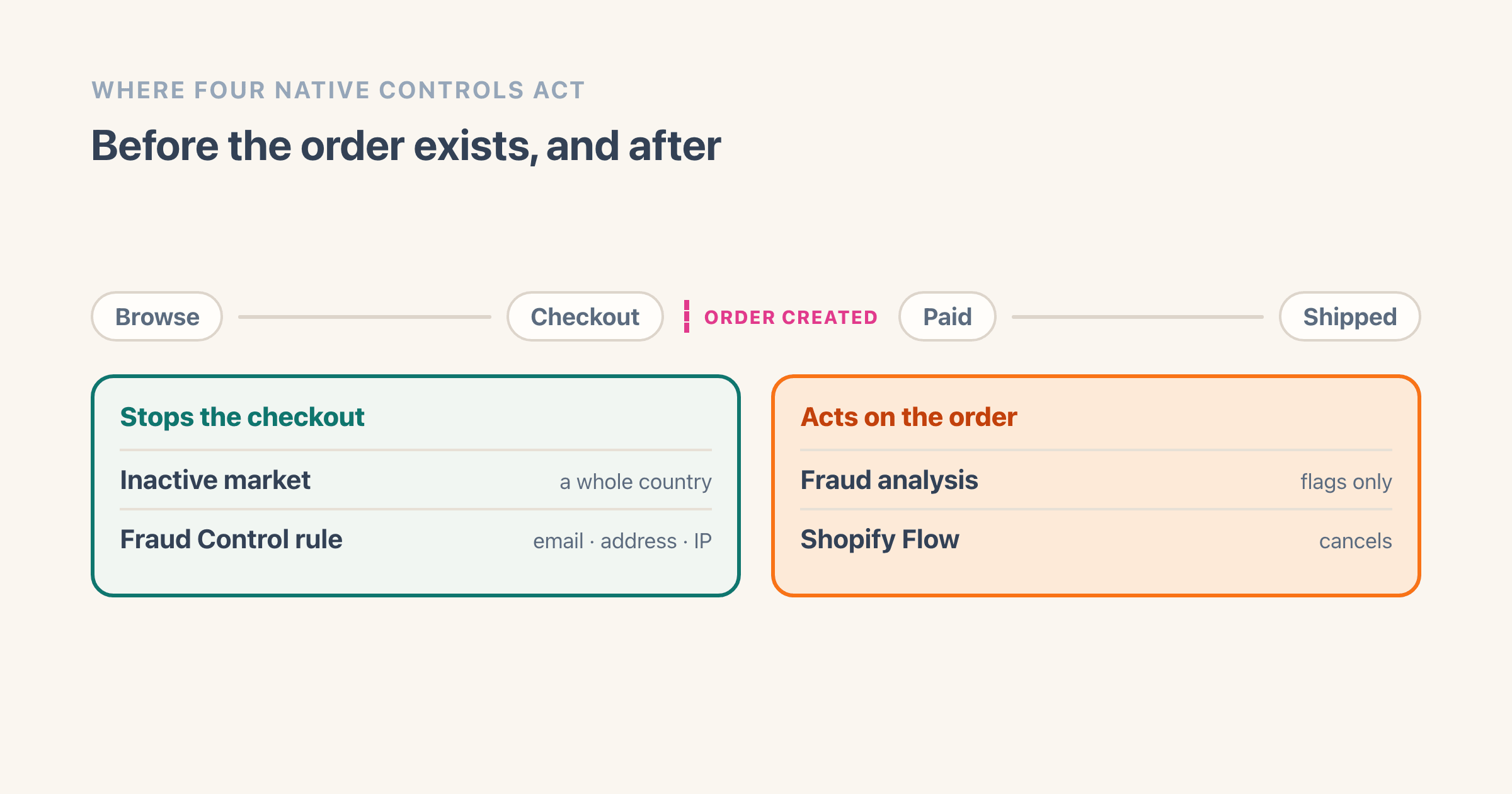
What you have instead is a handful of controls that Shopify never presents as a set. Sorting them by the moment they act is my grouping rather than Shopify's, and it is the sort that answers the question. Four of them sit on the timeline of an order, two before it exists and two after. A fifth changes what those four have to work with.
- Fraud Control checkout rules stop the checkout. Shopify Payments only.
- Markets takes a whole country out of your reach in one move, before any order is created.
- Fraud analysis labels an order low, medium or high risk once it exists. It blocks nothing.
- Shopify Flow cancels the order after it has been created. Free on the Basic, Grow, Advanced and Plus plans.
- Settings > Checkout can force everyone to sign in, which is not a block but decides what an email rule is worth.
Deleting the customer and cancelling an order both get their own section further down. Neither is on that list, because neither does anything about the next order.
I read the eight guides ranking for this question on 8 August 2026 before writing any of this. Not one of them mentions Fraud Control checkout rules, the only native control that stops one named person's checkout becoming an order.
Six of them send you to Fraud Filter instead, an app whose App Store listing now reads "This app is not currently available on the Shopify App Store". I could not find a Shopify changelog post announcing when it went, so the date here is not Shopify's. Chargeflow writes that "Shopify retired its Fraud Filter app on January 31, 2025", and Signifyd, writing the following week, dates it to the same day.
Does disabling a customer account stop them ordering?
On current customer accounts there is no button to press, so no. On the old version there was one, and it only ever worked alongside a second setting.
Shopify's page on managing customer accounts puts it in one sentence: "With customer accounts, you can't deactivate an individual account." Disable account belonged to legacy customer accounts, the older version Shopify has deprecated and no longer offers to new stores. If your store is on the current version, the advice filling this search result has nothing behind it, and Shopify has said the final sunset date for the old one will be announced later in 2026.
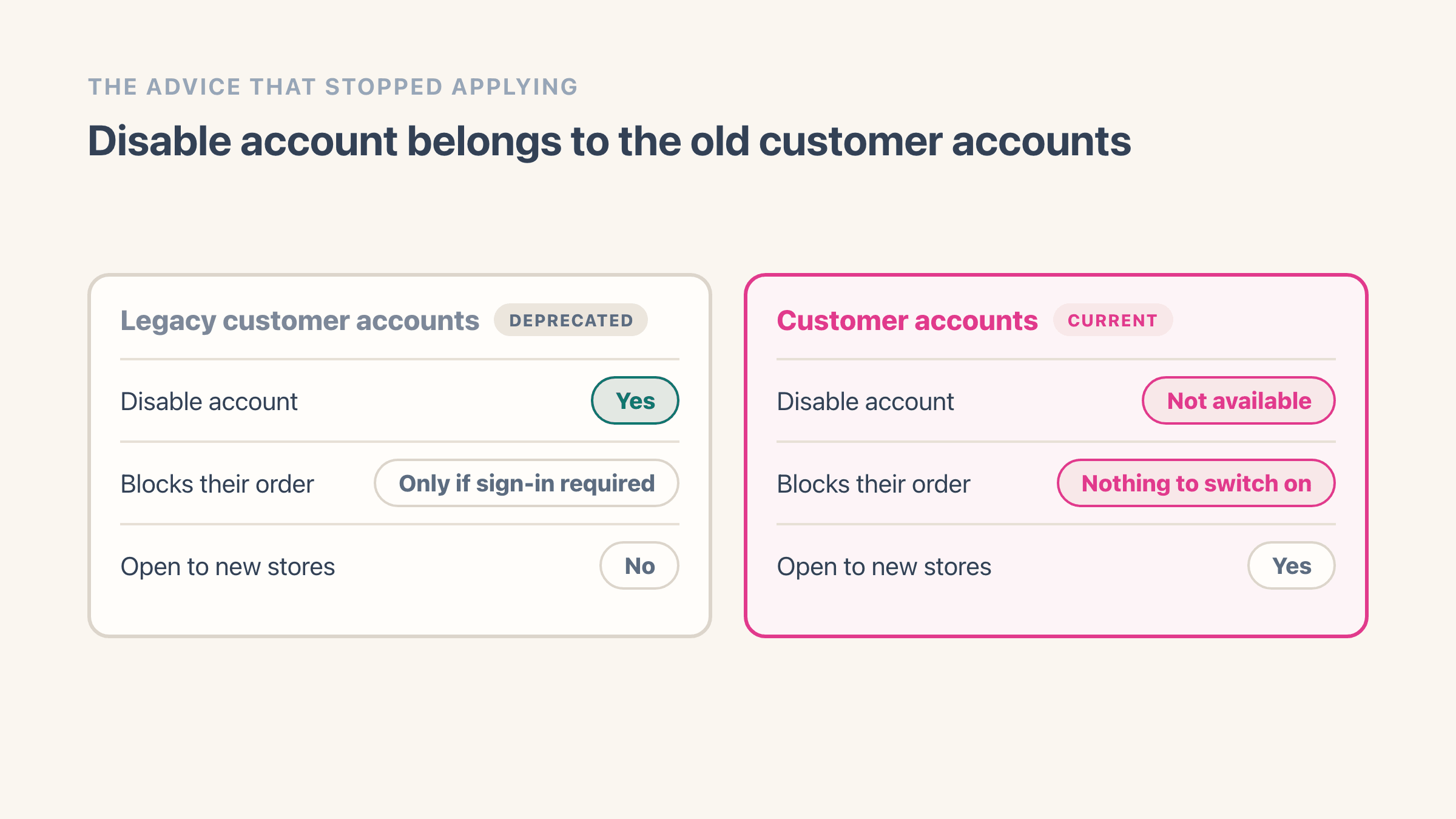
The old control is worth understanding anyway, because the advice never worked on its own even when the button was there. Shopify's legacy customer accounts page states the condition attached to it: "If your customer account settings require customers to sign in before checkout and you deactivate an individual customer's account, then they can't place an order in your store."
So Disable account blocked an order on a store that forced everyone to sign in first, and Shopify says nothing about what it does on a store that does not. Two settings had to line up. The guides that named only one of them were describing half a mechanism.
The one account-level lever Shopify still documents is store-wide: hide sign-in links, and "customers can't sign in, and your customer accounts menu no longer displays on your store". That applies to everyone who shops with you, which makes it a decision about your store rather than about one person.
Can you just delete the customer instead?
Usually not, and the reason is almost funny.
You delete a profile from Customers, then the customer's name, then More actions, then Delete customer. Shopify then lists four conditions under which the profile cannot be deleted, and one of them is that the customer "is associated with one or more orders".
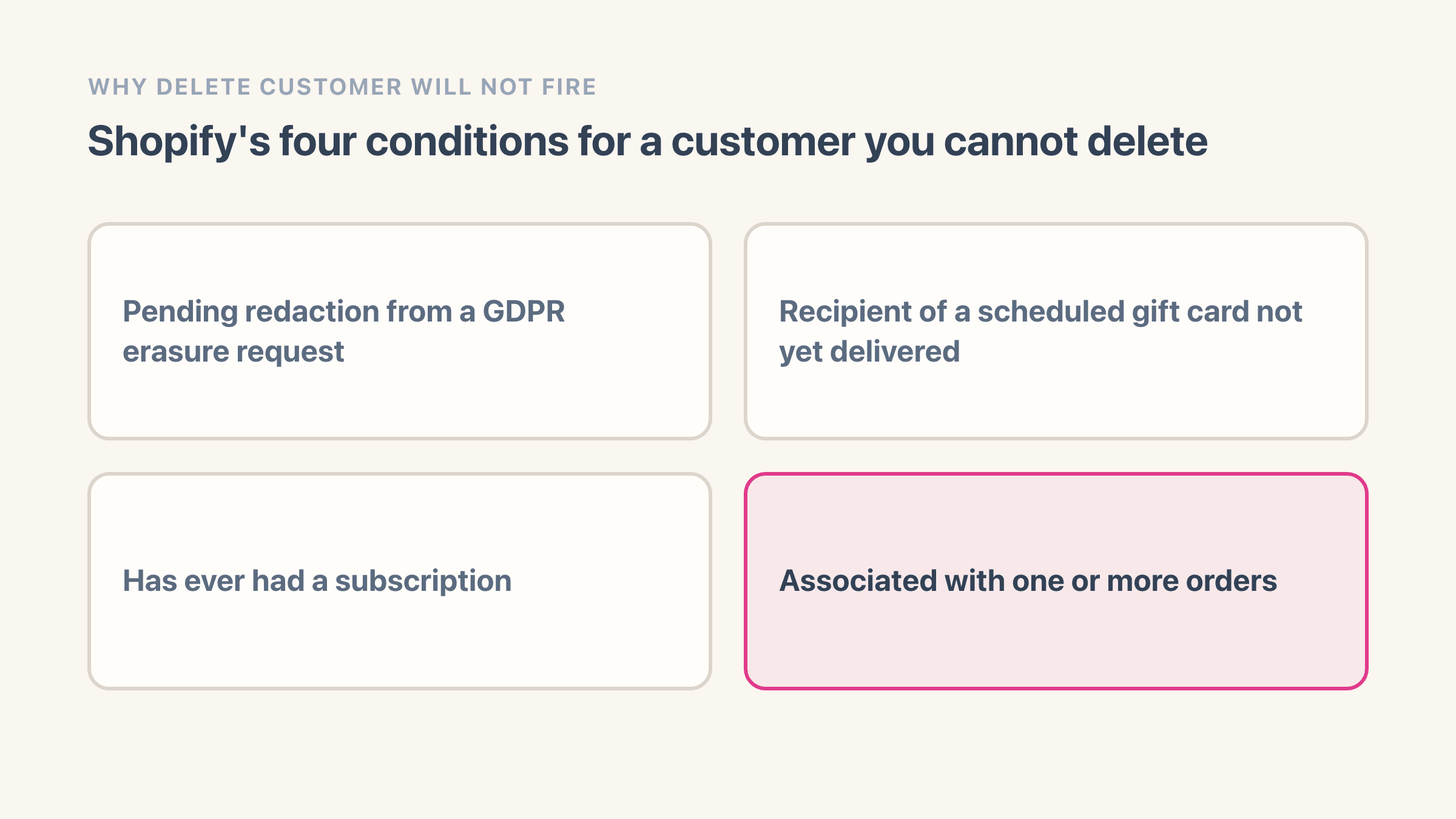
Anyone you want gone has ordered from you. That is how you know about them. So for the exact person this article is about, Delete customer is not available.
Erasing their personal data is a different action and it does something different again. Shopify "redacts information such as the customer's name and address, but the profile and order history remain in your Shopify admin". You will find guides saying erasure prevents new orders. Shopify does not say that anywhere I could find, and it would be a strange thing for a privacy tool to do. Treat erasure as a privacy obligation, not a door lock.
How to block a checkout before it becomes an order
This is the part that works, and it is five steps.
Check two things before you start, because both decide whether any of it will work. Shopify states that "Fraud Control checkout rules are only available for merchants using Shopify Payments", so on a third-party gateway you should skip to the next section. And the app itself "is available to all store plans in locations where Shopify Payments is available", which is a country test rather than a plan test - if Shopify Payments has not launched where you are, the app will not be there to install either.
- Install Fraud Control from the Shopify App Store. Shopify makes it and it costs nothing. Once it finishes, it sits in your admin under Apps like any other app.
- Go to Apps, then Fraud Control, then Rules, then Create rule. You land on a blank rule with its conditions waiting to be filled in.
- Choose what the rule matches. Shopify's page names three kinds of filter: emails, address attributes, and IP addresses. Conditions combine, and Shopify's own worked example pairs an IP address with a ZIP code so the rule only fires when both match. It does not publish a full field list, so plan your rule around those three and test it rather than assuming a field exists.
- Save the rule. From that point a checkout that matches never becomes an order. The shopper gets an error saying the checkout could not be completed and asking them to contact the store, so the block is visible to them even though the reason is not.
- Watch the abandoned checkouts section. "Blocked checkouts will show in the abandoned checkouts section of your store", which is how you confirm the rule is firing rather than sitting idle. The app also carries a dashboard of acceptance rate and high-risk orders for a date range against a comparison period, but the abandoned-checkout entry is the per-attempt receipt.
What can go wrong with a checkout rule?
When this goes wrong it goes wrong quietly, in one of two ways. Either you are not on Shopify Payments, in which case the rules were never available to you and nothing you set will hold. Or the rule is too wide. Shopify's own wording is to "use caution when setting up rules to ensure that legitimate traffic is not prevented from checking out", and a genuine customer caught by an over-broad rule produces no order, no email and no complaint you will necessarily see. They just leave.
Undoing any of it happens on the same Rules screen. Shopify's help page carries a section called Deleting or deactivating a rule, so you tick the rule and switch it off where you made it, and nothing about it is permanent.
What if you do not use Shopify Payments?
Then your tool is Shopify Flow, and the thing to be clear about is timing. Flow runs after the order exists, so it cancels rather than blocks.
Flow is free and, contrary to a claim that turns up in three of the guides I read, it is not a Shopify Plus feature. Shopify's page for the app says it plainly: "Shopify Flow is a free app available on the Basic, Grow, Advanced, and Plus plans." Install it from the App Store and it appears under Apps, then Flow.
Shopify ships four ready-made high-risk order templates, and one of them is the blocklist you came here for:
- Capture payment if order is not high fraud risk
- Cancel and restock high risk orders
- Cancel orders for customers who frequently return items
- Cancel and tag orders from known bad email addresses
Two details decide whether the workflow does anything. Build it on the Order risk analyzed trigger rather than Order created, because Shopify's fraud analysis takes a moment to run and a workflow that fires on creation reads a risk level that is not there yet. And the capture template carries its own prerequisite. Shopify's wording is that workflows managing payment capture "don't function if automatic capture is activated", so that one needs your store set to capture manually before it does anything at all.
The limit of this route is the money. An order that gets created and then cancelled has already been through your payment provider, and cancelling is not the same as the transaction never happening. If you are working out what each of those cycles costs you, what Shopify takes per sale is the arithmetic behind it.
Does Shopify's fraud analysis block anything by itself?
No. It reads every order and tells you what it thinks, and then it waits for you.
Fraud analysis labels an order low, medium or high risk, and puts a warning symbol next to the order number on the Orders page for the medium and high ones. Open the order and the Order risk section shows what drove the label. Shopify's description of what happens next is a list of things you do: "verify the order, cancel the order, or refund the order". Nothing in there is automatic.
Two prerequisites are easy to miss, and both are on Shopify's fraud analysis page. On the Basic plan without Shopify Payments you get risk indicators and support for third-party fraud apps, but not Shopify's own fraud recommendations. Those arrive on the Grow plan or higher, or on any plan using Shopify Payments. And some orders never get a recommendation at all, including ones processed offline, so a workflow keyed to risk level will skip them silently.
If the flagged order is the thing in front of you rather than the person, what the low, medium and high label predicts goes through the indicators, the plan condition above, and what Shopify recommends at each level.
How do you stop them checking out as a guest?
By turning off guest checkout for everybody, which is a bigger decision than it sounds.
The setting is called "Require customers to sign in to their account before checkout" and it lives in Settings, then Checkout, in the Customer contact method section. Turn it on and every buyer has to sign in first.
Read what that buys you carefully, because on current customer accounts it is not a block. This is the setting the legacy Disable account button needed to do anything, and the button is gone, so on its own the switch shuts nobody out.
What it does buy you is real. Every checkout now carries an email address the person can actually open, because Shopify signs customers in with a one-time six-digit code sent to that address rather than a password. That is what makes an email-based Fraud Control rule worth setting: without it, a determined buyer types any address they like at checkout.
The cost is real and Shopify states it. With the setting on, "accelerated checkout options such as Apple Pay won't display in the online store cart", because those buttons would let someone skip the sign-in. You are trading one-tap checkout for everyone against making one person's email address mean something.
Can you block a customer by country or IP address?
Country, yes, and bluntly. IP address, only through a Fraud Control rule.
For a country, Shopify is unambiguous about the effect. Its shipping zones page says that "if a country is in an inactive market in your Market settings, then customers from that country can't place an order even if the country is in a shipping zone with available shipping rates", and the markets page puts it as "customers in inactive markets can't complete a purchase".
Watch the word on the screen, because it is not the word in the sentence. Go to Markets, click the market, and Shopify's own step is to "change the status from Active to Draft", then Save. There is no Inactive option in that menu - a market you have put in Draft is what the help pages then call inactive. Deleting the market is the harder version of the same move, and Shopify's warning is that "deleting a market is permanent", so use Draft first.
This is a sledgehammer. You are closing the door on every buyer in that country to keep out one, and if the person is a domestic customer it does nothing at all.
For an IP address, the filter lives inside a Fraud Control rule alongside emails and address attributes. It works on the address the checkout arrives from, which is why it is worth pairing with a second condition. Home broadband hands out addresses that change, and anyone using a VPN changes theirs on purpose. An IP rule catches the careless and annoys the persistent.
What do you do with the orders they already placed?
Cancel them before they ship, and check the two conditions that stop you.
From your Shopify admin, go to Orders, click the order, then More actions, then Cancel order. Pick a reason, decide whether to refund now or later, and note that Restock inventory is ticked by default so the goods come back to you unless you say otherwise. If the payment was never captured, the status becomes Voided and there is nothing to refund.
Two things get in the way. Once an order is partially fulfilled you cannot cancel it, though Shopify names the way round that: cancel the fulfillment first and the order becomes eligible for cancellation again. A warehouse that ships fast still turns this into a returns problem. And bulk cancelling is capped at 250 orders at a time, which Shopify ties to accurate refund calculations, and which only matters if you are cleaning up after a bot rather than a person.
If they have already opened a dispute, cancelling the order does not touch it. That runs separately, on the bank's timetable, and what a chargeback costs you is worth reading before you decide how hard to fight it.
Why does the same person keep getting through?
Because every native control matches on something the person can change, and there is no native control that matches on the person.
An email address takes thirty seconds to replace. An IP address changes on its own. A shipping address is the stickiest of the three and even that has a workaround called a friend's house.
Shopify is careful about this on its own page. Asked whether the rules can prevent fraud entirely, its answer is "No. Fraud Control can't guarantee that you'll never receive a fraudulent order." The same page separately says the app "doesn't guarantee coverage against chargebacks", which is about who carries the loss rather than about how often the dispute arrives.
So set expectations at the right level. A checkout rule raises the effort required from zero to something. It does not make the person go away, and a determined repeat offender will get an order through eventually. Where the pattern is deliberate and expensive, this is the point at which a paid blocking app is worth the money, because the third-party ones combine signals a single Shopify rule cannot: Blockify and the other checkout-rule apps exist because Shopify's three filters run out of road.
There is also a quieter answer worth considering. If someone orders four times and returns three, they are not a fraud problem, they are a lifetime value problem, and the fix is a returns policy rather than a rule.
If it did not work, what do you check first?
Work through it in this order, because each step tells you which of the others was ever going to help.
Open Settings, then Payments, and confirm whether you are on Shopify Payments. That single answer decides whether Fraud Control checkout rules were available to you at all, and it is the reason most people's first attempt does nothing.
If you are on it, install Fraud Control, build one rule on the email address, and place a test order against it yourself. A rule you have watched block your own checkout is worth more than five you assume are running. If you are not on Shopify Payments, go to Flow instead, start from the Cancel and tag orders from known bad email addresses template, and switch its trigger to Order risk analyzed before you turn it on.
Then go back to the abandoned checkouts list in a week and see whether anything landed there. That list is the only place Shopify tells you the answer.
Frequently asked questions
Can I block someone by phone number on Shopify?
Not with Shopify's own checkout rules. The Fraud Control help page names three kinds of filter - emails, address attributes and IP addresses - and phone number is not one of them. If the phone number is the only detail that stays the same between orders, that is the case for a third-party checkout-rules app rather than a native setting.
What is the difference between blocking and blacklisting on Shopify?
Nothing, because neither word appears in the Shopify admin. Both are merchant shorthand for the same job, and Shopify's own vocabulary for it is a checkout rule in Fraud Control or a workflow in Shopify Flow. Searching the help centre for either word is why so many people conclude the feature does not exist.
How do I unblock a customer I blocked by mistake?
Wherever you set it. A Fraud Control rule is deleted or deactivated from the same Rules screen you created it on. A Flow workflow is turned off in Flow. A country you took out by moving its market to Draft comes back by setting that market to Active again and saving.
Can the customer tell they have been blocked?
They see something go wrong, but not why. Shopify's own answer is that a blocked checkout "will receive an error that the checkout could not be completed and for the buyer to reach out to the store owner". So expect a message from them rather than silence, and decide in advance what you want to reply.
Does blocking someone stop a chargeback that has already started?
No. A chargeback already in progress runs on the card network's clock and is decided on the evidence you submit, whatever you do to the customer's ability to order again. Blocking stops the next one; it does nothing about the one on your desk.
Is there a free app for blocking customers on Shopify?
Fraud Control is free and Shopify makes it. It is worth knowing that merchants have not been kind to it - the App Store listing showed 2.4 out of 5 from 20 reviews when I checked it on 8 August 2026, with several reviewers asking for conditions it does not offer. Free and native still beats paid and absent for most stores, but go in expecting a blunt instrument.