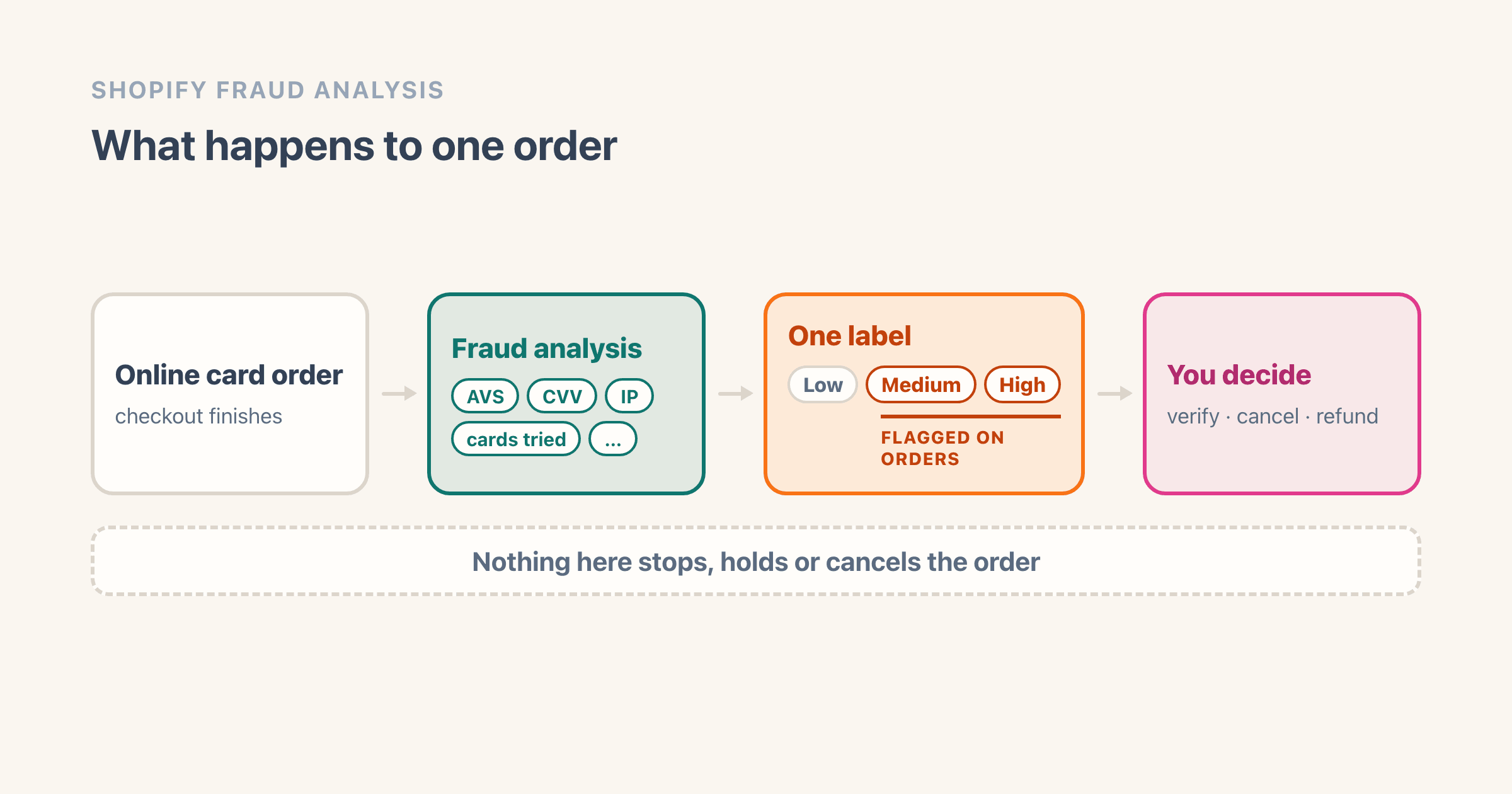
An order lands overnight with a small exclamation mark beside the order number. That mark is Shopify's fraud analysis, and by the time you see it the software has finished.
On any store using Shopify Payments, or on the Grow plan and up, Shopify reads every online credit card order and returns one label: low, medium or high. What it predicts is the risk of a chargeback caused by fraud, not a verdict on the shopper. Nothing gets blocked, held or cancelled by it. The decision is yours, and so is the money if you call it wrong.
What does Shopify's fraud analysis actually measure?
One thing, and it is narrower than the name suggests. Shopify's sentence is that the recommendation "tells you if an order has a low, medium, or high risk of a chargeback due to fraud".
The whole sentence is about a payment outcome. Shopify's fraud analysis page opens by saying the feature "helps you identify orders that could be fraudulent", and describes the machinery behind it as "powered by machine learning algorithms that are trained on historical transactions across all Shopify stores".
The stake sits on the same page, and it is bigger than one parcel. "Fulfilling high risk orders can result in a higher number of chargebacks and that can result in disabling payment processing and removal from Shopify Payments."
What Shopify never publishes is a number. Low, medium and high is the entire scale on that page. No score, no percentage, no threshold, which is worth knowing before you go hunting for one.
Which orders get a risk level, and which stores get a recommendation?
Two conditions decide it, and both are easy to walk past.
The first is the order. Shopify scopes the recommendation to "all online credit card orders". If the sale came through your point of sale, over the phone, or on a payment method that is not a card, that sentence does not cover it, and the page says nothing about what you get instead.
The second is your store. On the Basic plan without Shopify Payments, fraud analysis gives you indicators and support for third-party fraud apps. The low, medium and high label is not in that list. It arrives on the Grow plan or higher, or on any plan once you are using Shopify Payments.
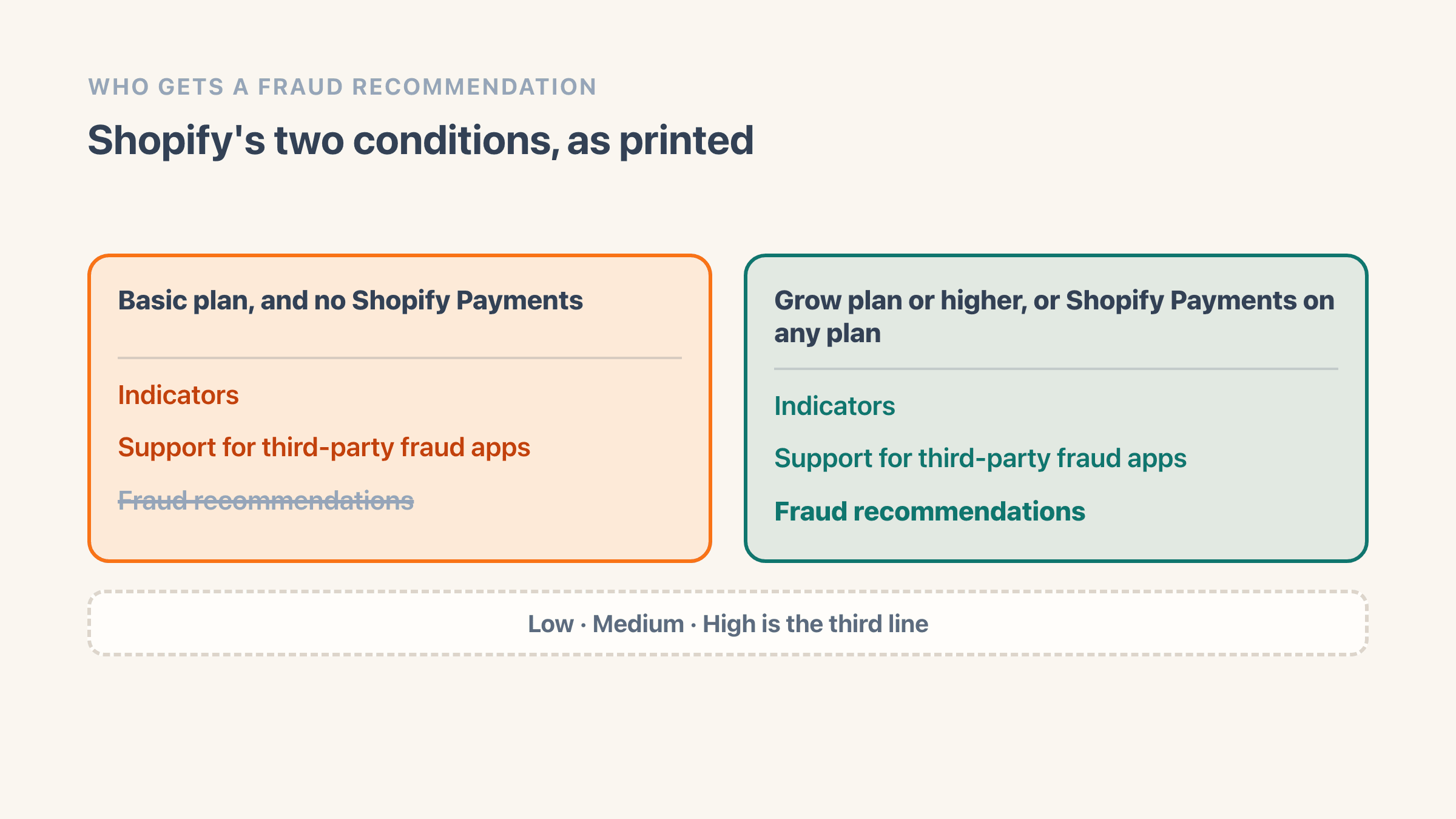
So a Basic store on a third-party gateway can open a suspicious order, find the raw indicators sitting there, and have no risk level to read. Nothing is broken and no setting is missing. That store was never in the group Shopify writes recommendations for.
What are the fraud analysis indicators Shopify looks at?
Four are published, and Shopify calls them examples rather than a list. The page introduces them with "The indicators can include information such as:" and then names:
- whether the card passed the address check that Shopify writes as AVS
- whether the shopper gave the correct security code, the CVV
- details about the IP address the order was placed from
- whether the shopper tried to use more than one credit card
The rest live in your admin instead of in the documentation. Open the order, find the Order risk section, and click the fraud analysis icon in its top-right corner to see the full indicator list for that order. Shopify's step says that view is available "on the Basic plan or higher".
Each indicator is colour-coded on that screen. Green means a detail that "usually happens with legitimate orders", red means one that usually happens with fraudulent ones, and grey is extra context Shopify thinks is worth having. What the screen does not show is the arithmetic. Nowhere does Shopify say how a set of red and green marks turns into low, medium or high, so you can read every signal on an order and still not know which one moved it.
On 11 August 2026 I read four of the guides ranking for this question: byRadiant, KlinKode, Disputifier and GeoFraudShield. None of them carries Shopify's "can include" qualifier, and none names the plan condition in the section above. So a merchant on Basic without Shopify Payments can follow any of them and go hunting for a label their store does not produce.
Where does the risk level show up in your admin?
In three places, and Shopify uses two different names for the mark on a single page.
On the Orders list, an order at medium or high risk is "flagged on the Orders page with a warning symbol next to the order number". Further down the same page, the walkthrough says "Suspicious orders are flagged with an exclamation mark beside the order number". One mark, one place, beside the order number. Look for the position rather than the word.
The second place is your inbox. "Flagged orders are also brought to your attention in order notification emails if you subscribe to them", so a store that never switched those on will only ever see this on the Orders list.
The third place is the order itself, and here two of Shopify's own pages disagree. The fraud analysis page tells you to open the order and find "a section called Order risk". The preventing fraud page, describing the same block, says "You can find the IP address that's associated with the order in the fraud analysis section of the order detail page". Both names point at the same block, and if you are using a third-party fraud app, "you'll find the app's recommendations below the Order risk section".
One timing trap is worth knowing before it catches you. Shopify says analysis "typically happens immediately, but in rare cases the process can take a few minutes", and follows that with "It's a good idea to wait for the fraud analysis to finish before you fulfill the order". Open an order the second it lands and an empty risk section means the check has not finished yet. It does not mean the order came back clean.
How do you see a flagged order before a real one arrives?
Shopify publishes a way to make one, and hardly anybody uses it.
Place a test order with shopify.test.medium@shopify.com as the customer email and fraud analysis returns a medium-risk recommendation on it. There is a high and a low version of the same address, and the same three values work in the Apartment, suite, etc. field of the shipping address if you would rather leave the email alone.
Three conditions have to hold or the order comes back with nothing on it:
- the order total has to be greater than zero
- your Shopify Payments gateway has to be in test mode
- if you are testing through another payment gateway, your store has to be on the Grow plan or higher
That is the whole trick, and it is worth twenty minutes on a quiet afternoon. One deliberate medium-risk order tells you whether your store gets the label at all, where the mark lands on your Orders list, what the indicator screen looks like on your own admin, and whether the notification email actually reaches you. It arrives in Orders like any other order, so cancel it when you have finished looking.
What does Shopify tell you to do with a high-risk order?
Three things, and only at high risk. Shopify's wording is that if an order is at high risk of fraud, "you can attempt to verify the order, cancel the order, or refund the order".
Now read that for what it leaves out. A medium-risk order carries the same mark on the Orders page, and Shopify never says what to do with one. There is no recommended action for medium anywhere on the page.
How do you verify an order before you cancel it?
The verification checklist lives somewhere else entirely. Shopify's preventing fraud page introduces it with "The following are customer details you can review to help you decide when an order is suspicious and should be canceled", and the questions it asks are about the IP address:
- "Is the customer's IP address located in a different general area from where they claim to be?"
- "Is the IP address for a web hosting company?"
- "Is the IP address a proxy service IP address?"
"If any of these statements are true, then you need to contact the customer to verify the authenticity of the order." Shopify is blunter about the next step than most vendors would be: "Calling the customer is always a good idea." It also points out that "Fraudulent customers often use invalid phone numbers", which is why the call is worth making even when nobody picks up.
That matches what I see running our own store, which turns over about $5 million a year. High-risk orders are the easy ones. Either a phone call settles it in sixty seconds, or the number does not connect and the decision makes itself. It is the medium pile that eats a morning, and Shopify has nothing to say about any of it.
Can you avoid the fees on a fraudulent order?
One setting changes the arithmetic while you are deciding. Shopify suggests changing your payment capture settings "to prevent automatic payment capture for certain orders and reduce the potential impact of the transaction fees for fraudulent orders to your business".
The fee behind that advice is the part worth reading twice. "Transaction fees are charged for all processed payments made through a third-party payment provider, and aren't returned to you when you issue a refund." Refunding a fraudulent order on an outside gateway hands the customer their money back and leaves the fee where it is, which is one line in the bigger picture of what Shopify takes per sale.
The steps for cancelling and refunding, including the two conditions that can stop you cancelling at all, are in how to block a customer on Shopify.
If you ship it anyway and it becomes a chargeback, who pays?
You do, unless that particular order happens to be covered by Shopify Protect. That is a separate feature with its own conditions, and a risk level is not among the ones Shopify publishes.
The fraud analysis page is plain about the first half. "Shopify does not cover charge reversals from banks", and "the decision to reverse funds is made by the bank that issued the credit card, not by Shopify".
Does Shopify Protect cover a fraudulent chargeback?
Shopify Protect has its own page, and it does reimburse: "If an eligible and protected order receives a fraudulent chargeback, then you're reimbursed the chargeback amount and associated chargeback fee." Eligibility runs on payment and logistics, and these are the conditions that catch most stores out:
- you have to be in the United States with a United States Shopify Payments account
- the order has to go through Shop Pay, and Shop Pay Installments orders are not eligible
- orders containing digital products, or products bought online and picked up in store, are not protected
- you have to fulfil within 7 days, with tracking from a supported carrier showing the parcel in transit within 10 days
- "Changing the shipping address on an order after checkout voids the Shopify Protect coverage for that order"
Shopify's page carries more than those five. There is a list of which carriers count, a requirement that every line item is already fulfilled, and a rule that only orders already showing a Shopify Protect status are eligible in the first place. What is not on it, anywhere, is a risk level.
I fetched both pages on 11 August 2026: the fraud analysis page never mentions Shopify Protect, and the Shopify Protect page never mentions fraud analysis, a risk level or a flagged order.
A third page joins them exactly once, and on the screen rather than on the money. Shopify's page on filtering orders by protection status says an order "undergoes a review process to determine whether it's eligible", and that "If an order is ineligible for Shopify Protect, then the order page will display risk analysis instead of a Shopify Protect status". So the two take turns in the same corner of the order. What that review looks at, and whether a high-risk label ever costs you cover, is on none of the three pages.
There is one cost that lands whichever way the dispute goes. Shopify's preventing fraud page says "Each chargeback counts toward your chargeback rate regardless of whether you win or lose the dispute", and what a chargeback costs you sets out the rest of that arithmetic.
Fraud analysis or Fraud Control: which one is which?
Two features, two help pages, and the names do most of the damage.
Fraud analysis is built in and produces the label. Fraud Control is a separate free app from Shopify that "creates and displays a dashboard in your Shopify admin that displays analytics related to fraud or potential fraud on your store", and that also carries checkout rules.
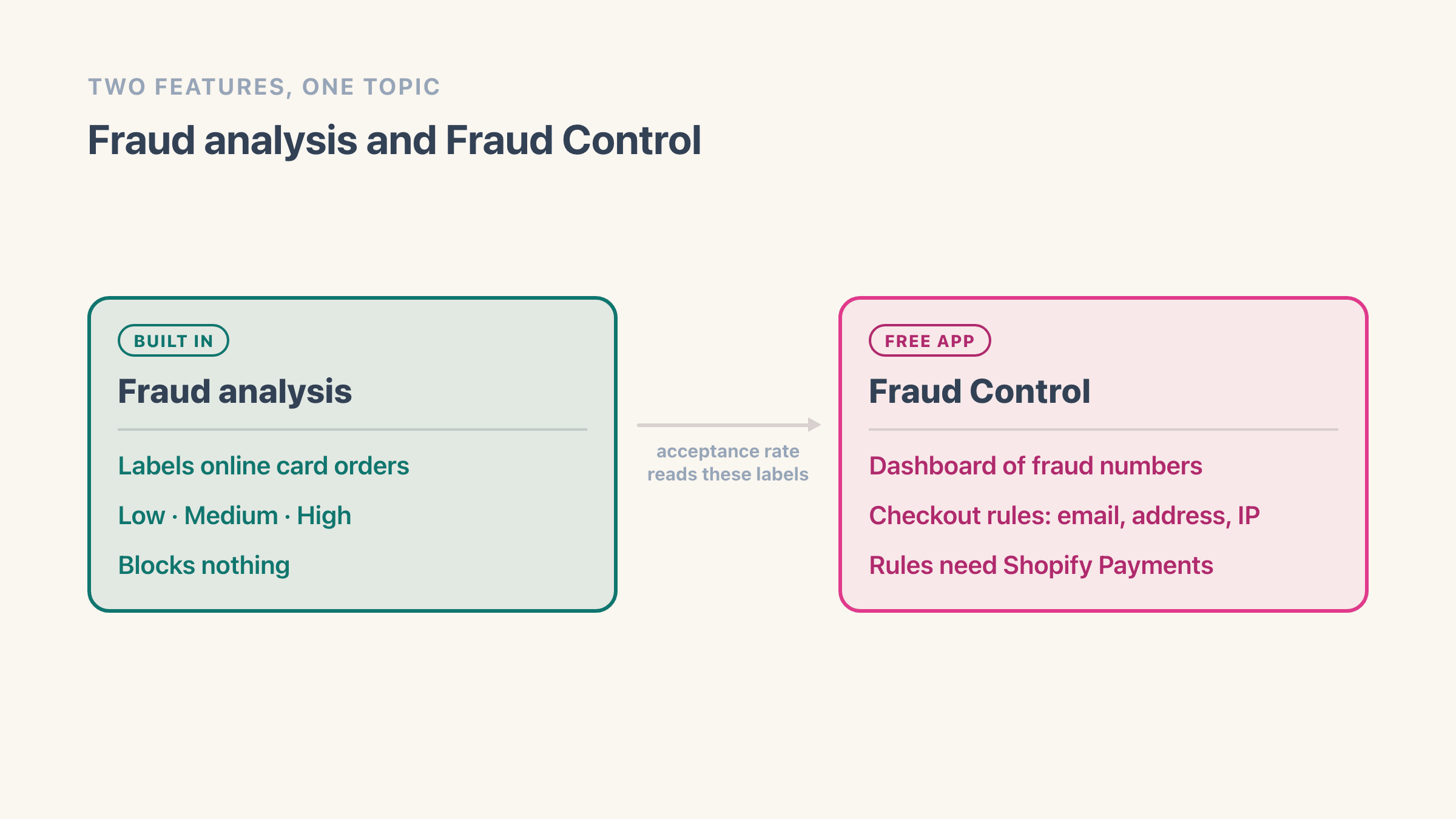
The dashboard sits downstream of fraud analysis. Its acceptance rate is defined on Shopify's page as "The percentage of all orders in your chosen date range that are marked as low-risk or medium-risk by Shopify's fraud analysis", so the app is reporting on labels the built-in feature produced.
The rules are the half that acts, and they carry a hard requirement: "Fraud Control checkout rules are only available for merchants using Shopify Payments." The app itself "is available to all store plans in locations where Shopify Payments is available", and "Some data isn't available unless you use Shopify Payments as your payment processor". Setting a rule up is a walkthrough of its own, and stopping the checkout before it becomes an order covers the five steps.
Shopify is careful about what the app promises, and the wording is worth quoting exactly. Asked on its own page whether checkout rules can prevent fraud entirely, the answer is "No. Fraud Control can't guarantee that you'll never receive a fraudulent order." Separately, "The Fraud Control app doesn't guarantee coverage against chargebacks." And plainer still: "It provides insight into potential fraud, but doesn't actively protect against it. You are solely responsible for any costs that result from chargebacks on your store."
What actually acts on the risk level?
Shopify Flow, and only once you have switched a workflow on yourself. Shopify ships four ready-made high-risk workflows:
- Capture payment if order is not high fraud risk
- Cancel and restock high risk orders
- Cancel orders for customers who frequently return items
- Cancel and tag orders from known bad email addresses
The trigger decides whether any of them do anything. Shopify's own instruction is to "use the Order risk analyzed trigger instead of the Order created trigger", because the order exists before its label does. Build one on Order created and it reads a risk level that has not arrived yet.
The capture workflow carries a second condition on top of that. "Workflows that manage capturing payments don't function if automatic capture is activated", so that template needs your store set to capture payment manually before it will do anything at all.
What fraud analysis will never do
Four limits. One is a thing Shopify states outright, and three are things I went looking for on its page and did not find:
- It never acts. Nothing Shopify documents about fraud analysis blocks, holds or cancels an order.
- It never shows its weighting. You can see which indicators came back red on an order. How they add up to a label is published nowhere.
- It never scores. Low, medium and high are the only values on the page.
- It never covers you. The bank decides a reversal, and the feature that reimburses is a separate one with its own eligibility list.
None of that makes the feature useless. A label that arrives before you pack the parcel is worth having, it costs nothing, and on our own store it is the only thing that reads every card order that comes in. It simply does less than its name suggests, and the gap gets filled by you, by a workflow you switch on, or by a rule that needs Shopify Payments.
What to do next
Make a flagged order rather than waiting for one. Place a test order with shopify.test.medium@shopify.com in a store with Shopify Payments in test mode, then open it and find the Order risk section and the icon in its corner.
Ten minutes tells you three things you cannot look up: whether your store gets the label at all, where the mark lands on your own Orders list, and whether that notification email reaches anybody. Then work out your answer to the medium-risk question while nothing is on the line, because Shopify is not going to answer it for you.
Frequently asked questions
Does Shopify cancel high-risk orders automatically?
No. Fraud analysis puts a label on the order and stops there. Shopify's own wording is that at high risk "you can attempt to verify the order, cancel the order, or refund the order", and all three of those are things you do. An automatic cancellation only happens if you switch on a Shopify Flow workflow yourself, and it has to run on the Order risk analyzed trigger.
What does medium risk mean on a Shopify order?
It means the order carries the same mark on your Orders page as a high-risk one, and that Shopify has published no advice about what to do with it. The fraud analysis page names actions for high risk only. My own rule is to treat medium as a prompt to check the phone number and the two addresses before packing.
Why does one of my orders have no risk level at all?
Three things cover most cases. Shopify scopes the recommendation to online credit card orders, so an order paid another way sits outside that sentence. On the Basic plan without Shopify Payments you get indicators and no recommendation at all. And analysis "typically happens immediately, but in rare cases the process can take a few minutes", so an order opened seconds after it lands can genuinely show nothing yet.
Can I test Shopify's fraud analysis without waiting for a fraudulent order?
Yes. Shopify publishes three test email addresses - shopify.test.low@shopify.com, shopify.test.medium@shopify.com and shopify.test.high@shopify.com - and the same three values also work in the Apartment, suite, etc. field of the shipping address. The order total has to be greater than zero, and your Shopify Payments gateway has to be in test mode, or your store on the Grow plan or higher if you are testing through another gateway.
Does a high-risk label mean I lose Shopify Protect on that order?
Shopify does not say either way. The Shopify Protect page sets eligibility on the payment method, the goods, the fulfilment clock and the carrier, and never mentions a risk level or a flagged order. The fraud analysis page never mentions Shopify Protect. All three pages I checked on 11 August 2026 are silent on how the two features interact, so read the eligibility conditions rather than the label.
Where do I see the full list of fraud indicators for one order?
On the order itself. Go to Orders, click the order number, find the Order risk section, and click the fraud analysis icon in its top-right corner. Shopify's step says that view is available on the Basic plan or higher. Only four example indicators appear in the documentation, so this screen is the only place the rest of them show up.