Definition
Which stores need a shop-by-brand page, and which do not?
Brand becomes a navigation axis the moment shoppers arrive already knowing the name they want. Multi-brand boutiques, auto-parts stores, grocery and health retailers, stockists carrying a distributor's lines and marketplaces with many sellers all work that way, and the Shopify forums have carried the same request from them for fifteen years. One merchant wanted a directory covering "over 500 brands". Another was building one for a store with "over 1000 vendors".
The stores that do not need one are the ones where the brand is you. A single-label store puts its own name or a supplier code in the vendor field, so the directory would be a page with one entry on it.
The threshold sits wherever your menu stops working. Under about fifteen brands, nav items cover it. Past thirty or forty the dropdown turns into a scroll, and past a hundred nobody reads a list without a search box. Brand count decides this rather than catalogue size: 4,000 products from six suppliers need no directory, 300 products from 120 labels do.
What goes on a good shop-by-brand page?
Five things, and the order they appear in matters more than the styling. The page wants an address of its own, something like yourstore.com/pages/brands, with one main-menu item pointing at it; a mega-menu holding 200 brand names is the version that always breaks.
- A search box at the top, the fastest route for a shopper who knows the name and the only one that survives past a hundred brands.
- The full list alphabetically, grouped under letter headings, with a letter bar that jumps down the page.
- A logo per brand where you have one, falling back to that brand's collection image or its first letter so the grid never shows an empty tile. Give each logo its own alt text, because a brand name that exists only inside a picture is one a screen reader and Google both walk past.
- A featured row for the brands you want pushed, sitting above the A-Z list rather than hidden inside it.
- A way to hide a brand you have stopped stocking, so no entry points at an empty shelf.
What do shoppers actually do on a brand directory?
They type first. Anyone arriving with a brand in mind heads for the search box, and where there is none they fall back to site search and get a wall of products. Everyone else scans, and scanning happens on logos before names, which is why a logo wall beats a text list for known labels and does nothing for unfamiliar ones.
The behaviour that gives this away shows up on your product pages. One merchant ran Microsoft Clarity and found shoppers clicking the vendor name under the product title, which in most themes is plain text going nowhere. Every one of those clicks is a request for the brand page, and making the vendor name a link is the cheapest fix here.
On a phone the letter bar stops being decoration. Three hundred names in one column is a scroll nobody finishes, and a merchant described exactly that on the Shopify community forum: alphabetical sections "spaced really far apart", with no way to see the results on one screen.
A-Z list vs featured brands vs search: which layout fits?
Three answers to three different shoppers, and a page that works runs all three. Search serves the one who knows the name. The A-Z list serves the one browsing to see what you carry. The featured row serves you, because that is where the best-margin brands and new arrivals go.
Brand count picks the emphasis. Under about twenty brands a logo grid on its own is plenty. Between twenty and a hundred, letter-grouped columns read best. Past a hundred, search belongs at the top with the A-Z list underneath. Easy Brand Page ships eight presets covering that range - classic cards, image cards, minimal text, a logo wall, list rows, compact chips, letter index rows and letter columns - and all eight sit on the free plan with the colour and spacing controls.
Two related questions come up by name. Showing the brands as a grid of logos is the logo wall preset above. Running them as a strip that scrolls on its own uses a separate block you can drop onto any page, which suits a homepage row better than it suits a directory.
One layout backfires reliably: a logo wall with no logos in it. A grid of grey placeholders reads as broken, so until you have brand images a text layout looks better.
Why does Shopify store the brand but not build the page?
Because the vendor is a line of text typed onto each product, not something your store keeps a record of. There is no brand entry anywhere to hang a logo, a description or a website address on, so Shopify has nothing to build a page out of. Every brand-page app on the App Store exists to create that missing record.
One thing makes the gap easy to misread. Shopify does keep brand details for your own shop, the logo and colours and slogan and social links you set up for yourself, and none of that has anything to do with the brands you resell.
What Shopify does generate is a listing for each vendor. Every store already has a page at yourstore.com/collections/vendors?q=Brand Name showing that brand's products, and capital letters do not matter, so acme and ACME land in the same place. Shopify also already tells Google that the vendor name is the product's brand. So Shopify treats the vendor as a brand behind the scenes. It just never gives you a page that lists them all.
Where should each brand entry link to?
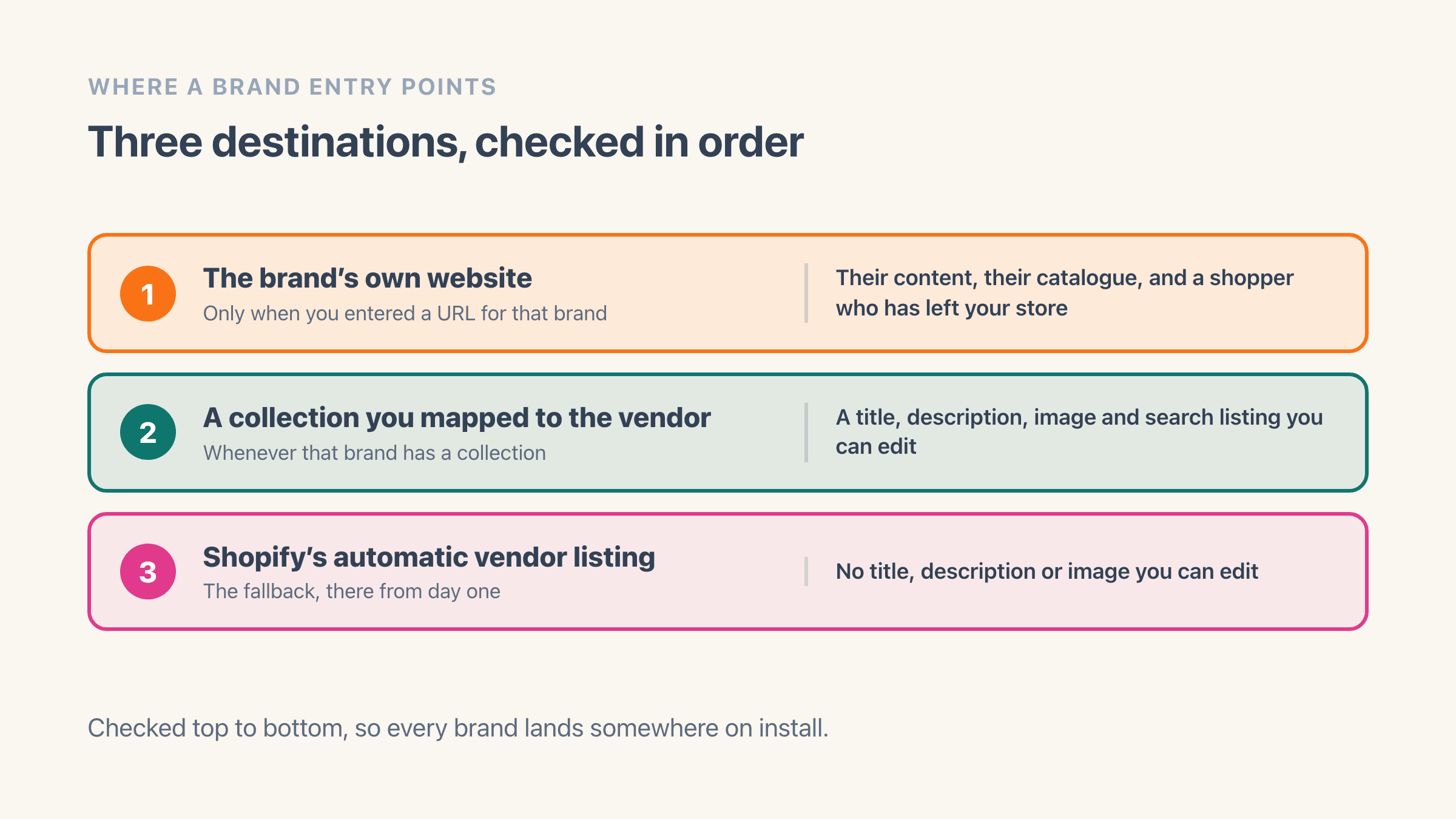
Three destinations, and the choice decides what the directory is worth. A collection you built for that brand is the strongest: a title, description, image and search-listing text you can all edit, plus a tidy address like yourstore.com/collections/acme, which makes it something you can point an ad or a supplier link at. Shopify's automatic vendor listing is the fallback that works from day one with nothing built. The brand's own website sends your shopper away, so save it for labels you barely stock.
The whole page does not need one rule. Easy Brand Page checks three things in order for each brand: a website address you typed in wins, then a collection you matched to that brand, then Shopify's automatic vendor listing. Bulk-creating one collection per brand is how you get there at 200 brands.
The link you never want is the one into an empty collection. A shopper who clicks a brand and lands on nothing has learned something about your store in one click. Hide the brand until it has stock.
Does a shop-by-brand page help SEO?
Indirectly, and less than the app listings imply. The directory itself rarely ranks, because nobody searches "brands we carry". What it does is put a link to every brand collection on one page, one click from your homepage, which is how 200 brand collections get found by Google at all.
The pages that rank are the individual ones. A brand collection with its own title, description and a paragraph of real content can hold "brand name + category" searches, and that is where brand-led traffic comes from. Shopify's automatic vendor listing cannot do that job, because there is no title or description on it for you to write. A Shopify developer put it plainly on r/shopify: "a vendors list isn't really indexed that well from doing it this way."
There is a quieter benefit as well. Shopify already tells Google that the vendor name on a product is that product's brand, so search engines pick those names up whether or not you have built a page for them.
Why do brands go missing from a brand directory?
Four causes, and every one of them is silent. Spelling is the one worth settling before you install anything, because a directory either groups the variants for display or hands you the cleanup.
Easy Brand Page groups case, accent and whitespace variants into one entry and never writes to your products, so "Acme" and "acme" appear once while the catalogue stays as it was. It stops short of guessing: "Coca-Cola" and "Coca Cola" remain two brands, because a hyphen can be a genuine difference. Tidying the field itself is a vendor rename or merge in the admin.
- The 50-brand ceiling on a hand-built page. Theme code can only run through a list 50 times, and Shopify's usual way of splitting a long list across several pages does not work on the brand list, so 80 brands show up as 50 and nothing warns you.
- Spelling variants. "Acme", "acme" and "Acme " with a trailing space are three separate values.
- Out-of-stock hiding. A brand whose products have all sold out drops off any directory set to hide empty brands.
- A rename. An automated collection set to match the old vendor name exactly empties the moment you tidy the spelling.
Example
A bike-parts store with 240 vendor names: the menu holds eight, a hand-coded page shows the first 50 and stops, and the full list only fits on a page with a search box and a letter bar. Fourteen of the 240 are spelling variants of seven brands already listed, so the number a shopper should see is 233.
Where it lives in your Shopify admin
Online Store > Pages is where the directory page itself gets created, and the brand on each product sits at Products > open a product > Product organization > Vendor. Shopify's own per-brand listing needs nothing built at all: yourstore.com/collections/vendors?q=Brand Name.
Commonly confused with
- A brand page
- A shop-by-brand page is the directory listing every brand you carry. A brand page is the destination for one of them, usually that brand's own collection.
- Shopify's automatic vendor listing
- Every store already has a listing per brand at /collections/vendors?q=Brand Name, with no title, description or image you can edit. The directory is the page that lists them all, and Shopify builds none of it.
- A collection
- A collection groups products. The directory groups brands, and each entry on it points at one brand's collection.
See also