Short answer
How do you link vendor names to brand pages?
Add the Brand link block to your product template
In the Shopify theme editor, open your product template and add the Brand link block where you want the brand to appear. There is no theme code to edit, and you add it once for every product page.
If it does not work
The brand name now appears twice on the page, because your theme was already printing it as small grey text above the title. Turn the theme's own version off in the section that holds the title and price, and keep the linked one.
How to undo it
Click the block and choose Remove block. The product page goes back to exactly how it read before, and nothing about your products changed.
It reads the vendor already on the product
The block takes the brand from each product, so you never type brand names anywhere. A product with no vendor set simply shows nothing, and brands you hide in the app are skipped.
If it does not work
Some products show a brand link and others show nothing at all. Those are the products with an empty vendor field, or ones whose brand you hid in the app. It is doing what it should - showing nothing beats showing a link to a page you would rather nobody opened.
How to undo it
Unhide the brand in the app, or fill in the vendor on those products, and the link appears without touching the theme again.
The name links to the brand's collection
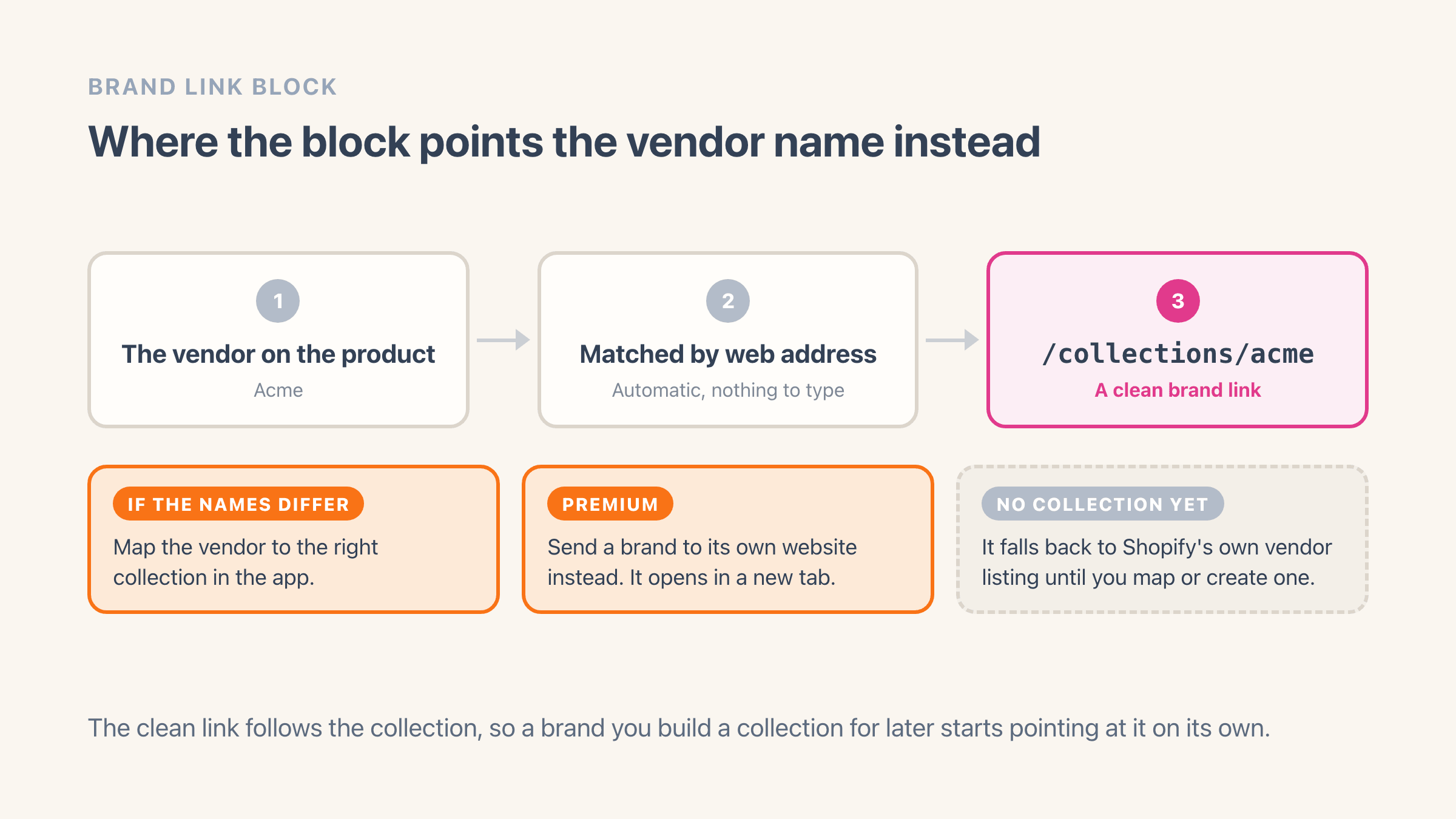
It looks for a collection whose web address matches the brand name and links there. You can change where a brand points in the app, and on the Premium plan send a brand to its own website instead.
If it does not work
The link lands on Shopify's automatic vendor listing rather than your collection, which means no collection web address matched that brand name. Common when your collection reads /collections/acme-inc and the vendor says Acme. Map the brand to the right collection in the app.
How to undo it
A mapping you set by hand survives every later scan, and changing it again is one edit. The block falls back to the automatic listing rather than breaking, so no product page ever dead-ends while you sort it out.
Style it to match the product page
Set the text before the name (it starts as "More from"), show or hide the brand logo, and align it left, center or right. The block picks up your theme's own typography.
If it does not work
It comes out louder than you expected, because it inherits your theme's type styles rather than bringing its own.
The bigger decision is placement: directly under the title it reads as part of what the product is, and below the buy button it reads as a next step for someone who likes the brand but not this item.
How to undo it
Wording, logo and alignment are theme settings, so the undo button reverses them while they are unsaved and you can set them back afterwards.
What you get
- The product's vendor name shown as a clickable brand link
- A clean collection address like /collections/nike rather than an automatic search listing
- The brand logo beside the name, from your upload or the collection image
- Automatic brand-to-collection matching, with a per-brand override in the app
- On the Premium plan, an option to point a brand at its own website in a new tab
- Free on every plan, with no theme code to edit
Where does the vendor name link to by default?
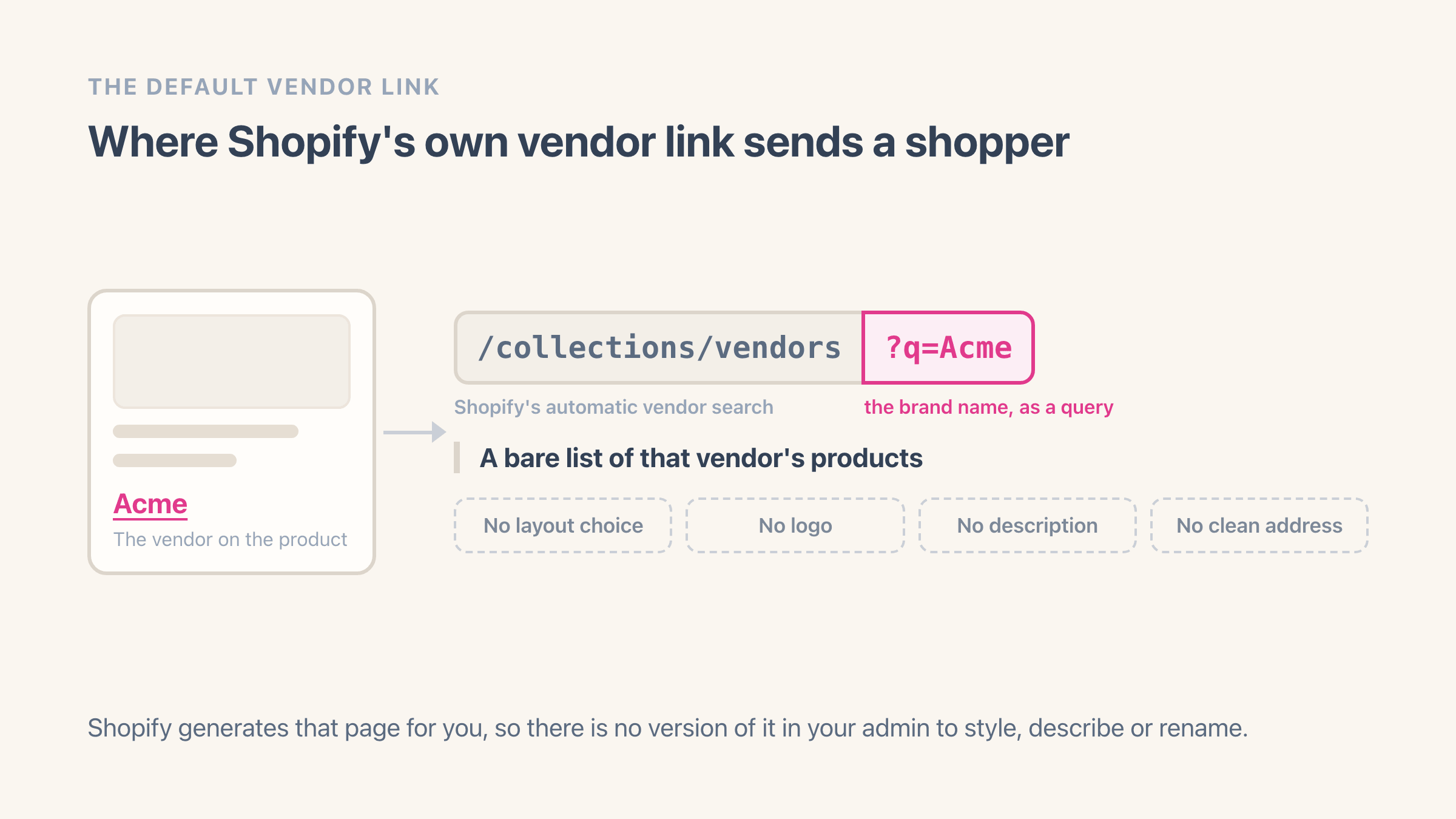
In most themes, nowhere. The product vendor is printed as plain text with nothing to click, and in the themes that do link it, the link goes to an address like /collections/vendors?q=Acme - a listing Shopify generates on demand rather than a page that exists anywhere in your admin.
That is the part worth understanding before you spend time on it. You cannot open that listing in Shopify and change anything: there is no title to write, no description, no banner, no control over the order the products appear in, and no tidy address to put in a menu. It shows the brand's products and stops there, which looks unfinished sitting next to collection pages you have actually built.
Looks are not the whole of it either. How those automatic vendor listings behave in search is worth five minutes before you decide where your brand links should point.
Where does the Brand link block send shoppers instead?
To that brand's collection page, at a clean address like /collections/acme. The block reads the brand on the product, looks for a collection whose web address matches that name, and links there; when the two do not line up you map the brand to a collection by hand in the app, and that choice survives every later scan.
It can show the brand's logo beside the name, using the logo you uploaded or the collection's own image, and the words in front of the name are yours to set. It starts as "More from", though "Shop all" and "Also from" both read well depending on how the rest of your product page is written.
A brand with no collection yet still links somewhere: the block falls back to Shopify's automatic vendor listing, so nothing on the page dead-ends while you work through your catalogue, and it switches to the collection by itself the day you create one. If you would rather not build those collections one at a time, creating a collection per vendor in bulk does the whole pass. On the Premium plan you can send a specific brand to its own website instead, which opens in a new tab.
Does your theme show the vendor on a product page at all?
Check before you add anything, because plenty of themes hide it. Open your theme editor, switch the page picker at the top to a product page, and read through the settings of the section that holds the title and price - if your theme can show the brand, the option is a checkbox in there.
The reason to look first is the double-up. If your theme already prints the brand as small grey text above the title and you add the Brand link underneath it, the same word lands on the page twice. Turn the theme's version off, keep the linked one, and the product page reads the way it always did with one more thing to click.
Where you place the block changes what it means to a shopper. Directly under the title it reads as part of what this product is. Below the buy button or next to the description it reads as a next step for someone who likes the brand and has decided against this particular item. I put it under the title on stores where people shop by brand, and lower down on stores where they do not.
What does a shopper expect when they click a brand name?
Everything you carry from that brand, on one page that looks like the rest of your shop. Shopify's automatic listing answers the first half of that and misses the second: no description, no banner, none of the filters a shopper gets everywhere else on your store, and an address that looks like machinery.
A collection meets the expectation because it is an ordinary page of your store. You can describe the brand at the top, put its banner behind that, let shoppers filter by size or price, and link to it from your menu. Someone who clicks Acme on a product page and lands somewhere that looks built keeps browsing, and that browsing is the entire return on this block.
It also changes how those pages get found. Google reaches pages by following links, so every product page pointing at its brand collection is another route into that collection - and a collection is a page you can give a real title and description to. If shoppers search your brand names alongside a product type, the page you control is the one worth sending them to.
What happens to the link when you rename a vendor?
It follows the new name by itself, because the block reads whatever brand is on the product at that moment. Rename Aurora Supply Co. to Aurora Supply across your products and the link starts looking for a collection called Aurora Supply as soon as the change saves.
What breaks is anything pinned to the old spelling. An automatic collection whose condition reads "Product vendor is Aurora Supply Co." matches that exact text, so it empties the instant your products stop saying it - no warning, no error, just a page with nothing on it. Change the collection's condition first and rename the products second, and the page never goes blank.
Inside Easy Brand Page the new spelling arrives as a new brand, because brands are tracked by the name your products carry. The old one stays in your list with a product count of zero, still holding its logo and its collection mapping, so the tidy-up is to set those on the new row and then use Remove brand on the old one. Moving a single product to a different brand behaves the same way, and its link changes as soon as you save the product.
When should you leave the vendor name unlinked?
When the vendor is you. Own-label and single-brand stores usually put their own name in the vendor field on every product, so the link would take a shopper from your product to a page holding your whole catalogue, which is a circle. Leave the block off those product templates.
Placeholders are the other case. A vendor reading "Default", a supplier code that arrived with an import, or a manufacturer's name on something you sell under your own label is not a brand anyone is hunting for. Hide those brands in the app and the block skips them, so the product page shows nothing at all rather than a link to a page you would rather nobody opened. A product with no vendor set shows nothing either, so there is no half-broken state to clean up.
And if you sell three hundred products from four brands, a decent menu does more for you than this block will. It earns its place when the brand is the thing your shopper already knows by name, and when your catalogue is wide enough that finding the rest of one brand takes real effort.