Short answer
How do you clean up duplicate vendor spellings?
Find your duplicate vendors
Open Products in the Shopify admin and filter by Vendor. Each distinct spelling is its own filter value, so "Nike", "nike " and "NIKE" show up as three separate vendors, which is how you spot the duplicates you need to merge.
If it does not work
Two entries in the list look identical and you assume the filter is glitching. It is not: one of them has a trailing space. A space is invisible in a list and counts as a different vendor everywhere in Shopify, which is why these are the duplicates that survive every clean-up.
Select the products with one spelling
Filter to a single wrong spelling, then select every product it matches. Ticking the checkbox at the top of the list selects the products on that page only, so use the Select all results option in the selection dropdown to cover everything the filter matched.
If it does not work
You rename what you thought was every product and the old spelling is still in your vendor list afterwards. The header checkbox only ever took the current page, and the rest of the matches were never selected.
The count shown in the selection dropdown is the number to check before you go further.
How to undo it
Selecting costs nothing and writes nothing. Change the filter or clear the selection as often as you like - the edit only happens when you save in the bulk editor.
Open the bulk product editor
With the products selected, choose Edit products to open the bulk editor. If the Vendor field is not shown, add it as a column so you can edit vendor for every selected product at once.
If it does not work
There is no vendor column and it looks like the bulk editor cannot do this. It can - the column is simply not shown by default, and you add it from the columns control before you can type in it.
Rename them to one clean vendor
Type the correct vendor spelling and apply it to every selected product, then save. All of those products now share one clean vendor value instead of the old variant.
If it does not work
A brand collection empties the moment you save. An automated collection whose condition reads "Product vendor is Aurora Supply Co." matches that exact text, so it holds nothing the second your products stop saying it.
No error, no warning, just a live page with no products on it. Change the collection's condition first and rename second.
How to undo it
A saved bulk edit has no undo button. The way back is another bulk edit putting the old spelling on the same products, which is the argument for doing one spelling at a time rather than the whole catalogue in one go.
Repeat until the duplicates are gone
Do the same for each remaining variant spelling until every product points at the single vendor name you want. Once they all match, the duplicate vendors merge into one. If you run Easy Brand Page, its auto-sync then updates the storefront directory on its own.
If it does not work
The duplicates come back a month later, and the culprit is nearly always an import. A supplier sheet that spells the brand its own way rewrites the vendor on every product it touches, so check the vendor column before you import rather than after.
What you get
- Case, spacing and accent spellings shown as one brand in the directory
- The most-used spelling picked automatically as the brand name
- Product counts summed across every spelling of a brand
- No change to the vendor stored on your products
- Automatic re-sync after you clean up vendors in Shopify
- A free plan for up to 30 brands
Should you rename the vendors or just fix how they look?
Rename them if anything besides shoppers reads that field - your product filters, your exports, your sales-by-vendor report, any other app you have installed. Fix only the display if the one thing bothering you is a shop-by-brand page showing "Nike" and "nike" as two separate brands.
Shopify stores a product vendor as free text on every product, so any difference in case, spacing or accents becomes a separate vendor. The bulk product editor is the real fix, because it rewrites the value itself and everything downstream follows.
If a tidy storefront is all you are after, you do not have to touch the data at all. Easy Brand Page keeps your brand directory clean while the underlying vendor values still vary, so the page can look right today and you can fix the product data on your own schedule, or never.
How does the app know two spellings are the same brand?
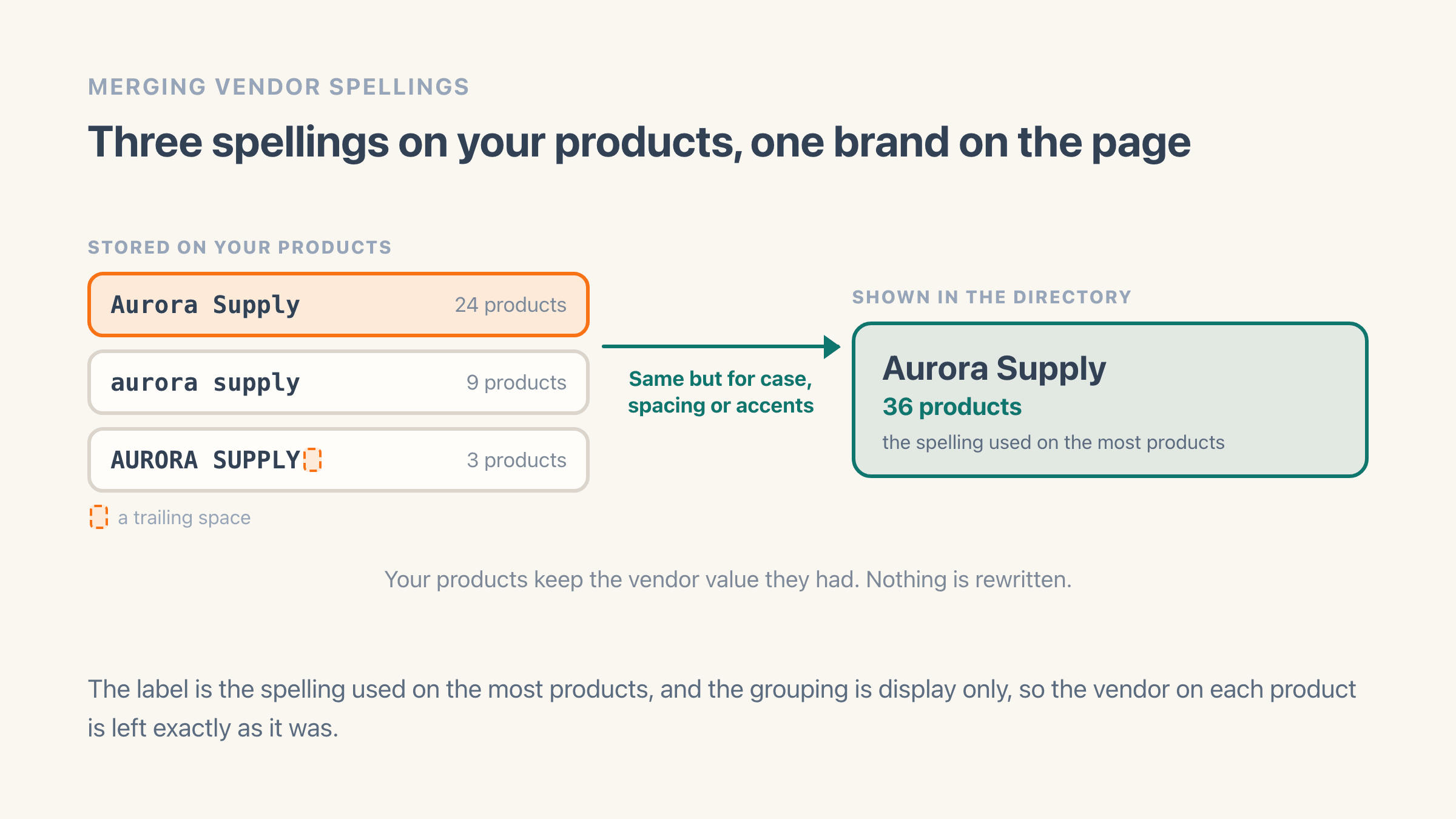
When Easy Brand Page scans your vendors, it groups spellings that only differ by case, spacing or accents into one brand, and labels that brand with the spelling used on the most products. The product counts from every spelling are added together, so the brand shows its true total.
It does this for the directory display only - it never rewrites the vendor on your products. The brand syncing runs automatically when products change, so the merged list stays current whether or not you ever clean up the raw vendor values.
What breaks when you rename a vendor?
Three things, and Shopify warns you about none of them. An automatic collection whose condition reads "Product vendor is Aurora Supply Co." matches that exact text, so the moment your products say "Aurora Supply" the collection empties - no error, no notice, just a page with nothing on it. Change the collection's condition first and rename the products second, and it never goes blank.
The second is Shopify's automatic vendor listing for the old name, which empties at the same time. That only matters if you pointed something at it, so check your menu before you start: a navigation item aimed at a vendor name you have just changed is a dead end for shoppers and a broken link for Google. Linking vendor names to a real brand page avoids the whole class of problem, since a collection keeps its address when a spelling changes.
The third is small and irritating. In Easy Brand Page the new spelling arrives as a new brand, because brands are tracked by the name your products carry. The old brand stays in your list with a product count of zero, still holding its logo, tags and collection mapping. Set those on the new row, then open the Edit menu on the old one and choose Remove brand, which takes it off your list and your storefront in one step and can be undone from the Removed brands filter if you get it wrong.
How do you stop duplicate vendors coming back?
Decide the exact spelling of each brand once and write it down somewhere you will actually look - a note in your supplier sheet, or the brand description in the app. Nearly every duplicate starts as a typo made months apart by someone who could not remember whether it was "Carhartt WIP" or "Carhartt Wip".
Imports are the other source, and they are worse because they arrive in bulk. A supplier sheet that spells the brand differently from your store rewrites the vendor on every product it touches, so check the vendor column before you import rather than after. Trailing spaces are the sneaky ones, since "Nike " and "Nike" look identical in a spreadsheet and count as two brands in Shopify.
Then check yourself every few months. Filter your product list by vendor in the Shopify admin and read the values: each distinct spelling is its own filter entry, so near-duplicates sit next to each other in the list and are hard to miss once you are looking for them.