Short answer
How we picked
- Is there a genuine free plan, or only a trial?
- Does it build the brand list automatically from your product vendors, or need manual setup?
- Does it include a shopper search box and an A-Z list?
- Does the brand list arrive with the page, or load in afterwards and slow it down?
- What does it cost as your brand count grows?
- Is anyone still maintaining it, and how many merchants have actually reviewed it?
At a glance
| Feature | This appEasy Brand PageOurs | Brand Page Pro A-Z | Brands Page Pro | LFS Instant Brand Page | Kaleido Shop By Brand | Brands Directory Section 2.0 |
|---|---|---|---|---|---|---|
| Free plan | Yes - 30 brands | Yes | No | No | No | No |
| Cheapest paid plan | $4/mo | $7.99/mo | $8/mo | $5.99/mo | $11.99/mo | $4.50/mo |
| Free trial on the paid planEasy Brand Page has a free plan rather than a trial, so there is nothing to run out. "Not listed" means the listing does not mention one. | No | Not listed | 14-day | 10-day | 7-day | 14-day |
| Builds the list from your product vendors | Yes | Yes | Yes | Yes | Not listed | Yes |
| Layout options | 8 presets, all free | 2 free, 15+ on Pro | 6 | 5 | Not listed | Not listed |
| App Store rating | 5.0 (4) | 4.6 (34) | 4.3 (33) | 4.6 (14) | 5.0 (6) | No reviews yet |
1.Brand Page Pro A-Z Brands List
The most-reviewed directory, and it has a free plan
Thirty-four reviews makes this the most-reviewed brand directory on the App Store, which in a category this small counts for something. Aperitive have been shipping it since 2017. The free Basic plan gives you the A-Z page, brand logos, featured brands and automatic mapping to your collections; Pro at $7.99 adds more than fifteen extra layouts, which is the widest choice of designs here and more than we offer.
- The longest review record in the category
- Free plan, and a paid tier with 15+ extra layouts
- Maps brands to your collections automatically
Watch out: Nine of its 34 reviews are one star, and the older ones describe the brand page going down along with the developer's own servers. Newer reviews look settled, but check it renders before you put it in your menu.
2.Easy Brand PageOurs
Best free plan, and the fastest page
Ours. It reads the vendors already on your products and builds a searchable A-Z directory from them, with a featured-brands row, per-brand show or hide, and eight layout presets that are free for everyone rather than held back for a paid tier. The brand list is written into the page your theme sends the shopper, so there is no second trip to fetch it: the names are on screen immediately and Google reads them on its first visit. New products update the directory on their own through a webhook, at no extra cost and on any plan.
- Free for up to 30 brands, which covers a real catalogue rather than a demo
- Eight layout presets, logo uploads and vendor mapping included on the free plan
- The brand list is in the page itself, with no extra script to load
- New and renamed vendors sync automatically, on every plan
Watch out: Three reviews, all five stars. Brand Page Pro A-Z has 34 and Brands Page Pro 33, and if you would rather buy something a hundred merchants have already tested, that is a fair reason to pick one of them over us.
3.Brands Page Pro
Best search experience on the directory itself
Smooth.ie built the nicest directory to actually use. Its search highlights the matching letters as the shopper types, which sounds small until you have three hundred brands and someone is hunting for one. Six layouts, a featured-brand slider, alphabetical quick links, and one $8 plan with no tiers to work out. The storefront wording is editable, so the page does not have to be in English.
- Search that highlights matches as you type
- Six layouts and a featured-brand slider
- One price, no brand-count tiers
Watch out: No free plan, and reviewers going back to 2024 report the automatic brand fetch quietly dropping brands from the page. Check the list after a big catalogue change.
4.LFS Instant Brand Page
Best if you want control over how often it refreshes
On the App Store since 2017 and still the most mechanically detailed of the older apps: five responsive templates, custom brand images, dynamic collection mapping and a favourites slider. Its plans are cut by refresh frequency rather than features, so $5.99 is the base, $9.99 refreshes your brands and collection mappings daily, and $14.99 does it every four hours. See our LFS Instant Brand Page alternative for the head-to-head.
- Nine years on the App Store
- Collection mapping and a favourites slider included at the base price
- Choice of refresh schedule if your catalogue moves constantly
Watch out: Paying $9.99 or $14.99 for a faster refresh is paying for something several apps here, ours included, do continuously at no extra cost. It also has the fewest reviews of the established directories, at 14.
5.Brands Directory Section 2.0
Cheapest paid plan of any brand directory
At $4.50 a month it is one of the cheapest paid options here, though Easy Brand Page comes in under it at $4 and adds a free plan besides. Reason8 built it as a theme section rather than a hosted page: it installs into your Online Store 2.0 theme, lists your brands alphabetically from your vendor data, and gives you colours, column count and an intro block. That is the whole product, and for a store that wants a tidy list and nothing else, the price is fair.
- The lowest price in the category at $4.50 a month
- Installs as a theme section, so it lives in your own theme
- Picks brands up from vendor data with no manual entry
Watch out: No reviews at all after four years on the App Store, and its listing does not mention a shopper search box or brand logos, both of which most apps here include.
6.Kaleido Shop By Brand
Best if you want someone to set it up for you
Kaleido sells the service as much as the software. The listing leads with VIP human support and unlimited design customisation, and the reviews it does have are all five star. If you want a brand page that matches a carefully designed theme and you would rather email a person than read documentation, this is the one on the list built for that.
- Hands-on human support as part of the product
- Unlimited design customisation
- Six reviews, all five star
Watch out: Priced by how many brands you carry, and it climbs steeply: $11.99 covers 15 vendors, $27.99 covers 99, and past that it is $79.99. A store with 120 brands pays sixteen times what the cheapest app here charges.
7.ESTS Shop By Brand
Best if you want SEO text written for you
The only app here whose listing advertises AI-generated SEO titles and descriptions for brand pages. It detects brands from your Shopify vendors, maps products in bulk, and gives you several layouts. We write per-brand SEO fields too, but a merchant fills them in; ESTS offers to draft them. If staring at 80 empty description boxes is what has stopped you, that is a real difference.
- AI-drafted SEO titles and descriptions per brand
- Automatic brand detection with bulk product mapping
- $6.99 for up to 25 brands
Watch out: No reviews in two years on the App Store, and the step from 25 brands to unlimited is $6.99 to $29.99 with nothing in between.
8.n17 Brand Pages
Best for a full landing page per brand
Most apps here build one directory page listing every brand. n17 builds a page per brand: hero image, product grid, text and a call-to-action banner, with its own SEO title and description, plus an A-Z directory tying them together. If your suppliers expect a proper brand page and not a row in a list, this is the shape you want. It is also the only app here selling a yearly price, at $60.
- A designed landing page for each brand, not just a directory row
- Per-brand SEO titles and descriptions
- Yearly billing at $60, cheaper than paying monthly
Watch out: Launched in September 2025 and still has no reviews, so nobody has publicly reported how it holds up on a large catalogue.
9.Brands & Vendors Pages Pro
Best for a store that is not in English
The newest app in the category, from a Spanish agency, and the one with the widest language support: Spanish, English, French, Italian, German and Portuguese. Its alphabetical navigator handles numbers as well as letters, which matters more than it sounds if you carry brands like 3INA or 4711. The trial is 30 days, the longest here by a fortnight.
- Six languages, more than anything else in this roundup
- A-Z navigation that also handles brands starting with a number
- 30-day trial
Watch out: Listed in April 2026 with no reviews yet, and its listing does not mention brand logos beyond an optional image, so a logo wall is not what you are buying.
10.BEE Logo slider showcase logos
Best for a row of logos on your homepage
Different job, and worth knowing about because plenty of people searching for a brand page actually want this: a scrolling row of logos on the homepage. BEE has 260 reviews at 5.0, far more than every directory in this roundup combined, and it puts a customisable logo slider anywhere on any page in a couple of minutes. Merchants use it for press mentions and payment badges as much as for brands. If a slider is what you are after, our Shopify brand logo slider guide covers both routes.
- By far the largest review base of anything here
- Free for up to three logos
- Drops onto any page, not just a dedicated brand page
Watch out: You upload every logo by hand and it never looks at your product vendors, so it is decoration rather than a directory. Nobody can browse your catalogue by brand from it.
11.Fab Logo Slider Scrolling Logo
Cheapest way to get an unlimited logo slider
The same job as BEE at a lower price, and it carries a Built for Shopify badge, which none of the brand directories here do. Unlimited logos and unlimited banners cost $3.99 a month, or $38.30 for the year, and you get marquee, static grid and slider styles.
- Built for Shopify badge
- Unlimited logos and banners for $3.99
- Yearly option at $38.30
Watch out: The free plan puts Fab branding on your storefront, and like BEE, every logo is uploaded by hand with no connection to your products.
How to choose a brand page app
First, decide whether you want a shop-by-brand page or a logo slider, because nine of these build the first and two build the second and they are not substitutes. A directory lets a shopper browse your catalogue by brand. A slider is a decorative row of logos you upload by hand.
If it is a directory, the free-plan question comes next. Only Easy Brand Page and Brand Page Pro A-Z have one; the other seven want a trial and a card. Then check what the app charges as you grow. Most bill a flat monthly fee whatever your brand count, but Kaleido prices by vendors, so a store carrying 120 brands pays $79.99 where a store carrying 15 pays $11.99.
On price the range is narrow: $4.50 to $11.99, with most sitting between $6 and $8. That is small enough that price should not decide it. What should decide it is whether the list keeps itself in sync with your products, and how the page behaves when a shopper on a phone opens it.
Why do some brand page apps slow the page down?
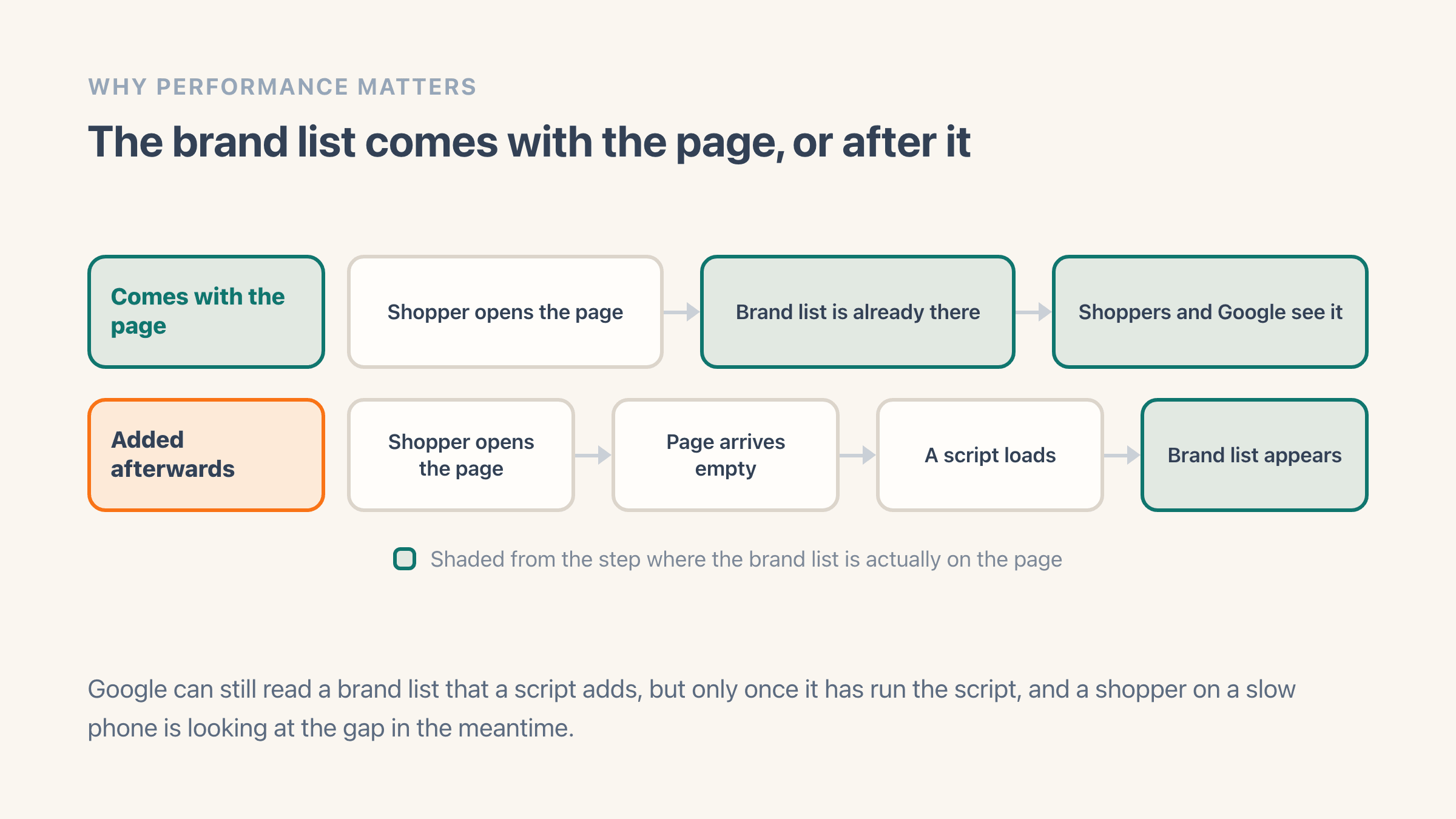
Because the brand list is not there when the page arrives. Some apps build the list into the page your theme sends out, so it is on screen the moment the page loads. Others send an empty page first, then run a small program in the shopper's browser that fetches the brands and draws them in. On a fast laptop you would never notice. On a four-year-old phone over patchy mobile data, that second trip is the difference between a brand page and a blank space with a spinner.
It shows up in search too. Google reads what came with the page first and comes back for anything added later, if it comes back. A brand directory exists partly so that someone searching your store name plus a brand name lands on your site instead of the brand's own, and that only works if the brand names are readable.
You can check any app before you commit. Install it on a test theme, open the brand page on your phone off wi-fi, and watch what happens in the first second. If the brands appear straight away, the list came with the page. If you get an empty box that fills in a beat later, it did not.
What should you check in your store before you install one?
Your vendor field, on every product. A brand directory is only ever as tidy as the brand names already sitting on your products, so ten minutes in your admin now saves you an evening of confusion after you install something.
Open Products in your Shopify admin and sort by vendor. Three problems turn up in almost every store:
- Spelling variants split one brand into several - "Nike", "nike" and "Nike Inc." become three entries in an A-Z list.
- Products with an empty vendor box appear under no brand at all. That is how a merchant ends up asking why 40 products vanished from the directory.
- Some stores put the supplier they buy from in that box rather than the brand a shopper would search for, which produces a beautiful page of names nobody recognises.
Do you have the brand logos ready?
A brand directory with names and no logos looks like a list, and shoppers scan logos far faster than text.
Gathering 40 or 60 logos at a consistent size and on the same background is the part of this job that actually takes an evening. Start collecting them before you start comparing apps.
Free plan or free trial: which should you test on?
A free plan, if the page matters to you, because a brand directory is not a feature you can judge in an afternoon. You need a week or two of real shoppers to see whether anyone clicks it. Two of the nine directories here have free plans; the rest give you between 7 and 30 days.
A trial gives you 10 or 14 days, and the clock runs whether or not you get round to the work. Setting a brand page up properly means building it, uploading logos, adding it to your menu and giving it a week to gather some traffic. If you cannot block out those two hours inside the trial window, you will end up either paying for a month you did not test, or uninstalling something that never got a fair look.
One thing to check on any free plan is what happens when you outgrow it. Ask what the page does on the day you add the brand that takes you past the limit. Being asked to upgrade is fine and expected. Having the directory quietly stop showing brands your shoppers were already browsing is not, so find out which one it is before you build your main menu around the page.
What does it cost to switch brand page apps later?
Less than you would think on the data, more than you would think on the page itself. The brand names live on your products, in the vendor box, so a new app rebuilds the same list in minutes. Nothing you typed into Shopify is lost.
What does not come with you is everything you added inside the old app. Logos you uploaded, brand descriptions you wrote, the order you put the featured brands in, any brand you chose to hide. All of that sits in the app you are leaving, so keep your logo files in a folder on your own computer rather than treating the app as where they live.
The other cost is the address. Apps put the directory at their own page address, so switching usually means the page moves and anything pointing at the old one breaks: your menu, links from blog posts, and whatever Google has indexed. You can point the old address at the new one under Online Store, then Navigation, then URL Redirects in your admin. It takes two minutes and is the step people forget until traffic drops.