Definition
Who actually reads image alt text?
A screen reader user is the primary audience, and every other rule about alt text follows from that. When someone browsing with VoiceOver or NVDA reaches a product photo, the software announces that there is an image and then reads out whatever description was saved with it. Leave that description off and some screen readers fall back to reading the file name out loud, so IMG_4821.jpg gets spelled out letter by letter while the shopper waits to find out whether the jumper is navy or black.
Describing images is also a formal accessibility requirement. WCAG 2.2 is the accessibility standard that public-sector buying rules, procurement questionnaires and most of the lawsuits point at, and it asks that anything on a page which is not made of words carries words doing the same job. That requirement sits at Level A, the lowest of its three levels. So a photo with nothing written about it fails the easiest check anyone runs, not a strict one.
It is the most common accessibility failure on the web by a wide margin. The WebAIM Million report published in February 2026 tested a million home pages and found missing alternative text on 53.1% of them, affecting 16.2% of all images on those pages. That figure had come down from 18.5% the year before, which is progress of a sort after fifteen years of people writing articles like this one.
Two other audiences read the same field. Search engines use it as one signal for what a picture contains and which searches it belongs in. And browsers print it as text when an image fails to load, which still happens on a slow mobile connection.
Where do you add alt text in Shopify?
The description is saved to the image itself rather than to a page, so you write it once and every place that photo appears picks up the change. There are five ways into the box, depending on what kind of image it is.
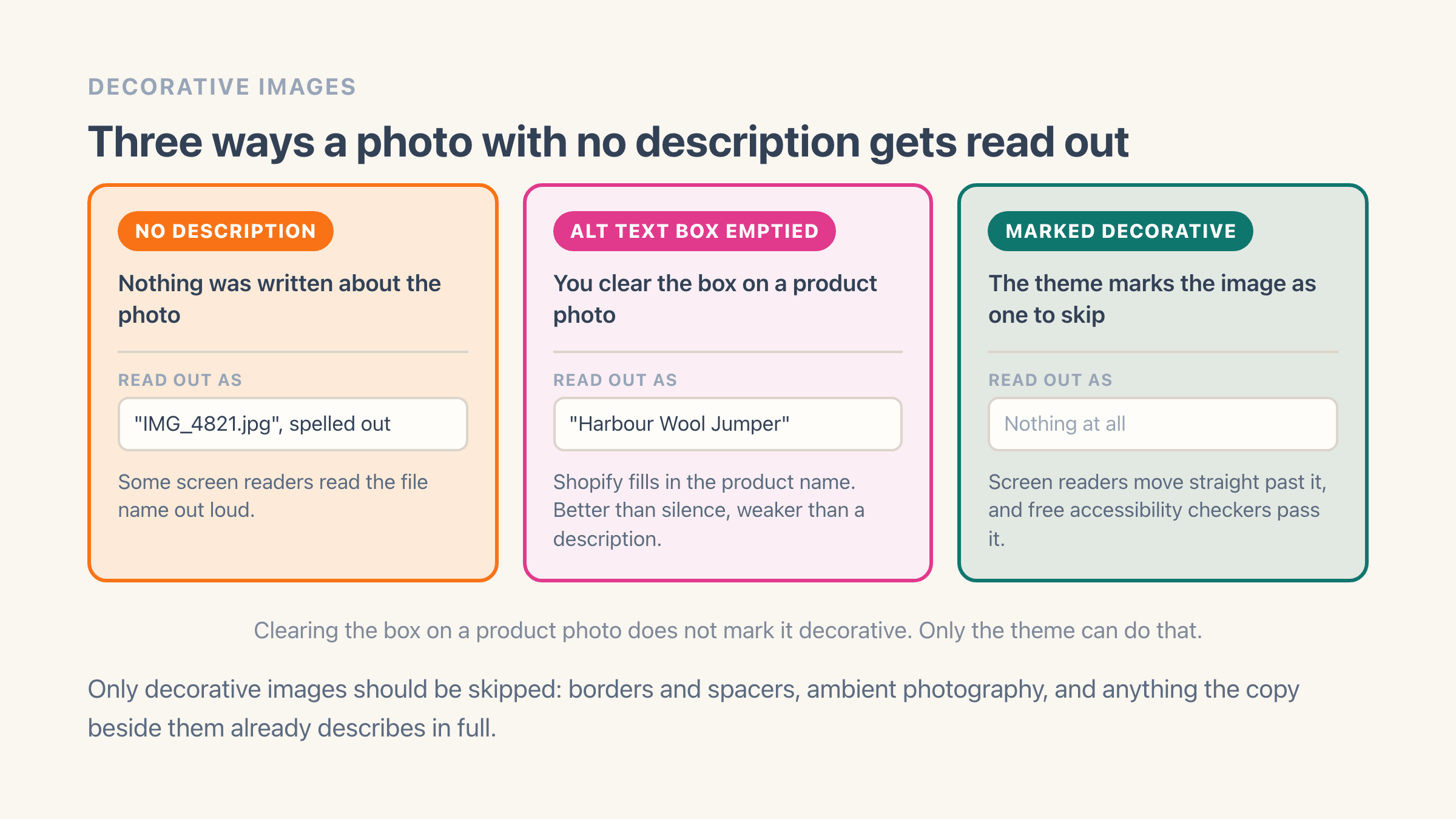
One thing catches people out here, and it is the reason a store can look described when it is not. Leaving the box empty does not leave the photo silent: on most modern themes Shopify falls back to the name of whatever the picture belongs to, so a product photo with a blank box gets read out as "Harbour Wool Jumper" and nothing else. The same fallback covers collection images, blog post images and variant photos. It beats silence and it tells a shopper nothing about what is in the picture.
- Product photos: go to Products, open the product, click the photo to open its preview, then click Add alt text, type the description and save. Shopify caps the box at 512 characters and recommends 125 or fewer. On a photo whose box is still empty, its media editor "might suggest alt text", one image at a time.
- Theme images such as logos, banners and section backgrounds: Content > Files, click the file, and fill the Alt text box. Shopify notes those edits apply to every place the file is used in the store.
- Collection images: a different screen from any product photo, and the one stores forget. Go to Products > Collections, open the collection, and click the picture in its Image card to reach the same Alt text box. Skip it and every collection banner in your navigation goes undescribed.
- The products CSV: an Image Alt Text column, exported and imported next to the columns holding each image address and its position, with the same 512-character ceiling. Fill it in a spreadsheet and import the file back.
- A bulk editing app: writes into the same boxes you would, across hundreds of photos at a time. Past a few dozen products this is the only route anyone finishes.
What separates good alt text from keyword stuffing?
Good alt text is what you would say to someone on the phone who asked what the photo shows. Name the product and then the thing this particular shot is carrying that the page copy is not: the colour, the angle, the material, whether it is worn or laid flat.
Google is unusually direct about where this goes wrong. Its guidance on image search offers "Dalmatian puppy playing fetch" as the model description, then warns that stuffing the description with keywords "results in a negative user experience and may cause your site to be seen as spam". The bad example it prints is a run of near-synonyms, which is exactly what an SEO plugin produces when you point it at a catalogue.
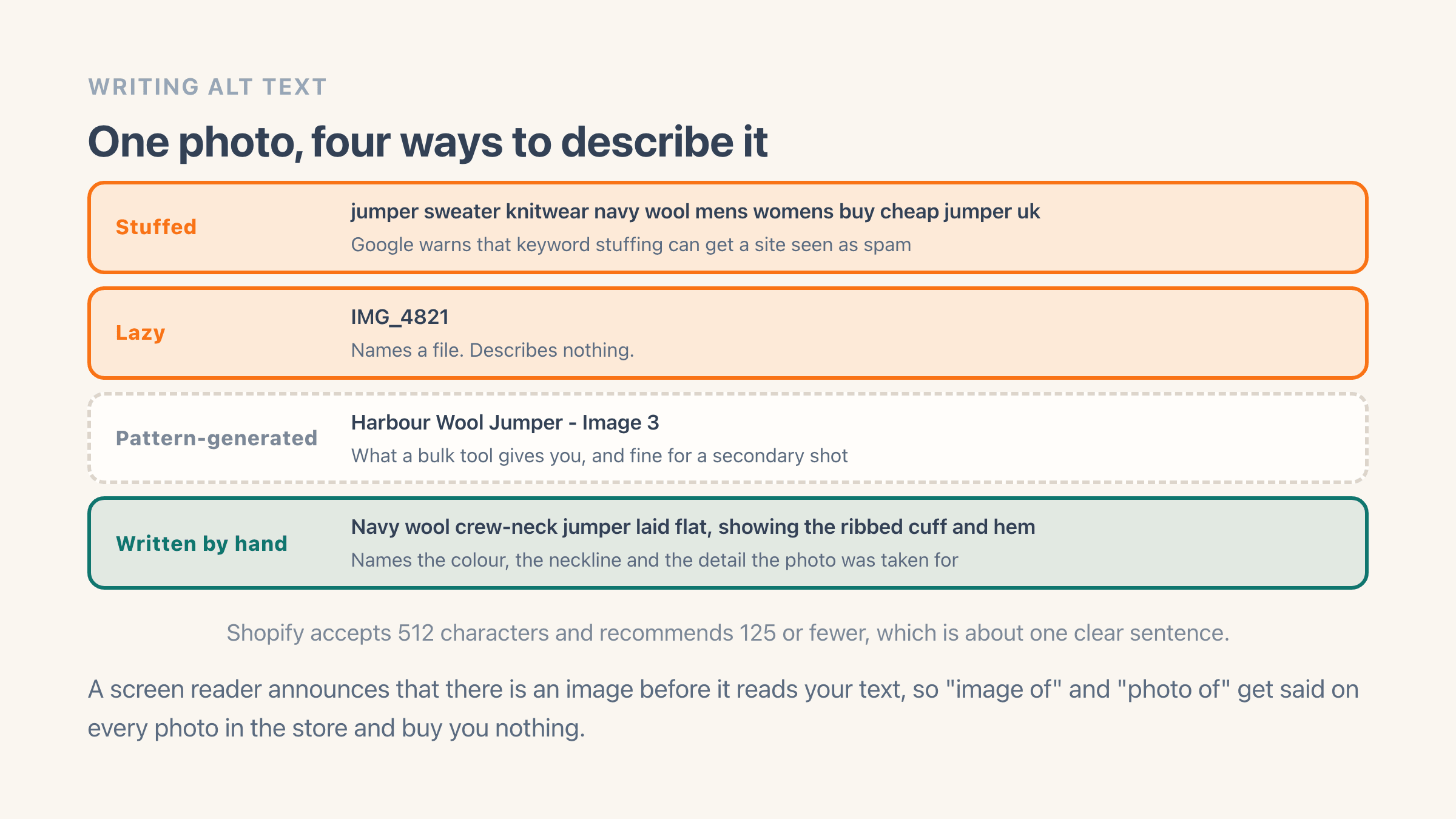
Drop "image of" and "photo of" from the front. A screen reader has already said the word image before it reads your text, so those two words get announced on every photo in the store and buy you nothing. Drop the brand name from every shot too, unless the brand is actually visible in the picture. Google already reads the brand off the product vendor field, so repeating it on every photo adds nothing and eats the sentence you had.
Length is the other place stores go wrong, in the opposite direction. Shopify allows 512 characters and recommends 125 or fewer, which is about one clear sentence. If an image genuinely needs a paragraph, and size charts, spec tables and nutrition panels usually do, that text belongs on the page itself as words every shopper can read. Keep the alt text short and let it point at the real thing.
When should an image have empty alt text?
Some images should carry a deliberately blank description, which is the standing instruction to a screen reader to skip past without announcing anything at all. For anything purely decorative that is the correct answer. The alternative is a shopper hearing "pink swirl divider graphic" between every section of your homepage.
A pale linen texture behind a section heading is the everyday version of that. Leave it blank for the theme to skip, because announcing it would interrupt the shopper for no reason.
The W3C guidance on decorative images puts four kinds of image in that bucket: pure visual styling like borders and spacers, an image inside a link that already has visible text next to it, ambient eye-candy that adds nothing to the words beside it, and an image the surrounding copy already describes in full. Shopify tells the people who build themes the same thing - decorative images get the blank description rather than a written one.
What happens when you clear the Alt text box on Shopify?
On Shopify this turns out to be a theme decision more than a merchant one, which almost nobody mentions. Clearing the Alt text box on a product or collection image does not mark that photo as decorative. It hands the screen reader the product name instead, because of the fallback described above. The genuinely skipped version comes from the theme, so if a bought theme is reading out its own dividers and background textures, that is a message to whoever built it. There is nothing you can fix from Products.
Forgetting to describe a photo and deliberately marking one as decorative look identical from the admin, and they behave differently on the storefront. With no description at all, some screen readers read the file name out loud. Marked as decorative, they move straight past the image, and the free accessibility checkers people run over a store pass it rather than flagging an error.
Does alt text actually help SEO?
Yes, and considerably less than most articles selling you an image app suggest. Alt text is a real signal for the image itself in Google Images, where it helps Google decide what the photo shows and which queries it belongs in. It is a weak lever on where the product page ranks in ordinary web results, and no amount of alt text rescues a page with thin copy and nothing linking to it.
The realistic payoff from a weekend spent on alt text is more of your photos appearing in image search, plus a store a screen reader user can actually shop. Both are worth having. Neither shows up as a jump in your keyword rankings the following week, and any tool that promises that is selling something.
If image search is the goal, alt text is the cheapest of the four or five things that move it. Descriptive file names help, which is why the description and the file name usually sit in the same panel. How heavy your image files are, and what format they are saved in, feed into how fast the page loads, which Google does count. And several copies of one photo spread across a catalogue compete with each other in the results rather than stacking, which is the quieter cost covered in duplicate product images.
How do you write alt text for a whole catalogue?
You do not hand-write 900 descriptions, and trying is how the job stalls at product 40. Split the catalogue into images that carry information a buyer needs and images that are variations on a theme, then spend the writing time on the first group.
The images worth writing by hand are the first photo of every product, anything showing a detail the description skips over (a lining, a texture, something held for scale), and anything that is really text in a picture: a size chart, a spec table, a banner with an offer printed on it. For everything else a pattern does the job. "Harbour Wool Jumper - Image 3" is a poor description of a photograph and a much better one than an empty field, because it tells a screen reader user which product they landed on and gives Google a subject.
Three routes cover a catalogue at once, and the step-by-step version of all three has the exact clicks:
- Export the products CSV, fill the Image Alt Text column in a spreadsheet and import it back.
- Pay a developer to run the edits for you, which is money well spent once and awkward every time the catalogue changes.
- Use a bulk editor: Easy Image Organizer generates that title-plus-position pattern across products, collection images and the whole Content > Files library in one pass, and renames the file to match, leaving you the hero shots to rewrite properly. Alt text and file name edits do not count against its free monthly edit limit - only reordering, replacing and deleting images do.
Example
One photo, four ways. A navy wool jumper shot flat on a pale background, third image on the product page. Stuffed: "jumper sweater knitwear navy wool mens womens buy cheap jumper uk"; lazy: "IMG_4821". Pattern-generated: "Harbour Wool Jumper - Image 3", which is what a bulk tool gives you and is fine for a secondary shot. Written by hand: "Navy wool crew-neck jumper laid flat, showing the ribbed cuff and hem" - it names the colour, the neckline and the detail the photo was taken for.
Where it lives in your Shopify admin
Products > open a product > click the photo > Add alt text, one description per image. Theme images such as logos and banners live at Content > Files > click the file > Alt text, and collection images at Products > Collections > open the collection > the Image card.
Commonly confused with
- File name
- The file name is what the picture is stored as. Alt text is the description read out loud, and Shopify keeps the two in the same panel while using them for different jobs.
- Empty alt text
- A deliberately blank description tells a screen reader to skip a decorative image. A missing one leaves some screen readers reading the file name out instead, and on a Shopify product photo it hands over the product name.
- Title text, the tooltip on hover
- The little box some browsers pop up when you hover comes from a separate title attribute that screen readers usually skip. Alt text is the one they read.