Short answer
How do you set up an event and start selling?
Create the event in the app
Set the date, venue and ticket types (for example General Admission and VIP). Each ticket type becomes a variant on the Shopify product behind the event, with its own price and its own number of places.
If it does not work
You put one number of places on the event and expect it to cap the whole room. That only happens with shared inventory switched on. Otherwise the number of places belongs to the ticket type, so a tier you left blank sells past the room while the one you capped closes early.
How to undo it
Ticket types, dates and capacity stay editable after the event exists. Raise or lower a tier's number of places rather than deleting a tier people have already bought into.
Customers buy through your store
The event sells through your normal storefront and checkout. You keep your payments, taxes, discounts and customer data in Shopify, with no separate ticketing account.
If it does not work
The event exists in the app but nobody can buy it, because the product behind it was never published to your Online Store sales channel. The symptom is a link that returns a missing page for shoppers while it opens perfectly for you in the admin.
How to undo it
To stop selling before the event, unpublish that product from the Online Store sales channel in Shopify. Tickets already bought are unaffected, and republishing puts it back on sale.
Tickets are emailed automatically
On purchase, each attendee gets a branded confirmation email with a QR-coded ticket. It links to their online ticket, where the PDF downloads, and one switch attaches the PDF as well. You can edit the email and the PDF to match your brand.
If it does not work
The buyer says nothing arrived. Nearly always the confirmation is in a spam folder or went to a mistyped address, and you find out the week of the event. Resend it from the admin to the address on the order, or correct the address and resend.
Scan people in at the door
At the event, staff scan the QR code with the web check-in page, which uses the phone camera, or the Shopify POS check-in tile. Out of the box each ticket admits one person once, on an entrance limit you can raise per ticket type.
If it does not work
The camera reads the code and nothing happens, because each scan is recorded as it happens and the venue signal has dropped. The other one you will meet is a code that flags instead of admitting, which means that ticket has used up its entrance limit.
How to undo it
Check the wrong person in and the check-in screen has an undo, so the ticket goes back to unscanned and can be used at the door properly.
What you get
- Ticket types and tiers as product variants, each with its own price and capacity
- QR-coded tickets with branded confirmation emails and PDF tickets
- Check-in from the web or the Shopify POS app, no extra hardware
- Recurring, multi-day and time-slotted events
- Reserved seating from a seat map, and free registration for free events
- Attendee management with search, filters and CSV export
- Promo codes, waitlists and ticket transfers you send from the guest list
Can you sell tickets on Shopify without an app?
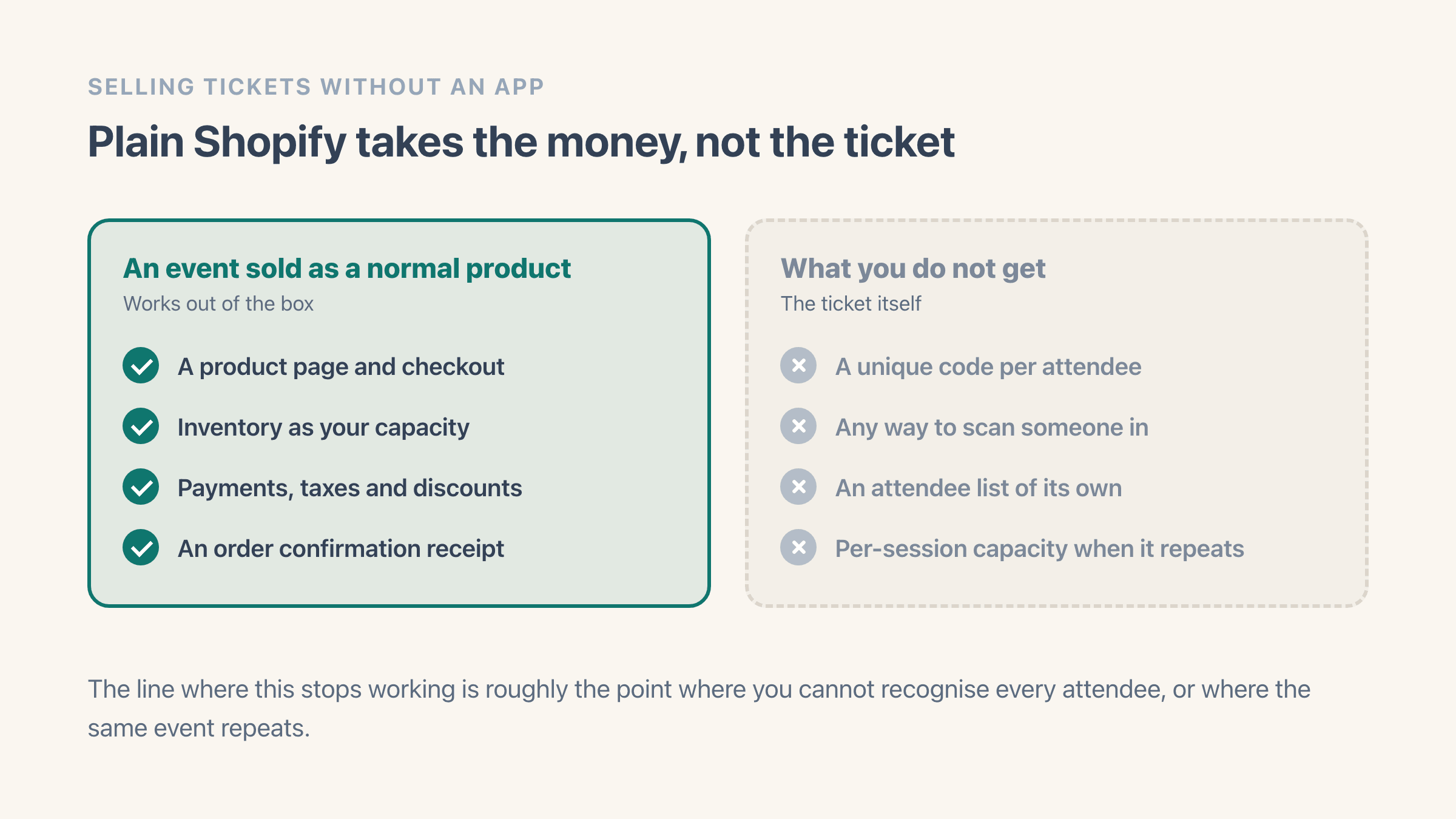
For taking the money, yes. Make the event a product, set the inventory to your capacity, and Shopify sells it like anything else. Nothing stops you, and for a 20-person workshop where you greet everyone by name it is genuinely enough.
What plain Shopify does not give you is the ticket. There is no unique code per attendee, no way to scan someone in, no attendee list separate from your order list, and no capacity per session if the same event runs on six dates. The order confirmation is a receipt, so at the door you are reading names off a phone and hoping nobody forwarded their email to a friend.
The line where that stops working is roughly the point where you cannot recognise every attendee, or where the same event repeats. Below it, skip the app. Above it, the door is the problem you are actually solving.
What it costs next to Eventbrite
Eventbrite charges per ticket. Re-checked on Eventbrite's ticketing fees help page on 13 August 2026, the United States rate is 3.7% + $1.79 per sold ticket, plus 2.9% of the total order in payment processing. Eventbrite publishes a different service fee for each country it sells in, so read yours rather than the US one.
Free events carry no fee at all, in Eventbrite's words: "If your tickets are free, you and your ticket-buyers don't pay any Ticketing Fees."
Put 200 tickets at $30 through that. The service fee works out at $1.11 + $1.79, so $2.90 a ticket, or about $580 on one event before payment processing - and whether that lands on your buyers or on you is a setting, not a given.
Sell the same 200 tickets through your own Shopify checkout and there is no per-ticket fee on either side. They fit on the Easy Tickets Essentials plan, a flat 29 USD for the month, and the app is free up to 20 tickets.
The setting sits on Eventbrite's organiser pricing page: "Event ticket fees are paid by your buyers by default, or you can choose to absorb them when you set up your ticket types", so on the default the $580 raises the prices your buyers pay rather than lowering your payout. Either way the sale has to carry it, and on your own checkout there is nothing equivalent to carry.
Be fair about where this reverses. If your events are free, Eventbrite costs nothing either. Eventbrite also brings its own marketplace audience, which matters if discovery is your problem rather than fulfilment. The flat-fee argument gets stronger as ticket price and volume rise, and it is weak for a small free meetup. We put the two side by side properly in Easy Tickets as an Eventbrite alternative, including the parts where Eventbrite wins.
Is a Shopify event ticket a digital product or a physical one?
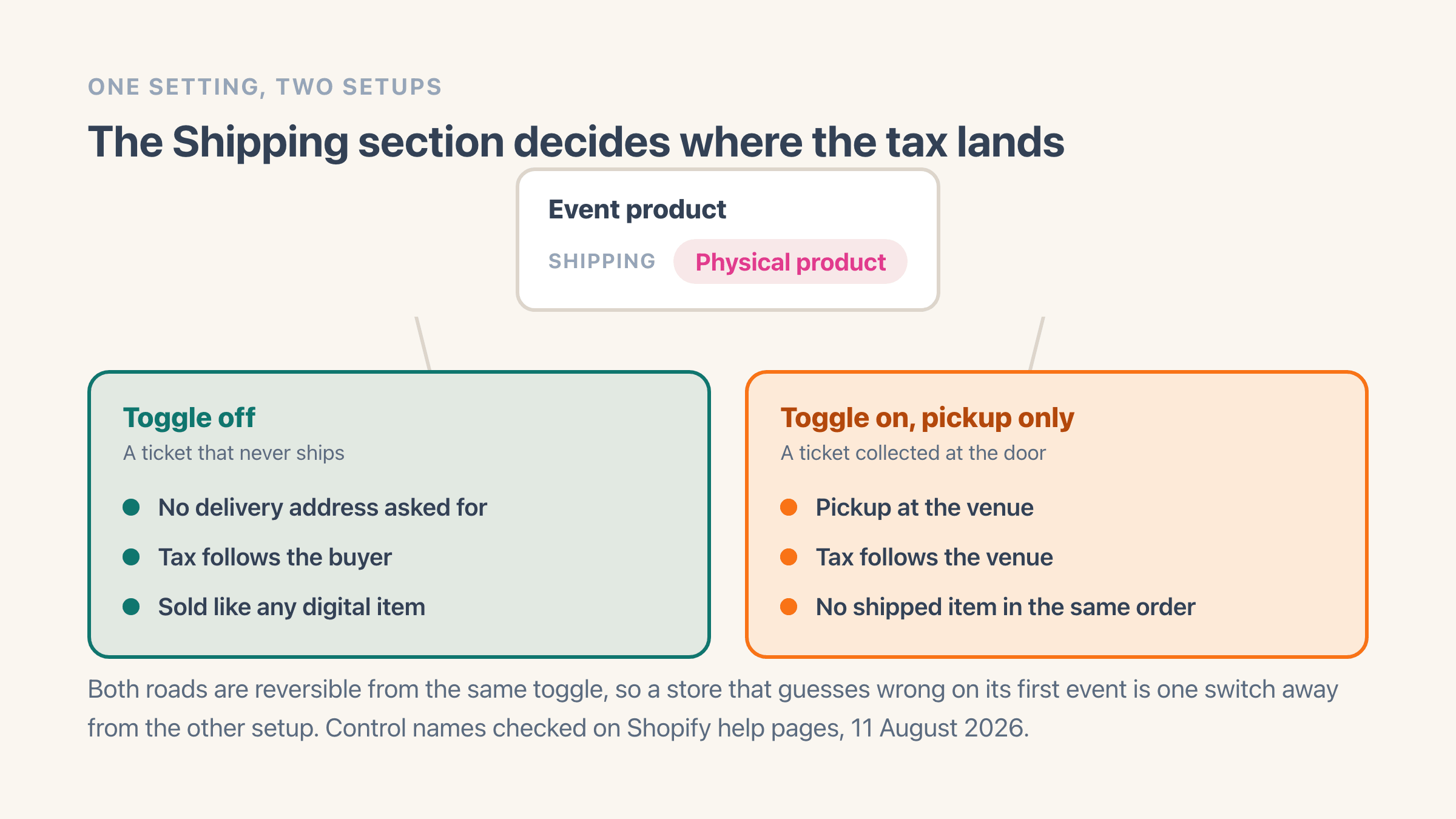
It is whichever you set it to, and the whole choice is one setting. Open the event's product in Shopify, go to the Shipping section, and the setting there is called Physical product.
Leave it off and checkout never asks the buyer for a delivery address, which is what most people want for a ticket that arrives by email. Turn it on and Shopify treats the ticket as something that has to reach the buyer, so it asks for an address and works out a rate.
The ticket itself still arrives by email either way. What the setting decides is what checkout asks for and, as the next section covers, where the tax lands.
The setting that decides whether the event sells out is a different one, in the Inventory section. Turn Track quantity on for the ticket and leave Continue selling when out of stock off, so the room closes when the last place goes.
One caveat if you also sell at the door. Shopify's help page on inventory tracking says the Continue selling when out of stock option "doesn't apply to Shopify POS", and the same page describes staff being able to keep selling in POS once availability reaches zero. The app's Sell tickets tile refuses a sold-out date, so the gap is a ticket rung up straight from the POS product grid.
Do you charge sales tax on event tickets?
Shopify does not decide that for you, and where the event happens can change the answer. Its help page on digital product taxes says that if you sell event tickets or provide services at a specific location, then "you might need to charge taxes based on the event or service location instead of the customer's billing address".
Read the word "might". The page does not say a ticket is taxed at the venue, and it does not say a ticket is a physical product. It says that when the venue's rate is the one that applies, Shopify documents a way to make the store use it.
That route is for a store that has already worked out the venue's rate is the one it owes, and it runs the opposite direction to the obvious one. Rather than turning the ticket into a digital product, you add the venue as a location, put it in your shipping settings with no rates against it, and keep the ticket a physical product whose stock sits at that location and can only be collected there. Tax then follows the venue, because the venue is where the buyer picks the ticket up.
One step in that list is easy to skim past. Shopify has you confirm that the region the venue sits in is already set up to collect tax in your store, and it puts that check before any of the product settings.
Know the cost of the route before you switch it on. The same page states that "Customers can't check out with an in-store pickup product and a product that requires shipping in the same order", so a shopper who wants a ticket and a T-shirt places two orders instead of one. That only starts once you restrict the ticket to collection at the venue, it only affects orders mixing the ticket with something you post, and turning the restriction back off ends it.
None of this is tax advice, and ticket rates differ by country and sometimes by city. What we can point you at is where the controls sit and which route Shopify's own pages describe. The tax checkbox itself lives beside the price and is called Charge tax on this product.
Do EU customers get 14 days to change their mind about a ticket?
Not for the ticket itself. Shopify's page on the EU right of withdrawal puts transport, accommodation and event bookings on the exemption list and names concert tickets, so the 14-day cooling-off period does not reach a dated event the way it reaches a jumper. Your own refund and transfer rules take over instead, which is an argument for making them plain on the event page.
The same page carries a separate change dated 19 June 2026, and it is about your store rather than about tickets. From that date it says an EU directive requires online stores to give customers a clearly visible withdrawal button or link they can use from the store itself, with a confirmation step and a confirmation email. The exemption above is untouched by it, so where it lands is the ordinary goods you sell next to the tickets.
Does Shopify create the QR code?
Shopify makes QR codes. It does not make tickets. Its own feature is called Shopcodes, and the help page puts it plainly: "With Shopify's Shopcodes app, you can generate QR codes that your customers can scan to browse or buy products."
A Shopcode points at a product page, or at a checkout with that product already in the cart. Everybody who scans it gets the same thing, which is exactly right for a poster or a shop window.
A ticket code has the opposite job. It stands for one named person, it is meant to work once, and scanning it has to change something on a list. That is the gap an app fills, and what a QR code ticket actually is covers the difference in one page.
How check-in actually works at the door
Every ticket carries a QR code of its own. Staff scan it with a phone camera on the web check-in page, or from the check-in tile in Shopify POS if you already run POS. There is no scanner hardware to buy and no separate app for door staff to install.
The part that matters on the night is the venue connection. Each scan is recorded the moment it happens, so the door needs a working signal. Check the reception standing at the entrance before doors open, and if it is weak, put a phone on a mobile hotspot as the backup.
Each code admits one person once until you say otherwise. Every ticket type carries an entrance limit, set to 1 out of the box, so a second scan flags rather than silently admitting, which is what stops one screenshot getting four people in. Raise it per ticket type when re-entry is part of the night, and running the door with Shopify POS covers what changes when you do.
How do you sell VIP and general admission at different prices?
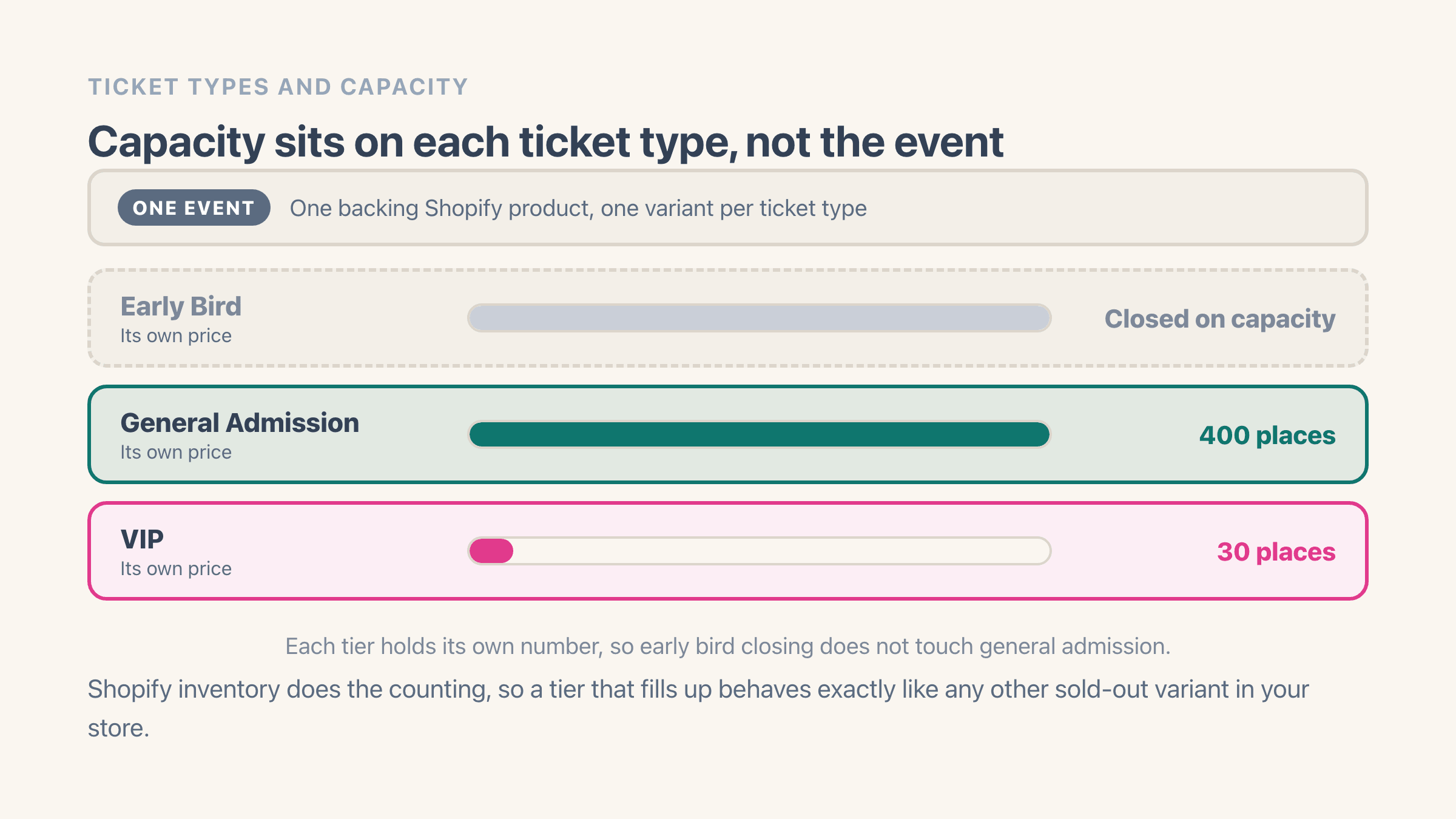
Add each one as its own ticket type on the event. General Admission, VIP and Early Bird become separate variants on the product behind the event, so each carries its own price and its own number of places. The app counts the live tickets on each type and keeps the variant in step, so a tier that fills up goes sold out the way any other product in your store does.
Because the number of places sits on the ticket type rather than on the event, you can cap VIP at 30 while general admission runs to 400, and close early bird by setting its number of places rather than remembering to switch something off on the night it should end.
Can someone give their ticket to a friend or change the name on it?
Yes to both, and the name change is in the ticket holder's own hands. They can correct their name and email from their ticket page.
A real change of hands is a transfer link you get from the guest list and send on. The new person gets a fresh QR code, and the old one stops working.
From the admin you can also edit the details, refund, resend a lost ticket, or move someone to another date of a repeating event without cancelling the order.
Attendee management has search, filters and CSV export, so the list you hand a venue or a caterer comes out of the app rather than out of a spreadsheet you maintained by hand.
How do you sell tickets for a weekly class or a three-day festival?
You set the pattern once and every date sells on its own. A weekly class, a three-day festival and a tasting room with hourly slots are three different counting problems, and recurring, multi-day and time-slotted events each generate their own sessions, with each session holding its own number of places. Thursday selling out does not close Friday.
For classes and workshops specifically, see running recurring classes on Shopify.
Can you sell tickets for an online or hybrid event?
Yes, and a webinar runs the same way a room does, with the access link standing in for the door. Set the event to Online and the Zoom connection creates a meeting for it, then puts the join link and passcode in the confirmation email. See how to sell webinar tickets on Shopify for the full setup.
Hybrid runs as two events: one in the room that you scan at the door, and one online that gets the join link. The link belongs to the whole event, so every ticket on an online event receives it.
What you can sell tickets for
One-off and repeating both work. Common setups are concerts and club nights, workshops and classes, tours and experiences, conferences, fundraisers, and restaurant events like set-menu dinners or pop-ups.