Short answer
How they compare
| Feature | This appEasy Tickets on ShopifyFlat plan, no ticket fee | EventbritePer-ticket fees |
|---|---|---|
| Service fee per sold ticketUS rate; Eventbrite publishes a different one per country | None | 3.7% + $1.79 |
| Who pays that fee by defaultEventbrite calls the two settings Absorb fees and Pass fees on | No such fee | Your ticket buyers |
| What the ticketing itself costsFree for 20 tickets a month; paid plans are flat, from 29 USD for 500 to 149 USD for 2,500 | A flat plan, $0 to $149/mo | Per ticket sold |
| Pricing model | Flat monthly plan by ticket volume | Per-ticket fees |
| Where checkout happens | Your Shopify checkout | Eventbrite-hosted |
| Who the buyer belongs to | Your Shopify customer | Eventbrite account holder |
| When you get paidEventbrite starts a single payout three days after the event ends, on its default schedule | Your normal Shopify payout | 3 days after the event |
| QR check-in app | Yes | Yes |
| Recurring events | Yes | Yes |
| Reserved-seating charts | Yes | Yes |
| Public event-discovery marketplace | No | Yes |
| Built-in marketing email toolEventbrite Pro is a paid plan on top of the per-ticket fees | No | Eventbrite Pro, from $15/mo |
What does Eventbrite charge to sell a ticket?
A service fee on every paid ticket, and payment processing on top. Checked on Eventbrite's own help page on 13 August 2026, the United States rate is 3.7% + $1.79 per sold ticket, plus 2.9% of the total order in payment processing.
Free events carry nothing at all. The same page says it plainly: "If your tickets are free, you and your ticket-buyers don't pay any Ticketing Fees." If everything you run is free to attend, the fee argument on this page does not apply to you.
Put the paid case on a real event. Three hundred tickets at $30 carry $870 of service fee - 3.7% of $30 is $1.11, plus the flat $1.79, so $2.90 a ticket. The next section covers who that $870 actually comes out of, because Eventbrite's default answer is not the one most people assume.
The same 300 tickets sold through your own Shopify checkout carry no service fee on either side of the sale. You pay the card processing you already pay on every order, plus one flat Easy Tickets plan.
Those 300 tickets fit on Essentials at 29 USD for the month, against $870 of Eventbrite service fee. Plans step up with volume, free for 20 tickets up to 149 USD for 2,500, and never take a cut of the ticket price.
One more scoping note before you plan around a number. Eventbrite publishes a different service fee per country, so a US figure read from a UK venue is the wrong number.
What does Eventbrite charge in your country?
Only three of the six below carry a payment processing line, because Eventbrite's page shows no processing fee at all for Australia, Ireland and the United Kingdom. From the same help page, checked 13 August 2026:
- Australia, 5.35% + A$1.19 per sold ticket
- Canada, 3.5% + C$1.29 per sold ticket, plus 2.9% of the total order
- Ireland, 5.9% + €0.79 per sold ticket
- New Zealand, 4.2% + NZ$0.55 per sold ticket, plus 2.4% of the total order
- United Kingdom, 6.95% + £0.59 per sold ticket
- United States, 3.7% + $1.79 per sold ticket, plus 2.9% of the total order
Who actually pays Eventbrite's fee, you or the buyer?
Your buyers, unless you change it. Eventbrite's organiser pricing page states it outright, checked 13 August 2026: "Event ticket fees are paid by your buyers by default, or you can choose to absorb them when you set up your ticket types." Its help page names the two settings Absorb fees and Pass fees on.
That changes what the fee does to you rather than whether it exists. Passed on, it makes your ticket cost more than the price you advertised. Absorbed, it makes your payout smaller.
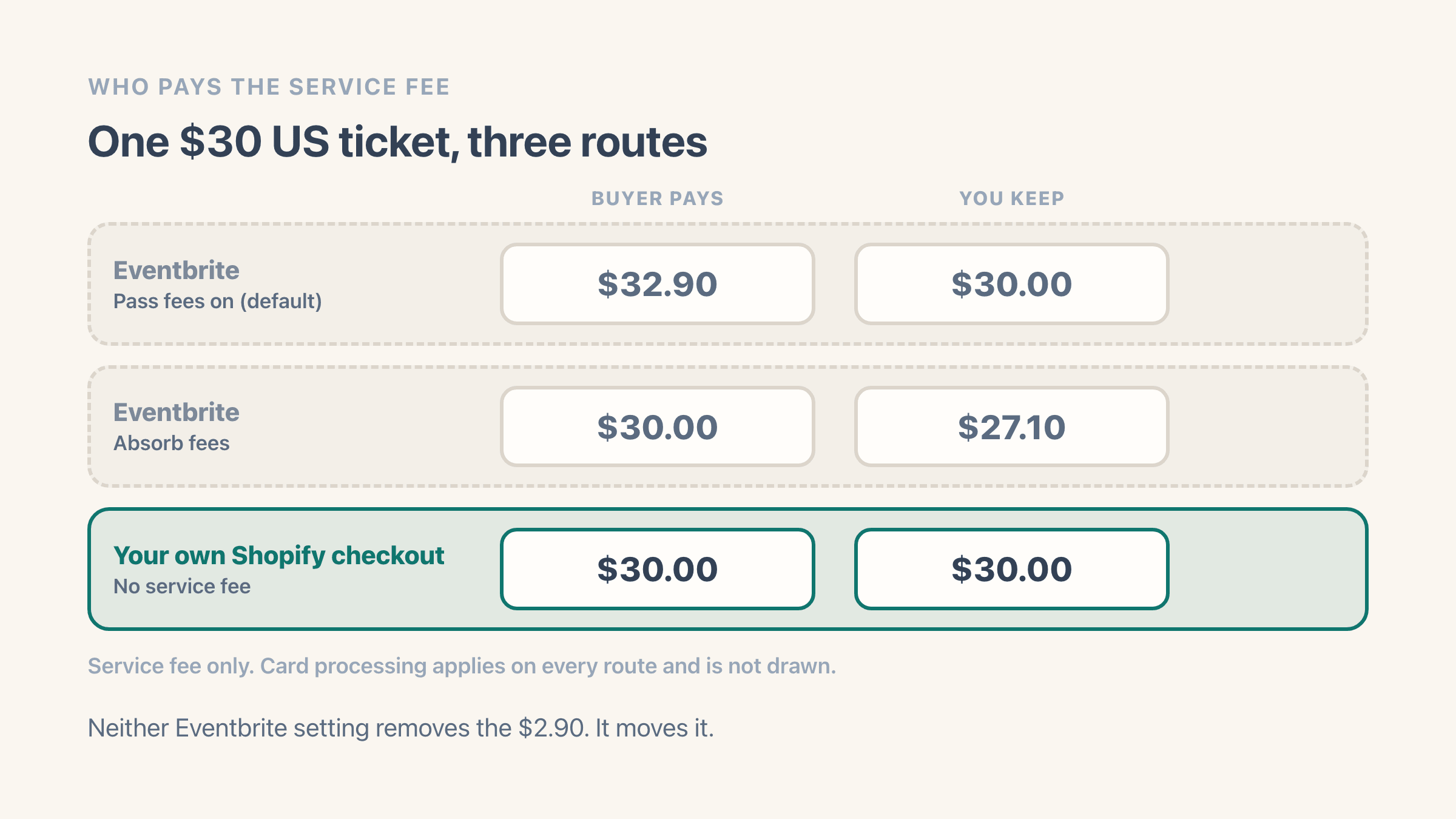
On a $30 ticket in the United States the service fee is $2.90. Pass it on and the buyer pays $32.90 for a $30 ticket. Absorb it and you keep $27.10.
Neither setting makes the fee disappear, so the fair way to read Eventbrite's cost is that it falls on your buyer or on you. Selling the same ticket through your own Shopify checkout has no equivalent charge on either side, so nothing is added to the price and nothing comes off the payout.
Payment processing is a separate line and it exists on both routes. Eventbrite charges 2.9% of the total order for it in the United States, and a Shopify order is charged your own card rate.
What does the Shopify side of this cost?
Your Shopify plan and your card processing, both of which you already pay whether or not you ever sell a ticket. On top sits one flat Easy Tickets & Events plan, with every feature on every plan.
Free covers 20 tickets a month. Essentials at 29 USD covers 500, Professional at 89 USD covers 1,500 and Business at 149 USD covers 2,500. Pay yearly and you pay for ten months.
For the numbers themselves, Shopify's pricing page served euros when we checked it on 13 August 2026, so these are the figures it showed rather than a conversion. Basic is €19 a month on annual billing or €27 month to month, Grow €56 or €74, and Advanced €289 or €384.
The rates it lists as standard online card rates are 1.9% + €0.25 on Basic, 1.8% + €0.25 on Grow and 1.7% + €0.25 on Advanced. American Express and international cards are priced separately beside them, so read the line that matches the cards you actually take. The page also warns that "Third-party transaction fees may apply when you use a third-party payment provider (instead of Shopify Payments). The rate depends on your plan", listing 2% on Basic down to 0.2% on Plus.
None of those Shopify figures is a ticketing cost, which is why the claim on this page is narrower than "Shopify is cheaper". It is the cost of the store you already run, and a ticket order draws on it exactly like an order for a jumper. The thing that exists on one route and not the other is the per-ticket service fee.
Who owns the sale and the customer
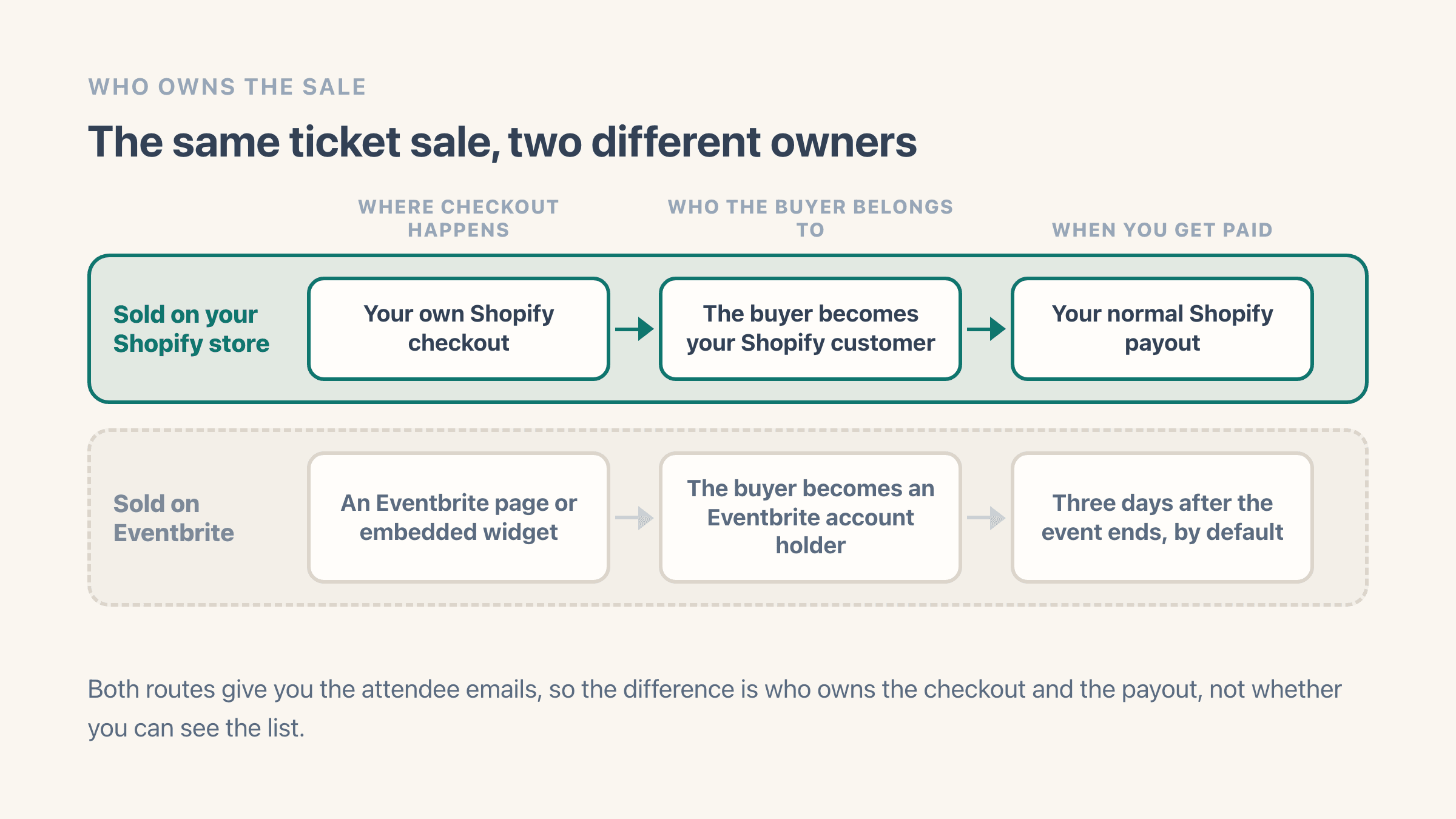
This is the part that is easy to miss. On Eventbrite the buyer completes the purchase on an Eventbrite page or embedded widget, Eventbrite processes the payment and controls the payout, and the buyer becomes an Eventbrite account holder.
The payout timing follows from that. Eventbrite's payout schedule page says "We'll start processing a single payout three days after your event's end date", on the schedule it calls After your event. That is the default rather than the only option, and the alternatives are covered further down.
On Shopify the ticket is a normal Shopify order. The buyer checks out on your store, becomes your Shopify customer, and the money follows your normal Shopify payout schedule, which runs as orders settle rather than waiting for the event.
You still get every attendee's details in the app, with per-event lists and CSV export. Eventbrite gives you attendee emails too, so the real difference is who owns the checkout and the payout, not whether you can see the list.
That is what decides who this route suits. Selling on Shopify fits best when you already have an audience, a storefront, or an email list, and you would rather keep the sale, the customer and the checkout on your own store. If that is you, see how selling tickets on Shopify works.
Whose brand is the buyer actually looking at?
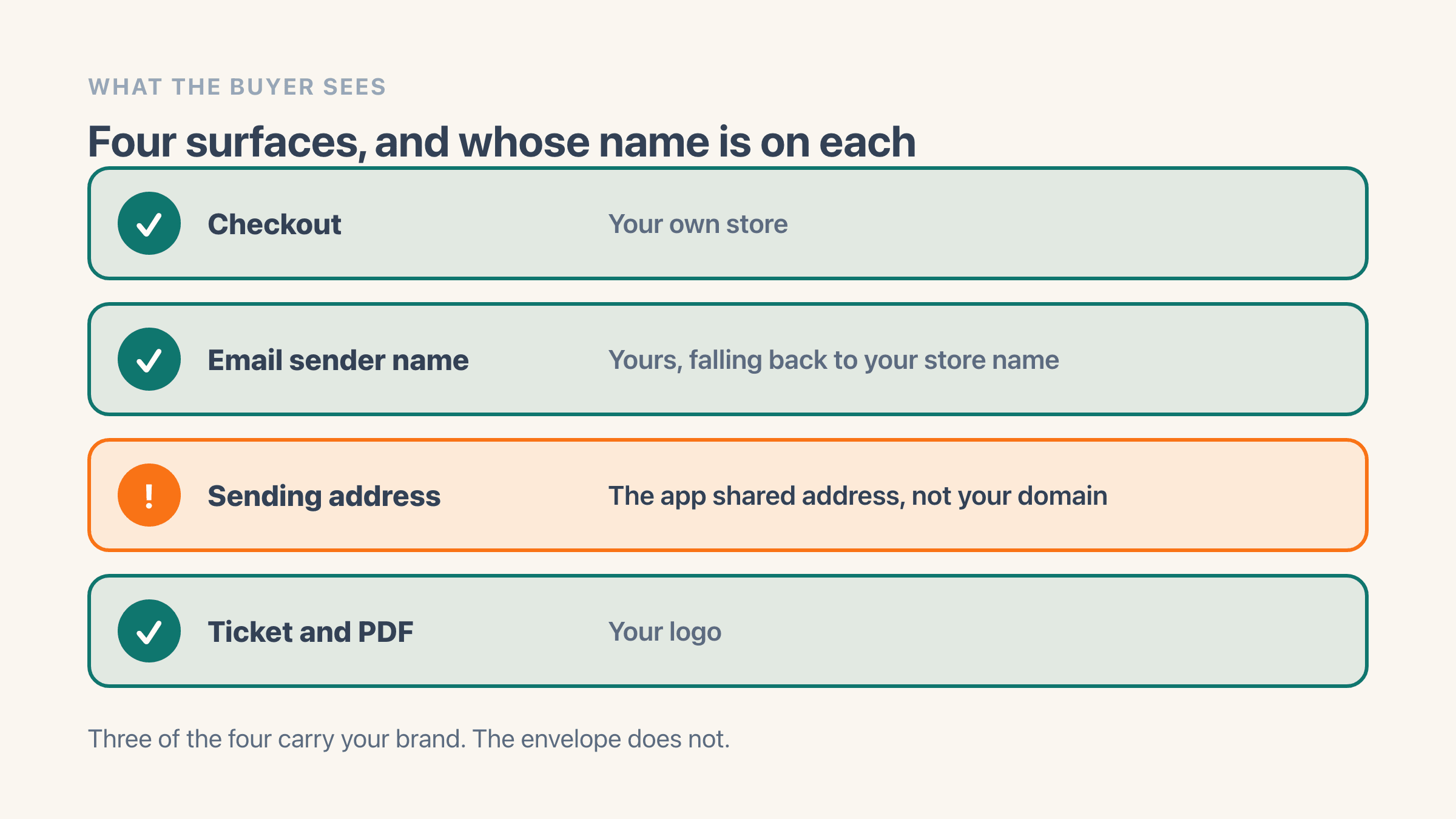
On Shopify, your own storefront and your own checkout. The ticket is a normal Shopify order, so the buyer never leaves your store to pay and never has to create an account somewhere else to hold it.
The ticket itself and the emails around it carry your logo. One logo set in Easy Tickets & Events feeds the confirmation email, the reminder email, the on-screen ticket and the PDF, and any single event can override the PDF logo with one of its own.
The sending address is the exception, and it is the part people notice. The Email sender name setting controls the name in the buyer's inbox, but the address behind that name is the app's shared sending address rather than something at your own domain.
Fill that setting in before your first sale. Left blank, the emails go out under the name “Easy Tickets” rather than your store's.
So the name is yours and the envelope is not. If the sending domain matters to you, settle that before you switch rather than after the first event. Branded tickets and emails for Shopify events covers what you can change inside the ticket.
Where Eventbrite is still the better choice
Eventbrite runs a public marketplace where people browse and discover events, which is a genuine source of new attendees that a Shopify store does not have on its own. If discovery traffic is central to how you sell, Eventbrite earns its fee.
A seating map is no longer a reason to pick it. Easy Tickets & Events has a seat map editor with rows, tables, price areas and wheelchair spaces, and shoppers pick their own seats on your product page.
Payout timing can go its way too, which cuts against everything above. The payout page offers Every week and Twice a month alongside the default, so an organiser who qualifies is not waiting for the event to end.
Qualifying is not automatic, though. The same page says you must have "Previously hosted a paid event on Eventbrite", "Previously received a payout to your bank account" and owner or admin access, and that "All pre-event payouts are also subject to a payout reserve and payout cap".
Eventbrite also sells a marketing plan on top of the per-ticket fees, and its organiser pricing page pitches it as "Save on marketing costs with Eventbrite Pro and send up to 10,000 emails daily. Starting at $15/month". Easy Tickets & Events has no marketing email tool at all - it sends confirmations, reminders, follow-ups and waitlist emails about the event and stops there.
Do you need Eventbrite's organizer app to check people in?
No, and it is one of the things people ask about before they switch. Every ticket carries a QR code that staff scan from a phone browser, or from the till if you already run Shopify POS at the door.
No separate organizer app, and no scanner to buy. Both routes do check-in, which is why the table above puts it on both sides rather than treating it as a reason to pick one.
Choose Easy Tickets on Shopify if
you already have an audience or storefront traffic, you want tickets sold through your own checkout with no per-ticket fee, and you want the buyer to be your Shopify customer paid out on your normal schedule.
Choose Eventbrite if
you are relying on Eventbrite's public marketplace to find new attendees, or you want its marketing email tool and can meet the conditions for one of its earlier payout schedules.