Short answer
How do you sell and scan from Shopify POS?
Set up the event
Create the event and ticket types in the app. The same event backs both your online sales and anything you sell in person.
If it does not work
Someone makes a second event for door sales, and now there are two capacities and two attendee lists for one night. That is the exact split this setup exists to avoid, and you find out when the room is fuller than either list says.
How to undo it
Ticket types, dates and capacity stay editable on the event. A duplicate event created by mistake can be taken off sale by unpublishing its product from the Online Store sales channel.
Sell online and at the register
Customers buy online through your storefront, and staff sell tickets in person from the Sell tickets tile in Shopify POS. Both draw from the same capacity.
If it does not work
Staff search for the event on the register and it is not there. The product behind it has to be available to the Point of Sale sales channel as well as the Online Store, and a product published to only one of the two is invisible on the other.
How to undo it
Sales-channel availability is a toggle in Shopify, so adding or removing Point of Sale takes seconds either way and never touches tickets already sold.
Scan at the door
At the event, scan the QR ticket from the Shopify POS check-in tile, or from the web check-in page if you are not on a POS device.
The web page has its own link per event, under the event's Check-in settings as Check-in URL. Open it on the door phone the day before and set a Check-in PIN on the same screen, because anyone holding the link can otherwise open the scanner.
If it does not work
The tile is not on the POS home screen, and doors are in ten minutes. Installing an app does not put a tile there.
Somebody has to add one to the smart grid, which you lay out with the POS editor in your Shopify admin. That is a job for the day before rather than the night.
How to undo it
Check the wrong person in and the check-in screen has an undo, which puts that ticket back to unscanned so it still works when the right person arrives.
Watch arrivals on the door device
Out of the box each ticket admits one person once, and the arrivals list refreshes every time that device scans, so the count on screen is the count in the room.
If it does not work
The count stops moving while a queue is plainly forming outside. Each scan is recorded as it happens, so a door device that has lost signal fails those scans rather than storing them to send later. Move that device onto a hotspot and rescan the people it refused.
What you get
- A Shopify POS check-in tile for scanning at the door
- A Sell tickets tile for selling at the register, with paper tickets printed at the counter
- Shared capacity and attendee list across online and in-person sales
- A web check-in page that runs in any phone browser, with no Shopify account for door staff
- A check-in PIN, so the link alone does not open the scanner
- Per-ticket rules for when a ticket can be scanned and how many times
- An arrivals list that refreshes with every scan, and an undo on each check-in unless you switch it off
Do you need Shopify POS to run the door?
No. The web check-in page runs in any phone browser and needs no POS subscription, so a volunteer with their own phone can work the door. POS check-in is the better option if you already run POS, because door staff stay in one app instead of two.
In practice, reach for POS when you are also taking money at the door and the hardware is already standing there. Use the web page when you have borrowed phones, casual staff, or a venue where nobody is selling anything.
What stops the door selling a place the website already sold?
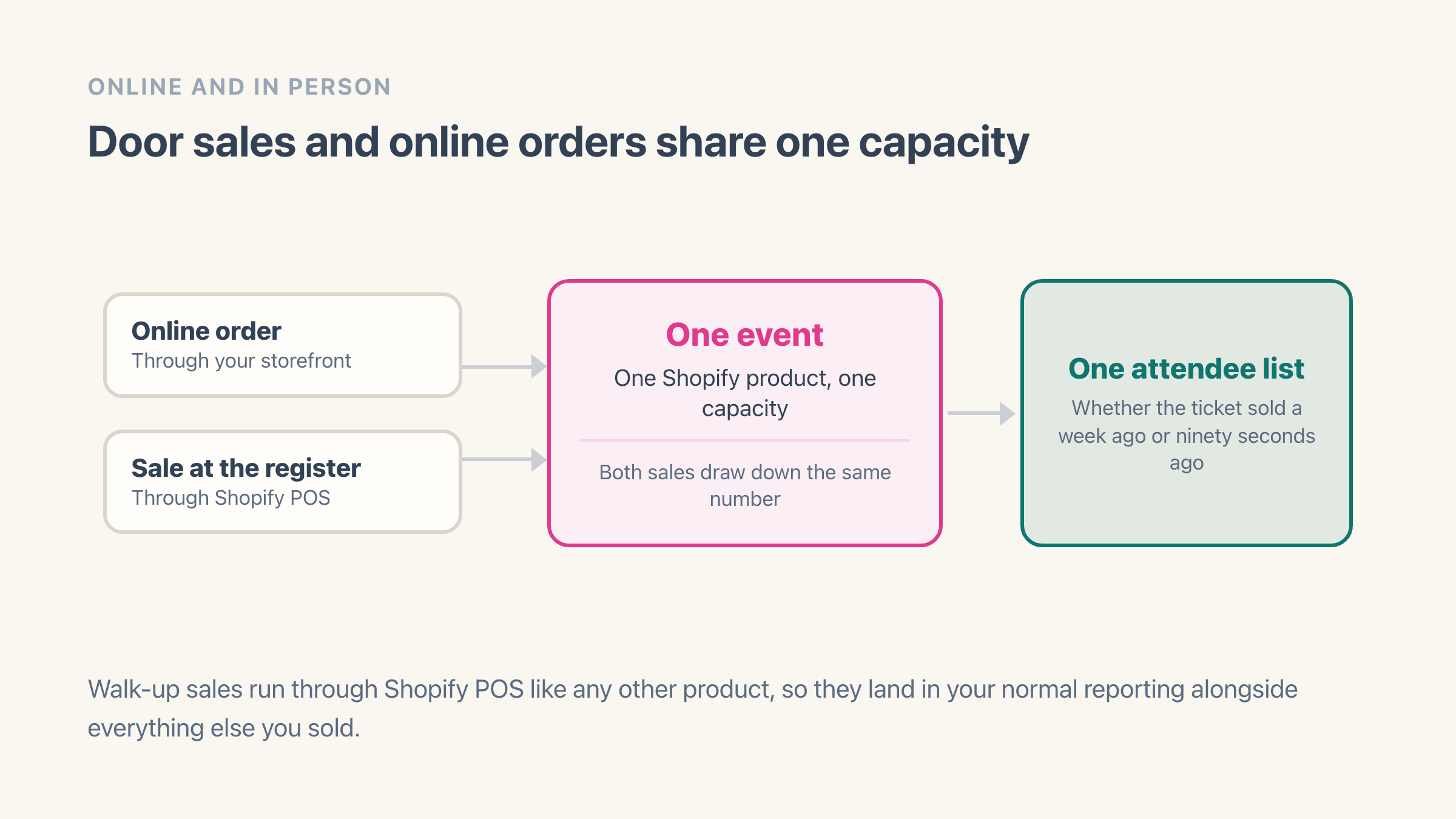
Both sides are drawing down the same number, right up to the last place. The event is a Shopify product, so a sale rung up at the register and an order placed on your website reduce one inventory count, and there is no second system holding a different figure. Selling some online and some at the door normally means exactly that second system, and you find out the two disagreed at the worst possible moment.
You also get one attendee list rather than two, whether the ticket was bought a week ahead or ninety seconds ago at the register. The register is reading the same number the website is.
Sell through the Sell tickets tile and the app refuses a sold-out date at the till too. The gap is a ticket rung up straight from the POS product grid.
Shopify's help page on inventory tracking says the Continue selling when out of stock option "doesn't apply to Shopify POS" (checked 13 August 2026). The same page says "Staff can continue selling products when available inventory reaches zero and below", so keep door staff on the tile for the last few places.
How scanning works at the door
Staff scan the QR code on each ticket, either from the check-in tile in Shopify POS or from the web check-in page using the phone camera. There is no separate scanning app for door staff to install and no scanner hardware to buy or charge.
When a code will not read, both screens can find the person another way. The web check-in page has a Missing list to check a guest in by name, a search box on dates with 2,000 or more tickets, and a Ticket number box for the number printed on the ticket, in the form #1001. Shopify POS has a Search attendees field that takes a name, an email address or the ticket code, with a Check in button on the row it finds.
Out of the box a code admits one person once, and a second scan of the same ticket refuses rather than quietly admitting, which is the thing that stops one forwarded screenshot getting four people through. That is a setting rather than a law, and the section on re-entry below is where you change it.
The arrivals list on the door device refreshes every time that device scans, and it picks up anything a second door phone has scanned in the meantime. A screen that is not scanning shows what it showed when it loaded, so reload it before you read a count off it. Every check-in also has an undo, on the row in the list and on the confirmation that appears as you scan.
How does a door phone get into the scanner without a Shopify login?
Through a link, not an account. Every event has its own check-in page, and you find it in the app under the event's Check-in settings, where it is labelled Check-in URL with a Start now button beside it. Open that link on the phone at the door and the scanner is there.
Nobody at the door needs a Shopify account, a staff invite or the POS app. That is the whole reason this path exists: the person working the door is often a volunteer, a friend of the promoter or one of the venue's own staff, and none of them belong in your admin.
The obvious worry is the other side of the same coin. Anyone holding that link can open the scanner, so every event has a Check-in PIN, set by the app and shown on the Check-in tab. The page asks for it before it shows anything, and it is not a curtain over a page that has already loaded: without the PIN the scanner shows no attendee list, no arrival count, and refuses every check-in and every undo.
Staff type the PIN once on their device and carry on scanning. A sensible pattern is one PIN per event, written on the run sheet rather than sent in a group chat that outlives the night.
- Set the PIN before the day, on the same screen as the check-in link
- Send door staff the link, not your admin login
- Remember the link and the PIN belong to one event, and a repeating series shares one of each across every session in it
When is a ticket allowed to be scanned?
Any time, until you say otherwise. Each ticket type carries its own answer under When is check-in allowed?, and the four choices are Any time, Only during scheduled event time, Any time after event starts, and Custom start / end times.
Any time is the default and it is the right one for most rooms, because it lets you scan the queue that forms before doors open. Pick one of the others when scanning early is the problem rather than the point: a festival where Saturday passes must not work on Friday, or a members' night where the early arrivals are supposed to wait.
The two open-ended choices, Any time and Any time after event starts, also offer Ticket expires after (days). That is the one for a pass with a life of its own, like a ten-visit class card, and it counts from when the ticket was bought rather than from the event date. Leave it empty and tickets do not expire.
A ticket presented outside its window is refused rather than admitted, and the next section is the list of what the door staff will actually read on screen.
Can the same ticket get two people in?
Not by default, and that default is a number you can change. Every ticket type has an Entrance limit, set to 1, described on the screen as the maximum number of check-ins allowed per attendee. At 1, the second scan of a code refuses and names the count it has reached.
Raise it when re-entry is part of the night. A limit of 2 covers a smoking area or a cinema interval where people leave and come back.
What the number cannot do is ration entries by day. Three is three scans in total, so a festival wristband set to 3 can spend all three on the Friday, which is why a multi-day pass is safer sold as one ticket per date.
The counter is per attendee, not per event, so the scanner can tell one person on their second entry from the person trying a friend's screenshot. In Shopify POS, an attendee found through search who has used every entry shows a Limit reached badge instead of a check-in button.
One thing to decide with it: Allow undo check-in is on by default and it is what lets staff reverse a scan made in error. Turn it off for a ticket type only if you need the arrivals list to be a record nobody at the door can edit.
What does the scanner say when it turns someone away?
It names the reason, and it is worth knowing the list before the night rather than reading it for the first time with forty people behind the person at the front.
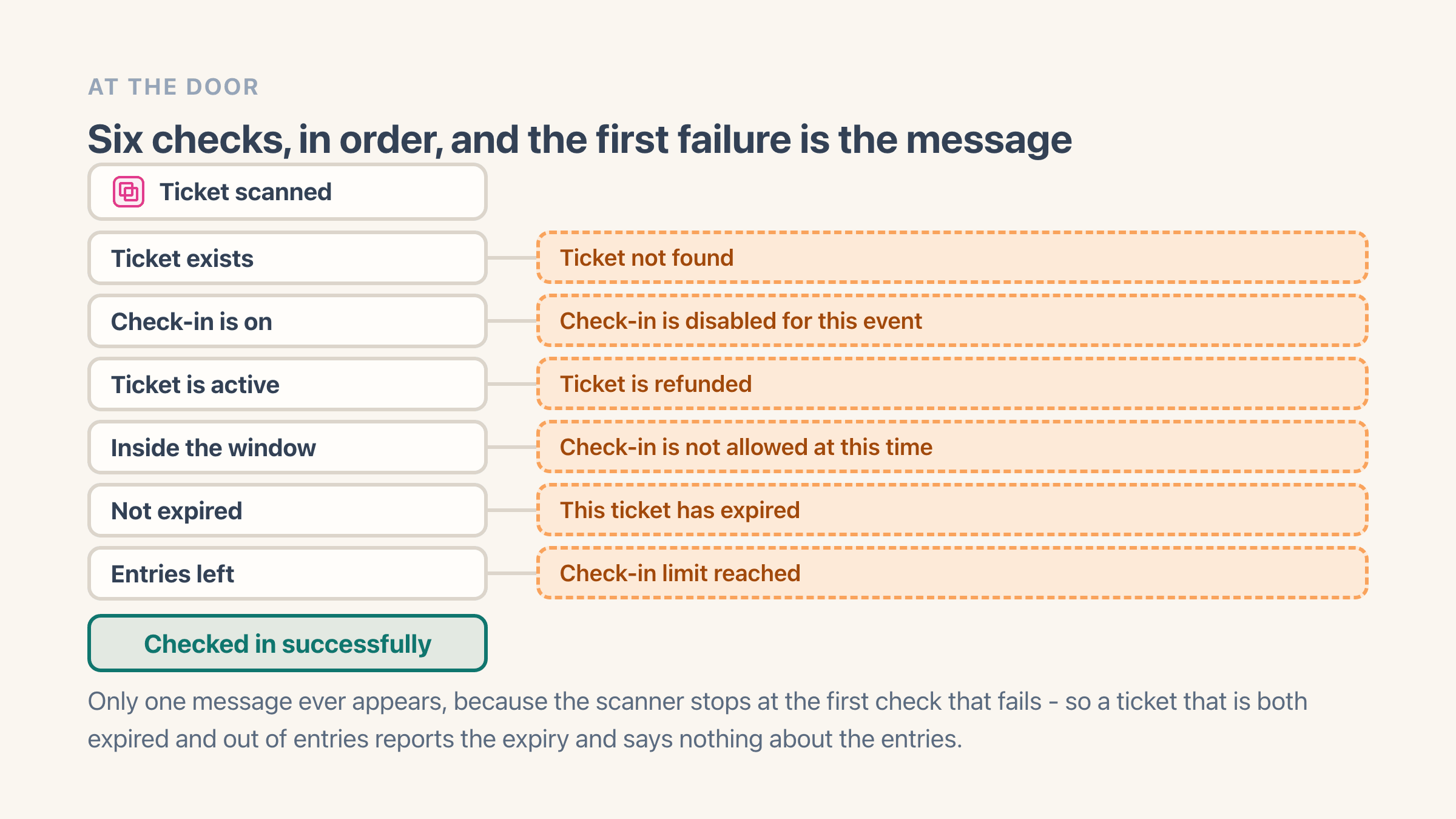
Every scan runs the same six checks in the same order, the scanner stops at the first one that fails, and the seventh line below is the one you want to see:
- Ticket not found - the scanned code does not match a ticket on the session that is open. Typed by number, the web page names the number back at you, as Ticket #1001 not found, and a number from another date reads that way too. On the web page, a code from another of your events reads “This ticket is for a different event” instead.
- Check-in is disabled for this event - check-in has been switched off in the event's settings.
- Ticket is refunded - the ticket is no longer active. That is the Shopify POS wording, and the web page says “This ticket was refunded”, or “This ticket was cancelled” for a cancelled one.
- Check-in is not allowed at this time - the ticket was presented outside the window set on its ticket type, either before it opens or after it closes. On the Any time after event starts setting the same refusal reads Check-in is not yet open.
- This ticket has expired - the ticket type has an expiry in days and this one is past it.
- Check-in limit reached - every entry on that ticket has been used, and the message shows the count, for example 1/1.
- Checked in successfully - the one you want, with the attendee's name, ticket number, ticket type and running count.
What happens if the venue wifi drops?
The door stops, so this is worth planning around rather than discovering. Basements, marquees, old buildings and any room with 400 people on the same network will lose you a connection at exactly the wrong moment.
Each check-in is recorded as it happens, which means the door device needs a live connection at the moment it scans. You can add the check-in page to a phone's home screen and it opens instantly, because the page itself is kept on the phone, but the scan still has to get through.
Three things make this a non-event, and all three happen before doors rather than during them.
- Test the signal standing at the entrance, not at the bar
- Keep one phone on a mobile hotspot as the fallback device
- Export the attendee list to your phone, so a dead room becomes names ticked off a list and reconciled afterwards
What if someone turns up without their ticket?
It happens at every event, usually because the confirmation went to a spam folder or the buyer sent someone else in their place. Both door screens can look a person up by name or email, so a missing code rarely stops the queue.
In Shopify POS, the check-in tile has a Search attendees box that takes a name, an email address or the ticket code. Find the person, press Check in on their row, and they are in without a code ever being scanned.
The web check-in page lists every guest still missing, A to Z by first name. Find the person and check them in from their row; on dates with 2,000 or more tickets a search box takes a name or an email address. The ticket number, in the form #1001, or the ticket link pasted in, works too.
If they booked under someone else's name, somebody with access to the app looks them up in the attendee list and resends the ticket to their address while they wait. That is the reason one name on the run sheet needs admin access on the night.
Which session does the scanner open for a weekly class?
The nearest upcoming one, chosen for you. On the web check-in page a repeating event has one link covering the whole series, and opening it lands on the next session by date rather than on the series as a whole.
A Time slot picker sits at the top of that page with every session in the series and the number of attendees against each, so switching to tonight, or to the 11am slot rather than the 2pm, is one tap.
The failure worth knowing costs about ten minutes of queue. The picker is showing next Thursday, tonight is Tuesday, and every ticket number staff type comes back as not found - because those tickets belong to a session that is not open on that screen. Glance at the picker before doors, on every device.
What you actually need on the night
Less than most people prepare. A charged phone per door, the event open on it, and a plan for what happens if the network goes. That is the whole list.
- A phone or POS device per entrance, charged, with the check-in screen already open
- The check-in PIN in the hands of whoever is working the door, rather than your admin login
- On a repeating event, the time slot picker checked on every device before doors
- At least one device on the web check-in page if the venue signal is unknown
- Someone with admin access who can resend a ticket on the spot
- A printed or exported copy of the attendee list, so you know how many people the room is expecting without a lookup
How do you sell a ticket to someone at the door?
Open the Sell tickets tile, pick the event, the date and the ticket type, and add the buyer's name and email if you have them. Payment runs through the POS like any other sale, so it lands in the same reporting as the rest of the night's takings.
The buyer gets the same email tickets as an online order, and the order's Tickets screen prints paper tickets at the counter. Seated events are the exception, because seats are only chosen on your product page.
For the full flow from creating an event to sending the ticket, see how to sell event tickets on Shopify.