Short answer
Can you take class bookings on Shopify without a booking app?
You can take the money. Make the class a product, price it, set inventory to the number of spaces in the room, and leave the "Continue selling when out of stock" box on the product page unticked so it stops at capacity. For one workshop on one Saturday, that is all you need.
It comes apart on the second date. Shopify counts inventory per variant, so a single "Drop-in" variant holds one number covering every Tuesday and Thursday you teach. Ten spaces sell and the class closes, including the week nobody has booked yet. A variant per date fixes the counting and hands you a standing job: a new variant every week, forever.
You also have no attendee list. The confirmation is a receipt with the buyer name on it, so the door is you and a phone, with no code to scan.
How do you set up a class that repeats every week?
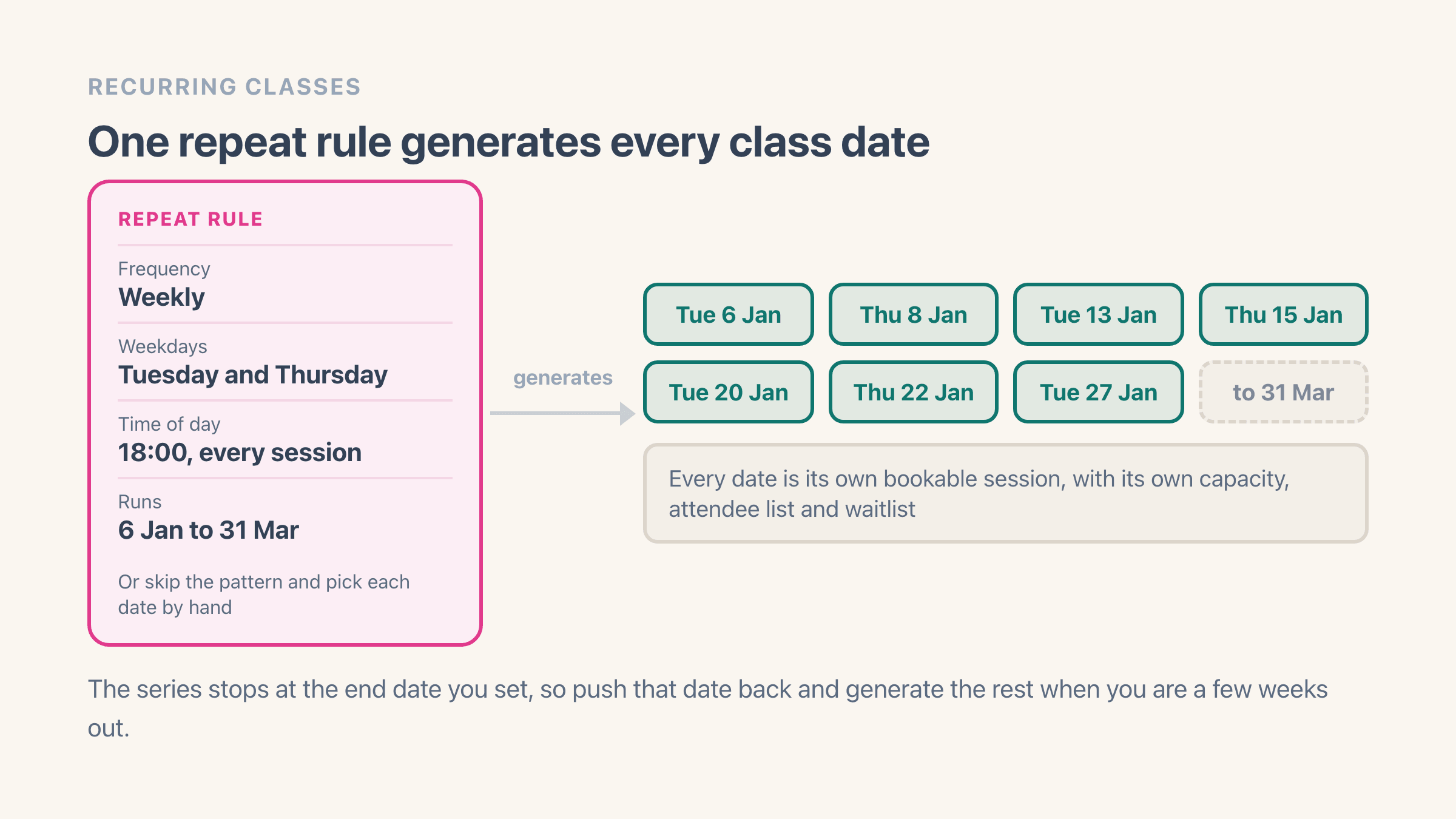
Create the event, set it to recurring, give it a time. The repeat rule is where the timetable lives, and Easy Tickets & Events takes daily, weekly with a weekday picker, monthly, or a list of dates you pick by hand for a term that skips half term.
- Frequency: daily, weekly on the weekdays you choose, or monthly
- Time of day: one sitting, or several, applied across the series
- Start date and series end date: the app generates every session between them
- Hand-picked dates: skip the pattern and select each date yourself
Can one class run more than once a day?
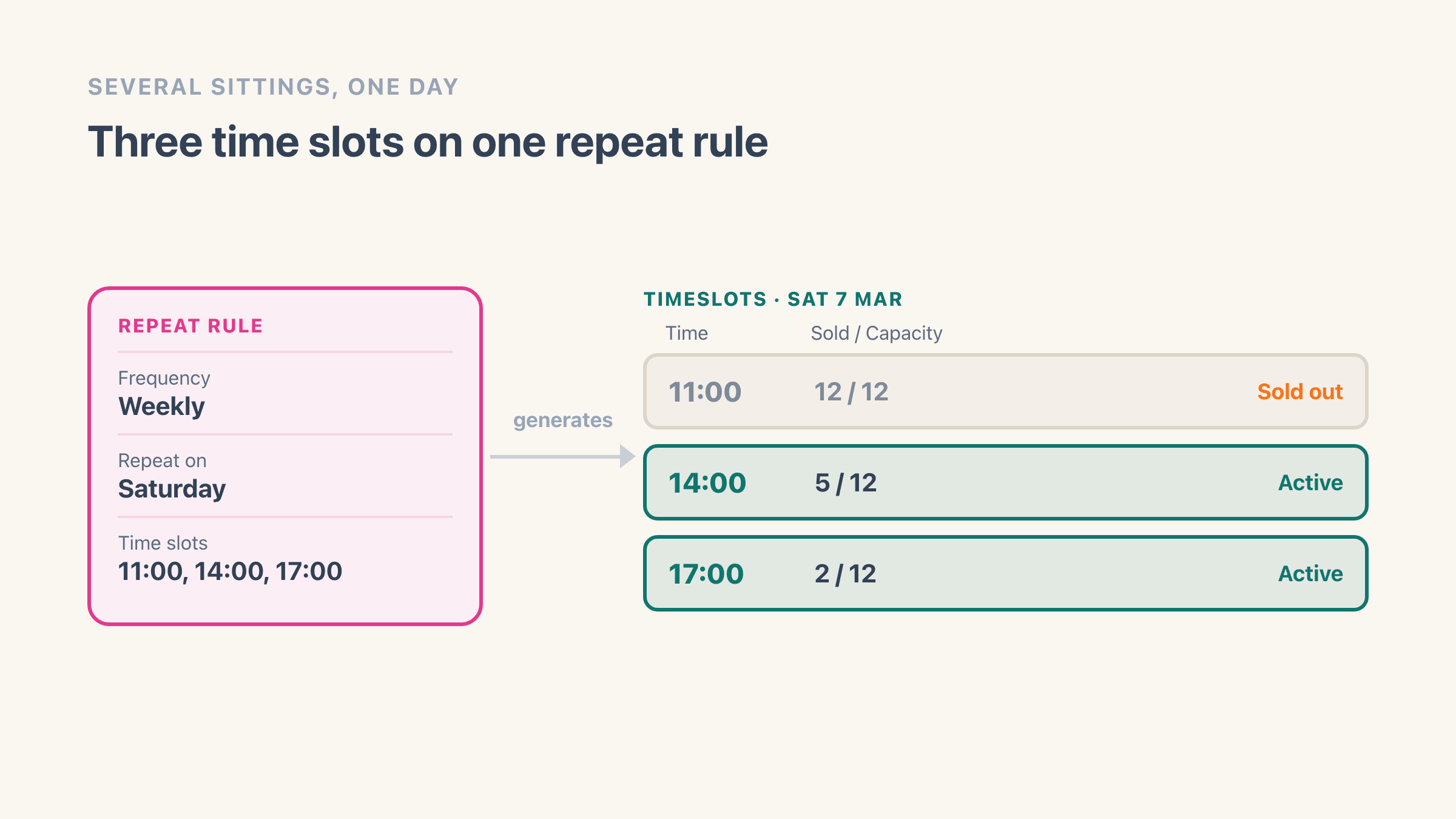
Yes, and the times are part of the repeat rule rather than a setting of their own. Under Time slots you give each sitting a Start and an End, so a tasting room running 11:00, 14:00 and 17:00 is three slots on one pattern.
Two modes decide how those times land across the week. Use same times for all days gives every weekday you picked the same list, which is the tour that runs hourly Tuesday to Saturday. Different times per day lets Saturday carry three sittings and Tuesday carry one, which is how most rooms actually book.
A Schedule preview counts the sessions you are about to create and lists the dates, six at first and up to fifty behind Show all. It is where a wrong weekday or an end date that runs too far shows up, while you can still change it.
What happens once the event is set to repeat?
Worth knowing before you build it. The times are stored on the repeat rule, so the Time slots tab only appears once an event is set to repeat, and a single Saturday with three sittings is still built as a repeating event rather than a one-off.
What you get for that is a sitting that counts on its own. The 11:00 selling out has no effect on the 14:00, and each slot carries its own settings:
- Its own start and end time
- Its own Capacity, described in the app as "Total tickets for this time slot. Leave blank to use the event's default."
- Its own venue, when you tick Use a different location for this time slot
- Its own status, shown as Active, Sold out or Cancelled, so cancelling the 17:00 leaves the 11:00 selling
If I edit the class, what happens to sessions people already booked?
Edits split in two. Description, location, ticket template, attendee fields and the email and PDF templates cascade, so rewriting the "what to bring" line once lands it on every future Tuesday. Capacity goes the other way, where the class value is a default and a per-session number wins, which is how the small-room week holds six.
Price has no per-session version. Every date sells at the class's own ticket prices, so a guest-teacher week that costs more runs best as an event of its own.
A session you have already edited or cancelled by hand stays as you left it when you save the pattern again. The save reports what it created, what it updated and what it skipped, and the skipped ones are exactly those. The recurring events docs have it field by field.
Should each class date be its own product, or one product with a date picker?
The choice decides what your catalog looks like. In date-picker mode the class stays one product and the product page shows a calendar. Days with a session are shaded, a full session says “Sold out” once the day is opened, and the student picks a session before it goes in the cart.
In separate mode every date becomes its own Shopify product with its own page and its own Shopify inventory. A weekly class run for a year is 52 products in your catalog. Worth it when the sessions genuinely differ, a visiting instructor or a themed workshop you want to advertise and rank on a page of its own.
Teaching the same class every week? Take the date picker.
How do you stop one class being overbooked?
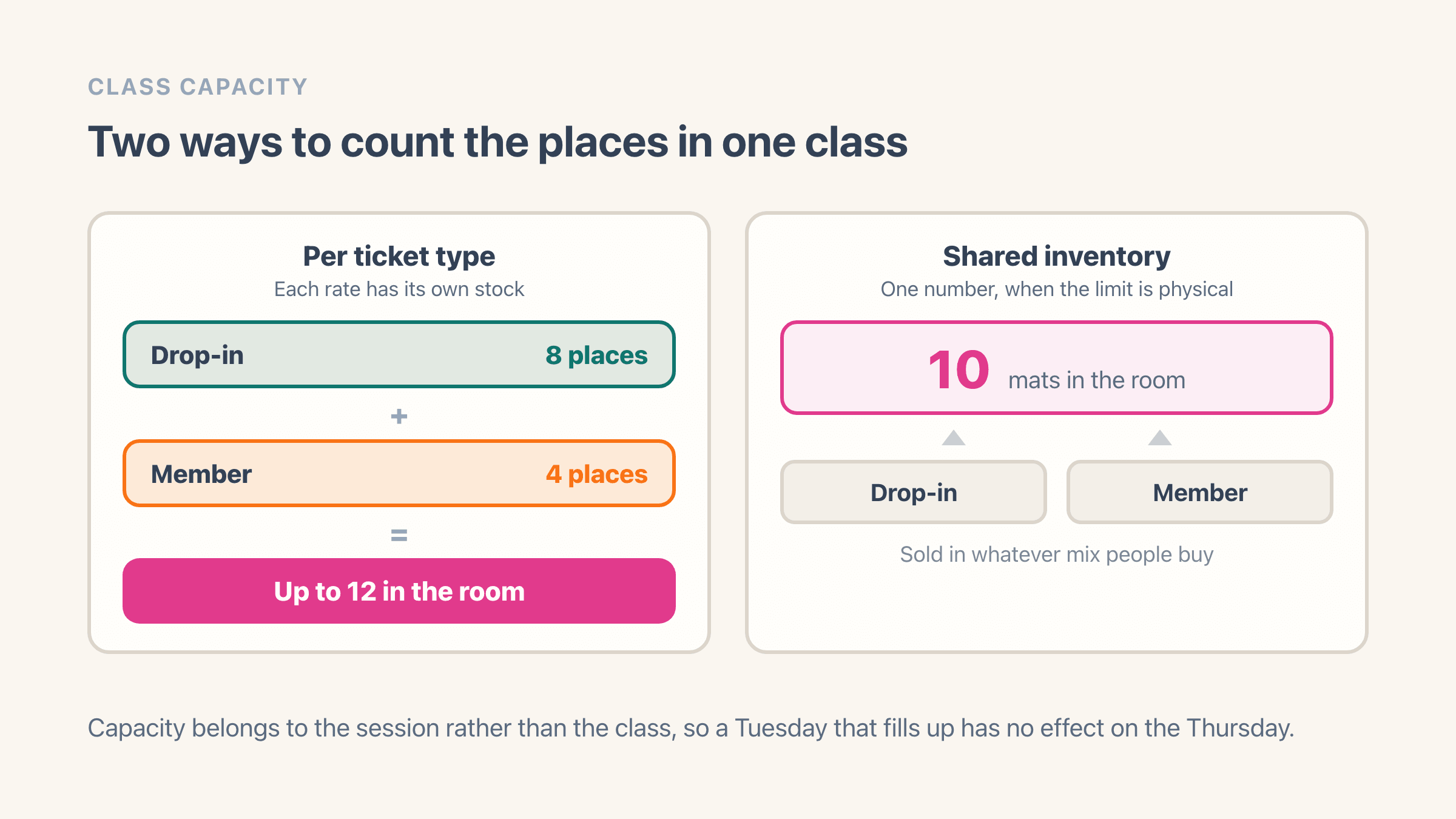
Capacity sits on the session, so Tuesday selling out has no effect on Thursday. Remaining spaces update as bookings land, and a full session shows “Sold out” in the picker instead of quietly taking an eleventh booking.
There are two ways to count. Per-ticket-type inventory gives each rate its own stock, so 8 drop-in places plus 4 member places means up to 12 in the room. Shared inventory pools them into one number, which is what you want when the limit is physical: 10 mats, 8 wheels, sold in whatever mix people buy.
One booking can cover more than one person. A ticket type with a group size of four counts four places against capacity and issues four QR codes, one per person.
Can you sell a 10-class pass or a monthly membership?
Yes to a class pack, no to a membership. Easy Tickets & Events sells class packs. A student buys ten classes once, then books each session with their pass until the credits run out or the pass expires.
What it has no version of is an auto-renewing membership.
Three other features sit close enough to be mistaken for a pass. Group size puts several admissions on one booking for one session. A bundle sells one purchase that generates claim links, so a company buys ten places for a workshop and sends each colleague a link to fill in their own name. Ticket expiry stops a ticket working after a set number of days, and it still buys one session.
If memberships are how the business earns, plan for that now. Shopify itself supports repeat and prepaid purchases, which is what the subscription apps on the App Store are built on. Running one of those alongside Easy Tickets is a workable setup - the subscription app takes the money on a schedule, Easy Tickets runs the timetable and the door.
When is an appointment booking app the better answer?
When you are selling somebody's time rather than a place in a room. This app puts a session on the timetable and sells seats in it. Appointment booking software works the other way round: the customer picks the slot and the length, often picks a staff member with it, and that slot is then theirs.
Test it against your own timetable. If Tuesday at 18:00 runs whether one person books or twelve, you want a ticket with a capacity number behind it, which is this app. If the 18:00 exists only because somebody asked for it, and taking it ties up an instructor for fifty minutes, you want booking software.
Worth being blunt rather than letting a studio find out in week three: nothing this app stores knows about a staff member or a bookable resource. Those fields do not exist in it. Shopify keeps a roundup of nine appointment booking apps, checked 14 August 2026, and that is a better place to start than bending a ticketing app into the job.
None of which stops the two sitting side by side. A studio can sell its timetable in Easy Tickets & Events and take its one-to-one sessions in a booking app, the same way a membership can sit in a subscription app while the timetable stays here.
What happens when a class fills up?
The Add to cart button on that date turns into Join waitlist, and the popup collects a name, an email and optionally a phone number. The waitlist belongs to the session, so a person waiting on Wednesday 18:00 is not sitting on a list for the whole term.
When a place frees up because an order was cancelled or refunded, the app emails waitlisted people automatically, oldest signup first, capped to the number of places that opened. Nothing is reserved. First to click through and check out gets it, so keep the batches small when two places opened and forty people are waiting.
You can also notify one person yourself from the waitlist tab, which is what you want when you squeeze in an extra mat. A Shopify Flow trigger fires on every signup, so the list can feed Klaviyo too. More in the waitlist docs.
A student cancels: transfer, refund, or move them to another date?
Transfer starts with you. Get a transfer link from the guest list and send it to the student, who fills in the replacement name and email. The app kills the old QR code, issues a fresh one, and keeps the transfer in the ticket history for when the name at the door does not match.
Refund the order in Shopify admin and the app picks it up on its own: the attendee is cancelled, the QR code stops working, and the place goes back on sale, which sets off the waitlist email. The app can also cancel a ticket without refunding, for the late cancellation your terms say you keep.
Moving a booking from Tuesday to Thursday is one action on the guest list. Move to another date lists the upcoming sessions, greys out the full ones, and the ticket keeps its QR code.
Students can also move themselves. Switch on Let customers change their date, and they get up to three moves per ticket from their ticket page, until the cutoff you pick of one day to three weeks before class.
Cancelling a whole session does work: open that date, cancel the instance, and sales close while everyone booked sees it on their ticket page.
How do you cut down no-shows in a class?
One reminder email goes out per session once you switch it on, 24 hours before the start unless you pick another of 1, 2, 6, 12, 48, 72 or 168 hours. Two hours ahead is a nudge and nothing more. Forty-eight gives someone room to cancel, which puts the place back on sale while there is still a weekend to sell it into.
The template is fully editable, so the reminder carries the studio address, the parking situation and your cancellation terms instead of a bare "your event is soon". Branding the ticket and the emails covers the editors for both. The popup asks for a phone number by default, if you want to text as well.
What the app has no version of is a no-show report, a deposit-forfeit rule or a strike system. The attendee export carries a Check-ins column and everyone who never scanned is a zero, so the list of people who booked and stayed home is a spreadsheet filter rather than a screen in the admin.
How does the instructor take attendance at the door?
Each session has its own check-in link that you add to the home screen of whatever phone or old tablet lives at the desk. Recurring classes get a Time slot picker at the top that opens on the nearest session, and you can PIN-protect the page before handing the link to a cover teacher.
The signal question deserves a straight answer, because a basement studio is where it bites. The page itself is cached after the first load, so it still opens on one bar of reception.
A scan is not cached. Checking someone in sends a request to the server, and nothing about it queues up to go later, so test the room before doors rather than counting on the app to ride out a dead connection.
Point the camera at the QR code on the ticket, on a phone or a printed PDF, and the student is checked in against a running count of who is expected. Lost the email? Type the ticket code. Scan the wrong person and there is an undo.
The page also carries two lists, Missing and Checked in, with a check-in button on each row, so a teacher can tick people off by name. A search box appears on dates with 2,000 or more tickets.
If your instructor wants paper, use Print guest list for the session before class.