Short answer
Does Shopify's bulk editor let you edit alt text?
No. You reach the bulk editor by ticking products in Products, Collections, Inventory or Customers and clicking Bulk edit, and every column it offers is a product or variant property. Shopify's documentation describes them as "a product property, such as price, SKU, and compare-at price". You can add and remove columns from the Columns menu, but media is not one of the things in that list.
In the admin, alt text stays a per-image field. Shopify's own walkthrough runs five clicks per photo: Products, the product name, the photo itself to open its Preview media page, Add alt text, then Save alt text.
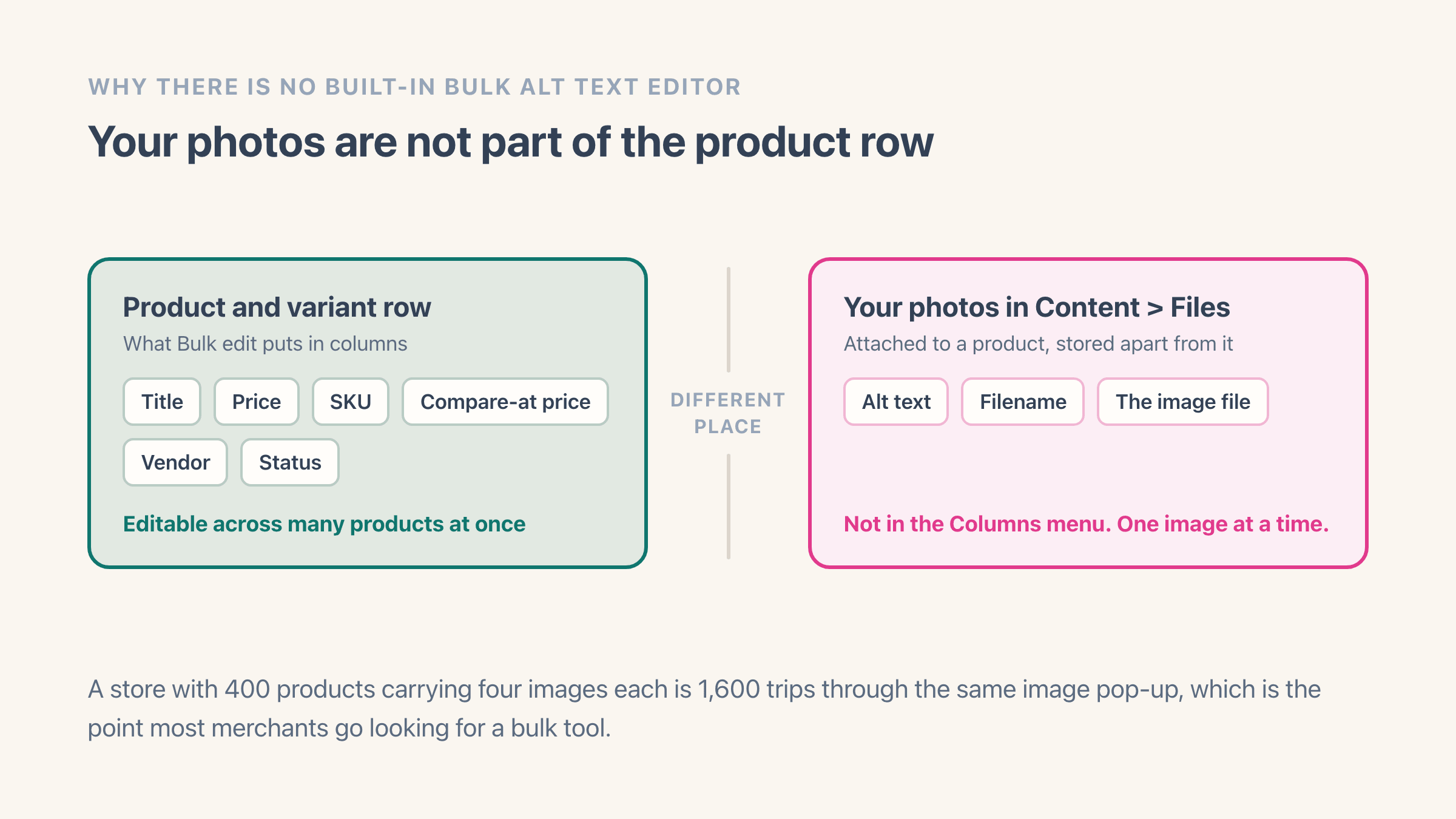
For a store with 40 products that is a quiet afternoon. For 400 products carrying four images each you are looking at 1,600 trips through the same little pop-up, which is where most people go hunting for a bulk tool.
A merchant opening a Shopify Community thread in May 2025 described the same job in their own terms: "entering alt texts manually for each image is taking 50% of my time". The question they opened with was whether alt text can be edited the way the products bulk editor edits everything else.
Why does the bulk editor leave photos out?
The reason images sit outside the bulk editor is that Shopify does not keep a photo on the product the way it keeps a price. Your images live in the file library, attached to the product rather than stored inside it, and the bulk editor edits the product row. That is also the good news if your search was really about titles: bulk editing titles, prices, SKUs or vendors is exactly what the native bulk editor is for. It is only the pictures it leaves out.
Does Shopify write any of the alt text for you?
Partly, and one photo at a time. Shopify's help page on adding alt text says the media editor "might suggest alt text for images where alt text isn't already filled in", and that accepting a suggestion saves it to the file.
What that sentence does not say matters as much as what it does. It offers nothing across a catalogue, it does not say where a suggestion comes from, and the word Shopify chose is "might". You meet the suggestion in the same per-photo panel as the empty box, so it saves you the typing on a photo you already opened and nothing beyond that.
A bulk version of it is not documented anywhere we could find on Shopify's help centre. For a store sitting on four thousand undescribed images, that means the suggestion is not the route out. The product CSV and a bulk editing app are.
Can you bulk edit alt text through a product CSV?
Yes, and it is the only free native route. Export your products, and the CSV comes back with Product image URL, Image position and Image alt text columns sitting next to the product fields. Shopify's own description of that column is "Alternative (alt) text describes the image and the product that it represents."
Size is the practical objection, and it is a real one. A reply in that Shopify Community thread put it as "this would import all data of products, right? so we are talking about a huge download here". Shopify's export is the product CSV, so alt text comes back wrapped in every other product column you own.
One warning in Shopify's import documentation should slow you down before you open the file at all: "Importing a CSV file that has been sorted by a spreadsheet editor such as Microsoft Excel or Apple Numbers might cause your products to be removed from their relevant image links on the CSV, and your product's images will be lost."
So the CSV works, with conditions:
- Start from a fresh export every time, and never re-sort the sheet before importing it
- Keep Product image URL, Image position and Image alt text together in the same file
- Take a backup of your product data before you import, which is the first thing Shopify's own import page tells you to do
- Try the import on a test store first if the catalogue is one you could not rebuild
What does a CSV import overwrite, and what does it leave alone?
Only when you tell it to, and then it matches on the product handle. The import screen carries a checkbox, Overwrite products with matching handles, and Shopify spells out what ticking it means: "Existing values will be replaced for all columns included in the CSV." With it ticked, "when the handle in the import CSV file matches an existing handle in your products list, the values in the CSV file overwrite the values in the matching columns in the existing product list."
None of it is reversible from the import screen either. Shopify says product imports "can't be canceled once they begin, and you can't view a history of past imports", which is the whole argument for running the file on a test store first.
Three more rules on Shopify's import page decide what happens to the columns you did not fill in. Shopify writes all three about a column it does not require, which is every image column on the sheet. The second one below is the one that costs people their alt text, and it is the exact opposite of the first.
- A column you leave out of the file entirely: "the value in the product list remains the same"
- A column you include but leave blank: "the matching value in the product list is overwritten as blank"
- A column you include that relies on data in a column you left out: "existing data is deleted or removed"
Which images can you actually bulk edit?
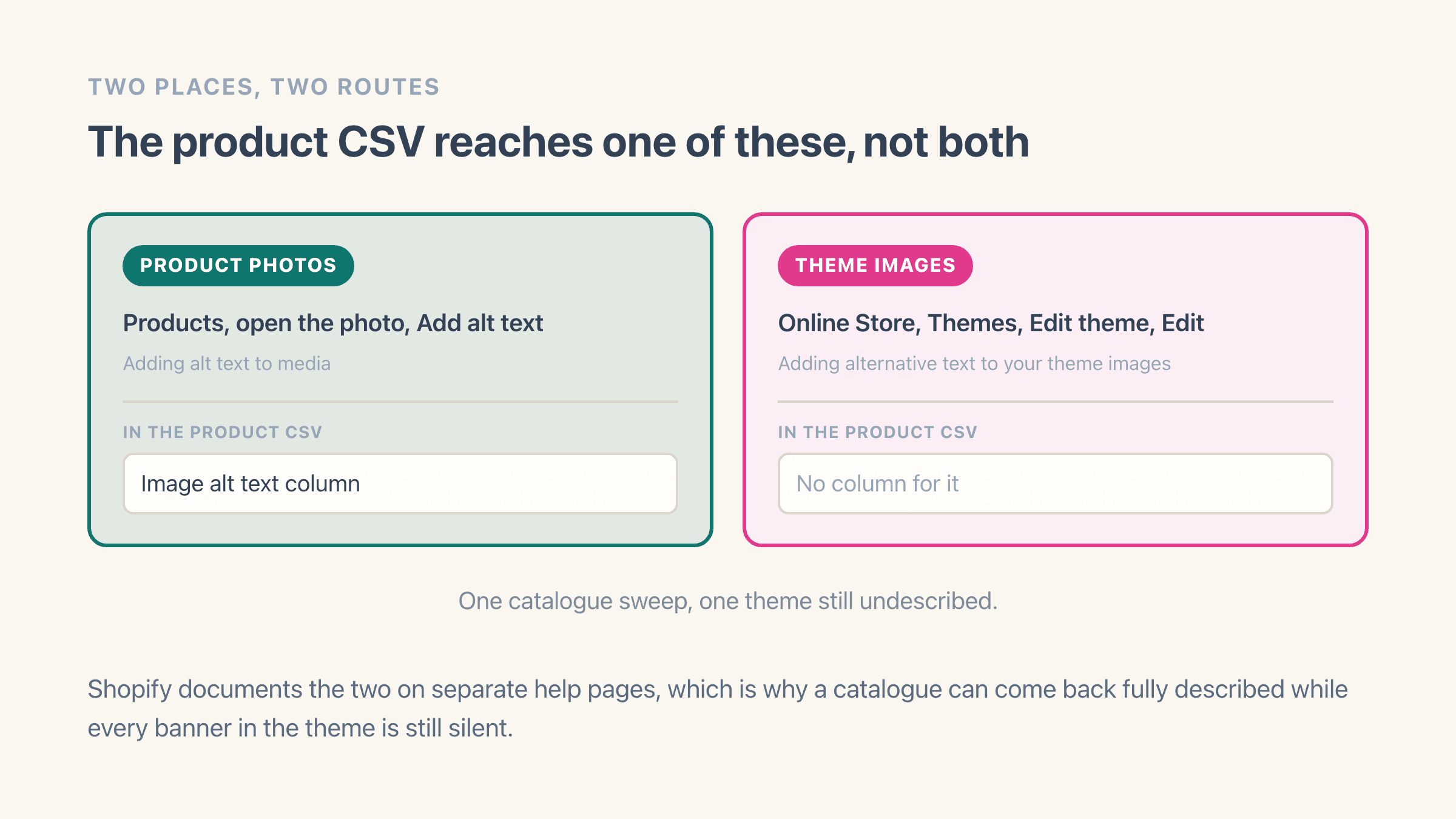
Product photos, and that is where the native bulk route stops. The image columns Shopify documents for the product CSV are Product image URL, Image position, Image alt text and Variant image URL, every one of them product-side.
Theme images are a different system with their own help page. Shopify documents them separately: Online Store, then Themes, then Edit theme, click the section holding the picture in the sidebar, Edit on the image, type the description, Save, then Save again for the theme. Your logo, your banners and your section backgrounds all live there.
Plan them as two jobs, because they are two different sizes. Where each alt text box lives walks the rest of the places alt text turns up, collection images included.
How to bulk edit alt text with Easy Image Organizer
The Image SEO screen lists every image in your store as one long table, with alt text and filename editable straight in the row. It reads your file library, so product images, collection images and files that are not attached to anything all show up in the same place. The working pass looks like this:
- Set the Alt text filter to Missing so the table only holds images that need work
- Narrow further by vendor, collection, product type, tags, SKU, or number of images per product
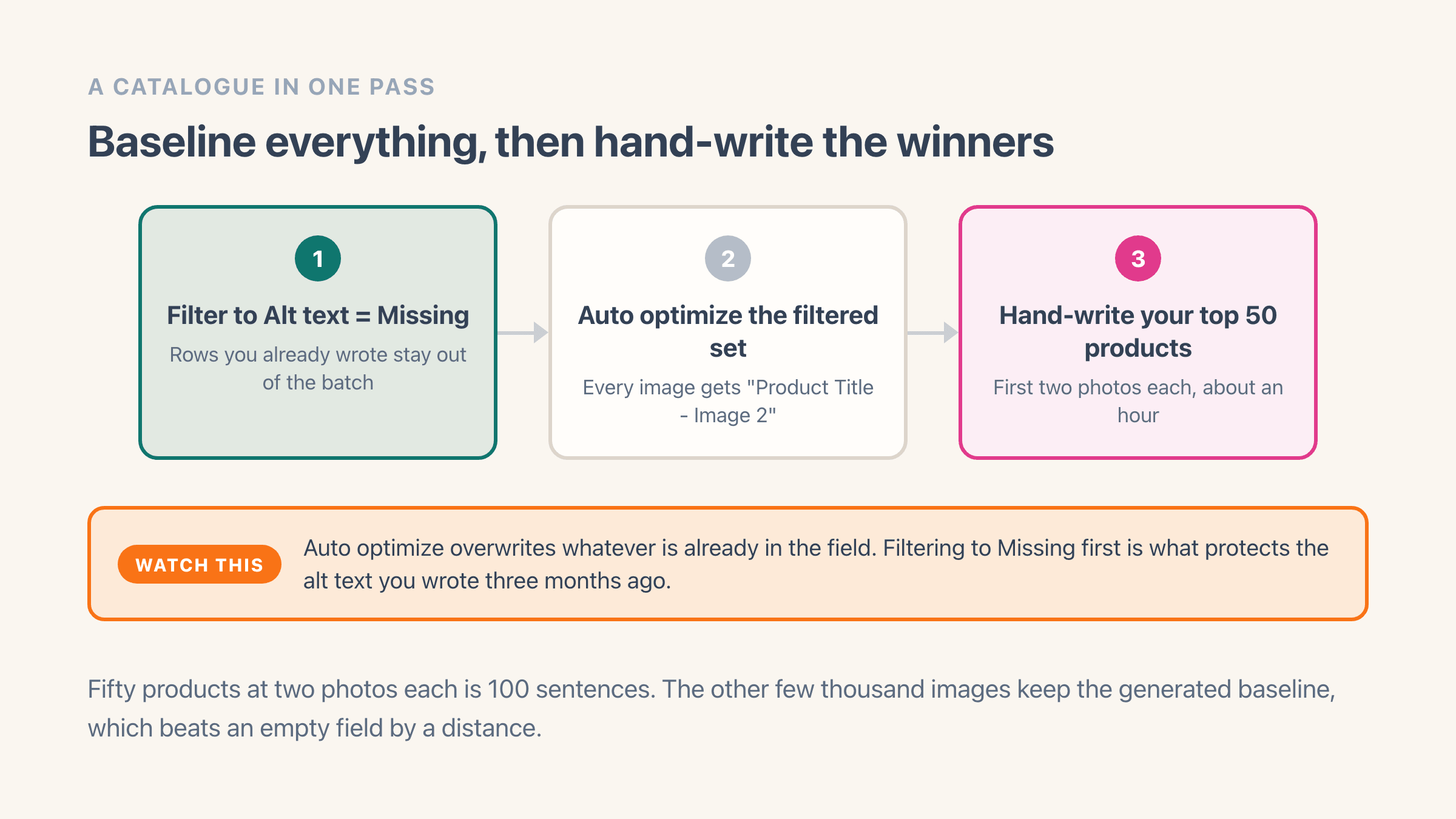
- Type alt text inline, or hit Auto optimize to generate "Product Title - Image 2" from the product it belongs to
- Read back the rows you changed, then Save all changes from the bar at the bottom, or throw the whole batch away
What does bulk alt text editing cost?
Nothing, on any plan. Alt text and filename edits in Easy Image Organizer are unmetered and always free, so a full catalogue sweep costs you zero regardless of how many images you touch. The duplicate scanner is free too.
The free plan does carry a cap of 100 product edits a month, and that number confuses people, so here is what actually moves it: reordering images, replacing an image, and deleting one. Those three. Writing alt text does not move the counter, renaming a file does not move the counter, and running Auto optimize across 3,000 rows does not move the counter. Pro at $8.99 a month is what lifts the cap on the reordering side, which matters if you are also doing a bulk image reorder.
Nothing writes to Shopify until you save. Edited rows carry an unsaved badge, the sticky bar counts them, and Discard all puts everything back the way it was. Saves go out in small batches with a progress bar across the top, which is the part you appreciate once you have staged 800 rows in one sitting.
How long should Shopify alt text be, and what should it say?
Shopify refuses anything over 512 characters. Its own guidance in the product CSV documentation puts the useful length far below that ceiling, at 125 characters or fewer. One clear sentence, in other words.
Describe what is in the frame. "Navy merino crew-neck jumper, front view on a white background" tells a screen reader user what they are looking at and tells Google what the photo shows. Google's image SEO guidance is direct about the alternative: cramming alt text full of keywords, which it calls keyword stuffing, makes for a bad experience and may get your site seen as spam.
A few habits worth breaking. Drop "image of" and "photo of", because the screen reader has already announced that it is an image. Drop the brand name from every shot unless the branding is visible in that shot. And avoid repeating the product title verbatim across all six photos of one product, since the reason photo four exists is that it shows something photo one does not. That is the built-in ceiling on any generated baseline, ours included, and it is why the workflow below treats generated alt text as a floor rather than a finish.
Should you rename image filenames at the same time?
Usually yes, once, and with your eyes open. Google says a filename gives it "very light clues about the subject matter of the image" and recommends short descriptive ones, offering my-new-black-kitten.jpg as the improvement on IMG00023.JPG. If your catalogue arrived as a supplier dump or a migration export, almost everything you own is currently the second kind.
The catch is that a Shopify image URL contains the filename, so renaming the file moves the image to a new URL. Shopify puts it plainly in its files documentation: "When you change your file's URL, the previous URL for that file no longer works."
Shopify's product CSV documentation reads as though none of that is possible, and the difference is which route each page is describing. Its requirements for the image file name include that it "is final: you can't edit it after the image has been uploaded to your store". The files page is the one that describes a rename, through what it calls the URL Handle, so read together: the CSV will not rename anything, and the rename that does exist costs you the old address.
Your storefront follows along on its own and the product page is fine. What is not fine is anything outside Shopify that pointed at the old address: a campaign email you sent last month, a hand-built marketplace feed, an image address typed straight into your theme. Rename in waves rather than one giant sweep if you have any of those.
Two smaller things to know. A rename cannot change the file type, so a .jpg is still a .jpg whatever else you call it. And Shopify asks that a filename be "unique and doesn't match any existing files in your store", which is why forty images named after the same product title need the position number on the end. That is what the blue-cotton-shirt-1.jpg pattern is doing.
How do you do this across thousands of products?
Baseline everything, then hand-write the photos that actually pull traffic. Filter to Alt text = Missing, run Auto optimize across the whole filtered set, save. Every image now has a truthful if plain description, which beats an empty field by a distance no amount of clever copy makes up for.
There is one trap in that sequence. Auto optimize overwrites whatever is already in the field, including alt text you wrote by hand three months ago. Filtering to Missing before you run it is what protects that work, and it is the difference between a five-minute job and an evening spent retyping. If you have already audited part of the catalogue, use the row checkboxes and Auto optimize selected instead of the all-rows button.
A quieter limit sits underneath it. Auto optimize builds its description out of the product or collection an image belongs to, so any file belonging to neither gets skipped and stays empty. Those files still sit in the table and still take a description, you just have to type it yourself.
Then pick your winners. Pull the top 50 products by revenue or by image impressions in Search Console, and write real alt text for their first two photos. Fifty products at two photos each is 100 sentences, call it an hour. The remaining four thousand images keep the generated baseline and that is a fair trade, because those are the images nobody was ever going to find in Google Images anyway.
Should you scan for duplicates first?
One sequencing note before any of it. Run a duplicate scan first. If the same supplier photo is sitting on six unrelated products, writing alt text on all six is work you will bin when you clean them up. What counts as a duplicate is worth a minute if you have never had to define it, we covered finding duplicate product images separately, and there is a free duplicate scanner that reads your public product feed without installing anything.