Short answer
How we picked
- What is the job - compression, alt text, resizing, or organizing?
- Does it reorder images across products, or only edit one at a time?
- Does it edit alt text and filenames in bulk?
- Does it find duplicate images?
- If it replaces your files, does it keep the originals and can you put them back?
- Is there a free plan, and what does it cost as you scale?
At a glance
| Feature | This appEasy Image OrganizerOurs | Avada AI SEO Image Optimizer | Tiny SEO Speed Image Optimizer | StoreSEO | SEO Image Optimizer Wizard | Hextom Bulk Image Edit |
|---|---|---|---|---|---|---|
| Free plan | Yes - 100 edits/mo | Yes - 100 images | Yes - 50 images/mo | Yes - 25 images | Yes - the whole app | Yes - 50 edits |
| Cheapest paid plan | $8.99/mo | $34.95/mo | $14/mo | $14.99/mo | Free | $9.99/mo |
| Compresses images | No | Yes | Yes | Yes | Yes | Yes |
| Keeps a backup of your original files | No | Not listed | Not listed | Not listed | Not listed | 30 to 180 days |
| Reorders images across many products | Yes | Not listed | Not listed | Not listed | Not listed | Not listed |
| Finds duplicate images | Yes | Not listed | Not listed | Not listed | Not listed | Not listed |
| App Store rating | New - no reviews | 4.9 (4,329) | 5.0 (2,235) | 5.0 (668) | 4.8 (646) | 4.6 (568) |
1.Avada AI SEO Image Optimizer
The safest pick if you judge by review count
Four thousand three hundred reviews at 4.9. Nothing else in this roundup is close, and if you want the option nobody gets fired for choosing, this is it. It compresses, resizes, converts formats and writes alt text with AI, and the free plan covers 100 images plus a speed booster and an SEO audit. It is an SEO suite that happens to lead with images rather than a pure image tool.
- The largest review base of any image app on the App Store
- Free plan covers 100 images and an on-page audit
- Compression, resizing, format conversion and AI alt text in one place
Watch out: The step off the free plan is $34.95, the steepest here, and you are buying a whole SEO suite whether or not you wanted one.
2.Tiny SEO Speed Image Optimizer
Best rated, and the widest technical SEO toolkit
A flat 5.0 across 2,235 reviews, which is remarkable at that volume. TinyIMG compresses and resizes, writes alt text, and then keeps going into things most image apps leave alone: JSON-LD schema, lazy loading, broken-link detection with redirects, and CSS and JavaScript minification. Paid plans buy monthly optimization allowances, from 1,500 at $14 to 15,000 at $49, and you can stay on the free tier and pay three cents an image instead.
- The highest rating here at that review volume
- Pay-per-image option, so a one-off cleanup need not cost a subscription
- Schema, redirects and minification alongside the image work
Watch out: Their listing does not mention reordering images across products or finding duplicates, so it will not tidy a messy collection grid.
3.Easy Image OrganizerOurs
The only one that reorders across products and finds duplicates
Ours, and it is the odd one out on this list: it does not compress a single byte. It does the organizing jobs instead: dragging images into a new order across hundreds of products at once, rewriting alt text and file names in bulk, and finding duplicates.
The duplicate finder compares how the pictures look rather than what they are called, so the same photo re-saved at another size still gets caught. Of the ten other listings on this page, only one mentions organizing at all, and that is drag-and-drop inside a single product's gallery rather than across the catalogue.
The free plan allows 100 image edits a month, and alt text, file names and duplicate scanning do not count against it at all.
- Reorder images across many products in one pass
- Duplicate finder that matches on how images look, not their file names
- Bulk alt text and file names, unlimited even on the free plan
- $8.99 for unlimited, cheaper than most paid tiers here
Watch out: No compression, no resizing, no format conversion. If your problem is page weight rather than mess, every other app on this page is a better fit than ours, and you should buy one of them instead.
4.Hextom: Bulk Image Edit & SEO
Best safety net if a bulk edit goes wrong
The one that assumes you will make a mistake. Every Hextom plan includes a backup of your original images, from 30 days on the free tier to 180 on Advanced, so a bulk edit across three thousand products can be undone. It covers alt text, file renaming, compression, resize, crop, watermarking and scheduled tasks, and it has been running since 2016. Ours has no equivalent backup, which is a genuine reason to prefer Hextom for anything destructive.
- Backup and restore of original files on every plan, including free
- Watermarking, cropping and scheduled recurring tasks
- Nine years on the App Store
Watch out: Everything is metered as "edits", so a catalogue-wide pass eats an allowance quickly: 1,000 edits at $9.99 is one image each on a thousand products.
5.SEO Image Optimizer Wizard
Best free option, with nothing to upgrade to
Free, not freemium: StoreYa charge nothing and there is no paid tier waiting behind a limit. You get image compression and optimization, bulk alt text, format conversion and resizing, plus sitemaps, meta tags, robots.txt and an SEO audit that benchmarks you against other stores. It recently added an LLM.txt generator aimed at getting a store quoted by AI assistants.
- Genuinely free, with no image cap to hit
- Compression, alt text and resizing included
- Sitemaps, robots.txt and an audit score alongside
Watch out: 17 of its 646 reviews are one star, a higher share than most here, and there is not much you can do about slow support when you are not paying anything.
6.StoreSEO SEO & Image Optimizer
Best if you want images and product SEO on one bill
Prices by products and images together, which suits a store treating image work as one part of a wider SEO job rather than a separate task. Compression, resizing, bulk optimization, alt text generation and format conversion sit next to keyword tracking and per-product SEO scoring. $14.99 covers 100 products and 500 images; the top tier goes to 10,000 products and 50,000 images.
- 5.0 across 668 reviews
- Images, keywords and product SEO priced together
- Free tier to test on 25 products
Watch out: The free tier caps at 25 images, which is a demo rather than a plan, and the jump from $39.99 to $249.99 leaves nothing in the middle for a large catalogue.
7.Crush: Speed & Image Optimizer
Best if you would rather pay by megabyte than by image
Charges by data rather than image count, which is the fairer deal if your photos are large: $4.99 buys 500MB a month, $9.99 buys 2GB. It compresses automatically as you upload or on demand, renames files and alt tags for SEO, lets you choose between compression algorithms, and covers theme assets as well as product photos. Running since 2016.
- Priced by megabytes, so big photos are not punished twice
- Compresses theme assets, not only product images
- Choice of compression algorithm and automatic processing of new uploads
Watch out: The free tier is 25MB once, not monthly, so it is a sample rather than a plan. Their listing does not mention reordering or duplicate detection.
8.VF Image Resizer+
Best for making a mixed catalogue look consistent
Aimed at the store whose photos came from six different suppliers at six different sizes. It batch-resizes to one shape, removes and replaces backgrounds with AI, crops, compresses and writes alt text and file names, then keeps doing it automatically for new products. It has a preview and a revert, so you can see the result before it lands.
- AI background removal, which almost nothing else here offers
- Preview and revert before changes go live
- Keeps optimizing new products automatically
Watch out: Their listing does not mention reordering images across products or finding duplicates, and the pay-as-you-go rate of $1.99 per 100 images works out dearer than the subscription past a few hundred.
9.Pixc: AI Photo Resize
Cheapest paid plan of the resizing tools
Five dollars a month for 100 images makes this the cheapest paid entry among the resizing tools, and it carries a Built for Shopify badge. Its trick is AI Extend, which grows a photo outwards to fit a different shape instead of cropping the product out of frame - useful when a supplier sends you a tall image and your grid wants a square. Originals are kept for 7 to 30 days.
- Built for Shopify badge
- AI Extend fills out the frame rather than cropping the product
- Originals kept for 7 to 30 days
Watch out: The lowest rating in this roundup at 4.2, with 30 of its 404 reviews at one star. Read a page of those before you commit a catalogue to it.
10.ATAI - AltText.ai AI Alt Text
Best alt text, and the widest coverage of where images live
Does one job properly. It writes alt text as images are created or updated, pulling in the product name, brand and description so the text describes the actual product rather than repeating the title, and it reaches images most apps miss: collection images, metafield images and images inside descriptions. Built for Shopify badged, and it names ADA, EAA and WCAG accessibility as the point rather than only SEO.
- Alt text on collection, metafield and description images, not just product photos
- Runs automatically on new and updated images
- Pay-as-you-go at $3 per 50 images if you only need a one-off pass
Watch out: Alt text and nothing else. No compression, no resizing, no organizing, so it is always a second app rather than your only one.
11.Bulk Image Editor & Optimizer
Best all-rounder if you want one app rather than two
The closest thing here to a single app for both jobs. LitacatLabs cover compression, format conversion and resizing like the optimizers, then add a drag-and-drop gallery, linking images to variants, CSV import and export, and a 30-day backup. It has a Built for Shopify badge and the most generous free plan of any paid app here at 200 images a month.
- Compression and gallery organizing in one app
- CSV import and export, and variant linking, which ours does not do
- 200 free images a month, plus 1,000 extra in the first month
Watch out: Only 22 reviews, and its listing describes organizing a product's gallery rather than reordering across hundreds of products at once, which is the job that takes an afternoon by hand.
Which image app do you actually need?
The one that matches the job in front of you, because these apps are not interchangeable. If your problem is that pages feel slow or your alt text is empty, Hextom or SEO Image Optimizer Wizard are the right category. If your problem is that the wrong photo shows first on your collection pages, or the same product photo is sitting on nine products, that is organizing, and it is what Easy Image Organizer is for.
Write the problem down in one sentence before you open the App Store. "My product pages take too long to load" and "my collection page looks messy because every product leads with a different angle" send you to different shelves, and the app that wins on one of them will do nothing at all for the other.
And if the problem is that you sell clothing and have no on-model photos at all, that is a different job again - making images rather than managing them. That one belongs to PackScene, our AI on-model photo app, not to anything on this list.
Why one app rarely does everything
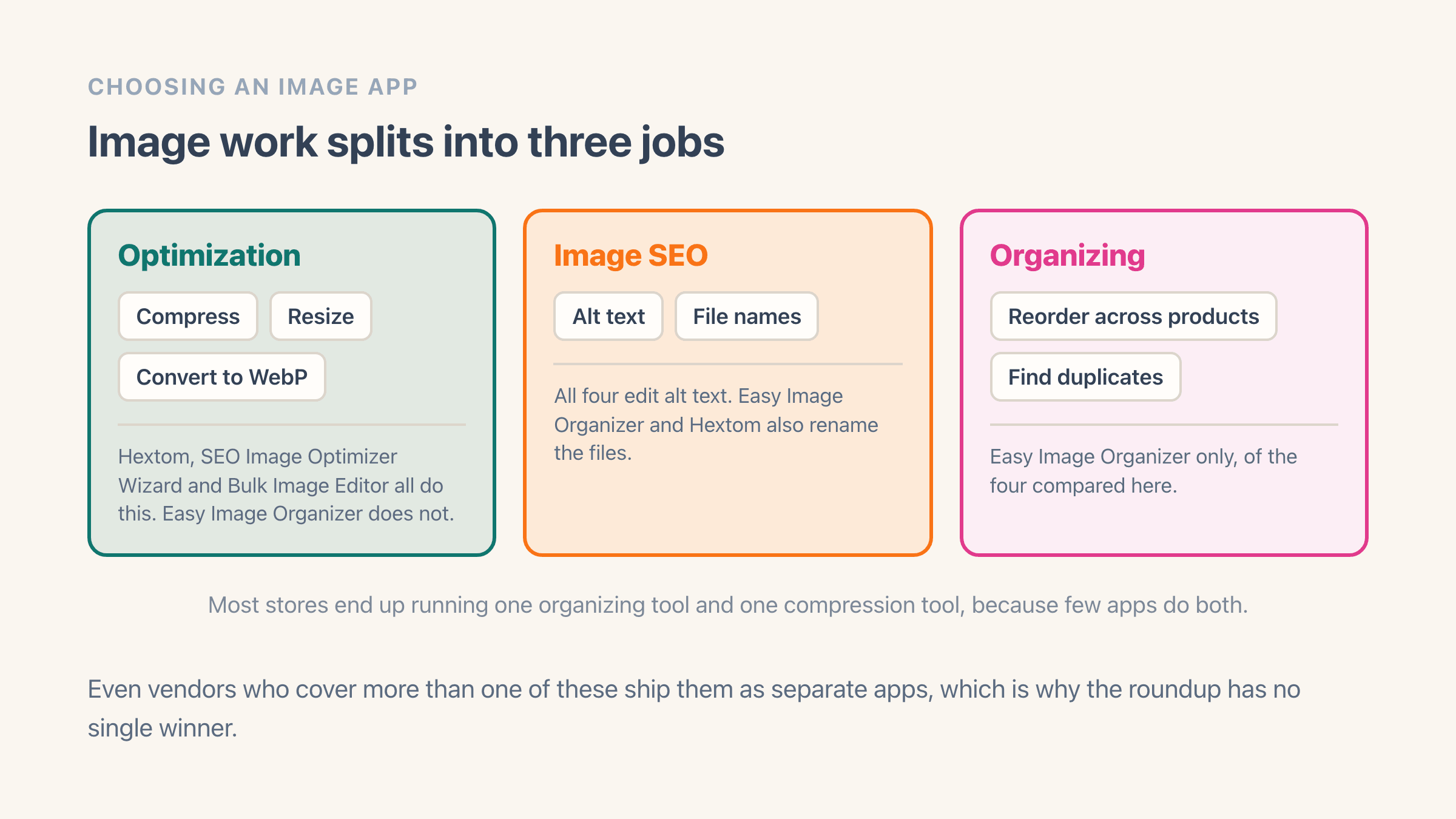
Image work splits into optimization (compress, resize, convert), SEO (alt text, filenames), and organizing (reorder, dedupe), and each has its own specialists. Count the eleven apps on this page and the split is stark: eight compress, two write alt text and little else, and one organizes. Even vendors covering several jobs ship them as separate apps.
Easy Image Organizer combines the organizing jobs, reorder plus duplicate scanning plus alt-text and filename editing, so you are not stitching three tools together for catalogue cleanup. What it will not do is make your images smaller, and the honest recommendation on this page is that most stores want one app from each column rather than one app.
What should you check in your own catalogue first?
Three things, and all three are visible in your Shopify admin in about ten minutes. Do this before you install anything, because it tells you which of the jobs above is actually your problem, and it stops you paying for the wrong one.
Start with the first image on a collection page. Shoppers see one photo per product there, so if some products lead with a plain shot on white and others lead with a lifestyle photo or a size chart, the grid looks untidy no matter how good the photography is. Scroll one busy collection and count how many products lead with the wrong kind of image. Under ten and you can fix them by hand. Over fifty and you want an app that reorders across products in one pass.
Then open five products and click into an image. There is an alt text box on each one, and on most stores it is empty, because Shopify never fills it in for you. Empty on five out of five means it is empty on the whole catalogue, which is a job measured in hundreds of images and not something to do by hand.
Last, check whether image weight is really your problem. Shopify serves product photos through its own image service, which sizes them for whatever a modern theme asks for and hands most browsers a lighter file, so compression apps are solving a smaller problem than they were five years ago. Your admin has an Online store speed report under Analytics, then Reports. Look at what it blames before you assume it is the pictures, because on plenty of stores the slow part is a theme slideshow or a stack of other apps.
Do you need two image apps?
Often yes, and it usually costs less than it sounds. The two jobs run on different clocks. Compression is mostly a one-off: you run it over the whole catalogue once, then it only has to keep up with new uploads. Organizing comes back every time you add products, merge a supplier feed or reshoot a range, so it is the one you keep.
That difference gives you an option people miss. You can install a compression app, let it work through the catalogue, check the results and then uninstall it, which costs you one month rather than a permanent line on your app bill. Just remember it will not be there for the next hundred products you upload.
Before you let any app run over the whole catalogue, run it on five products and look at them on a phone. Compression replaces the file that shoppers see, so ask whether the app you pick keeps the original and can put it back. Bulk alt text and filename tools are safer, since you can rewrite either of those again at any time. Reordering is reversible too, though it is faster to get the rule right on a handful of products than to undo it across four hundred.