Definition
How does a packshot become an on-model photo?
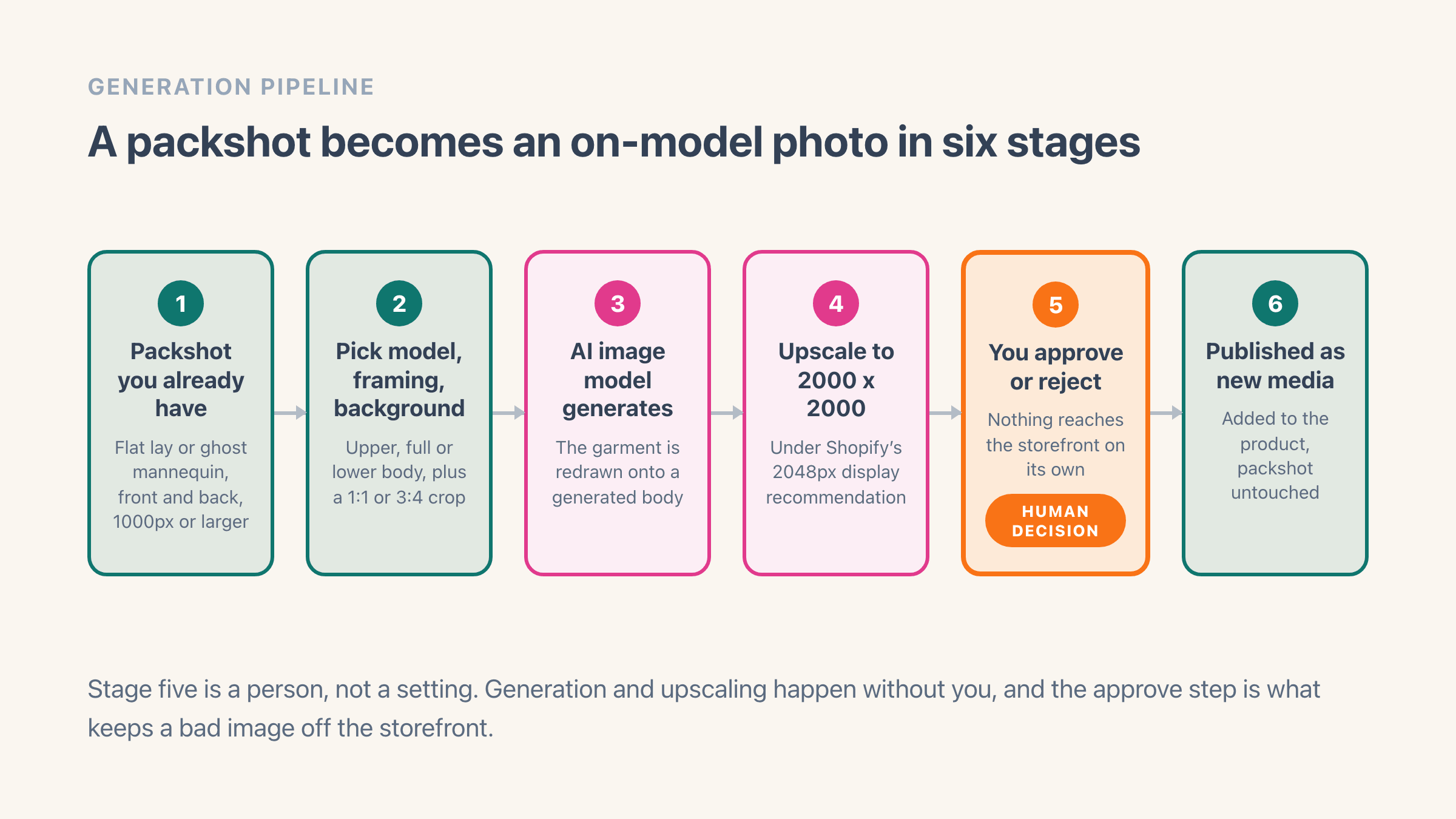
The model reads the packshot you already have, plus your choices about who wears it and how it is framed, then redraws that garment onto a generated body. Your original file is never edited: a new image is built from scratch with the packshot as reference, which is why the output can be right about the shape of a hoodie and slightly wrong about the weave.
Two mechanical limits decide most of the quality before any style choice does. Resolution comes first: a packshot under roughly 512 pixels a side struggles, and 1000 or more is where results get consistent. Format is blunter than people expect, because JPEG and PNG are reliable while HEIC, SVG and oddly profiled WebP can fail the generation outright rather than degrade politely.
Front and back views are generated as a pair inside one run so they share a model. Start a second run for the same product and the face changes, because generative models vary between runs and no setting pins an identity down. Generate a whole collection in one run instead, which is the difference between a category grid that looks shot and one that looks assembled.
Which products does AI product photography actually work for?
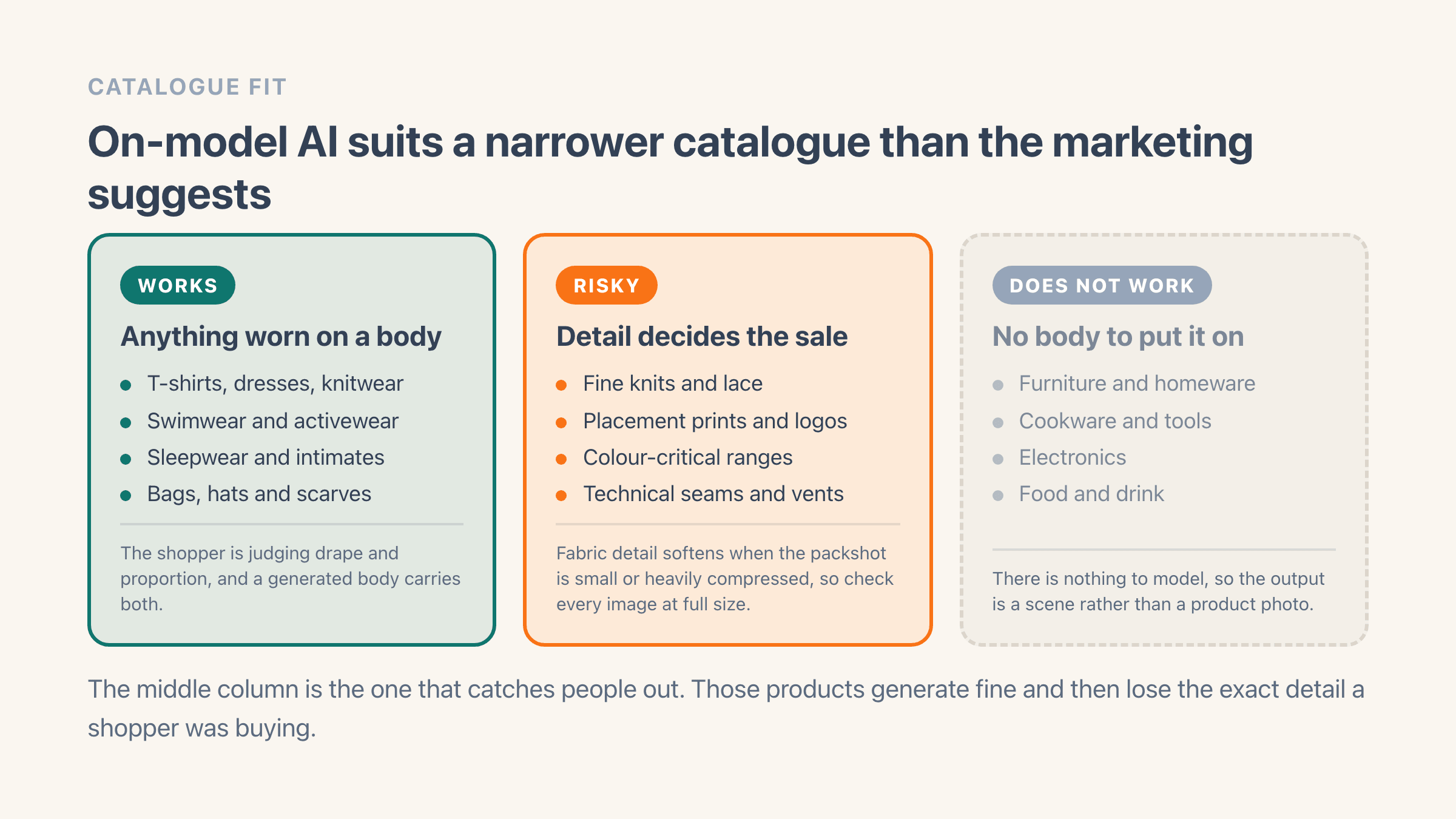
Anything worn on a body. Clothing, swimwear, activewear, sleepwear, intimates and accessories that hang off a shoulder or sit on a head all work, because what a shopper is judging is drape and proportion, and a generated body carries both convincingly.
Hard goods do not, for a structural reason rather than one someone fixes next quarter. Furniture, cookware, tools and food have no body to be placed on, so what comes back is a generated room with your product somewhere in it. A scene is a different job from a product photo.
The band that catches people out sits between the two. Fine knits, lace, placement prints and colour-critical ranges generate perfectly happily and then quietly lose the exact thing the shopper was buying, because fabric detail softens whenever the packshot was small or heavily compressed and the upscaler ends up inventing texture rather than recovering it. Generate ten of your trickiest products first and judge them at full size, never as thumbnails.
Are AI lifestyle photos the same as AI model photos?
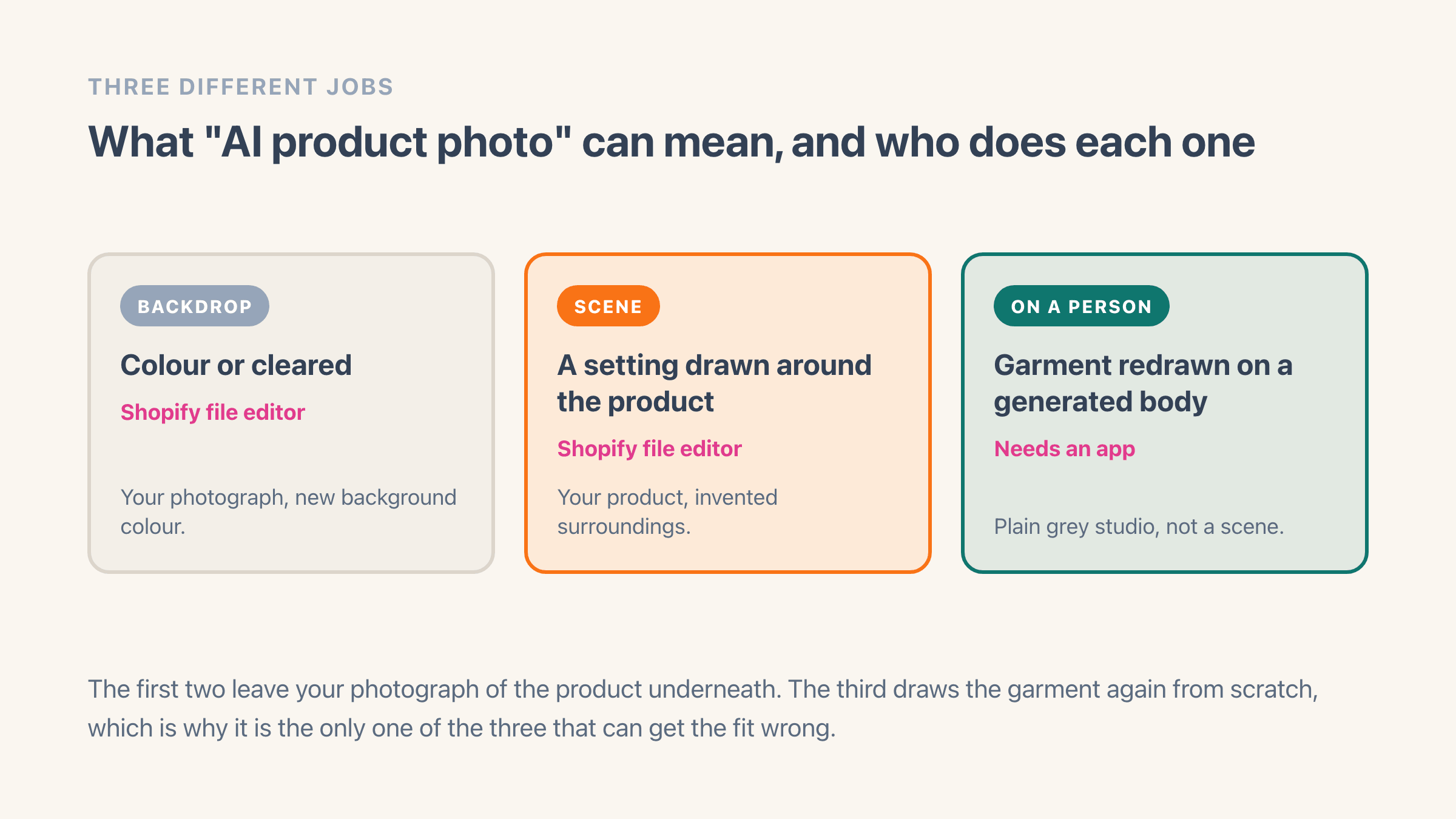
No. A lifestyle photo puts your product into a setting, a kitchen counter or a beach or a coffee table, so a shopper sees it in use. An on-model photo puts a garment on a person, and in most tools that person is standing against a plain studio wall.
The tools blur the two because one generator can do both and their marketing uses the same word for each. It costs money at the point of purchase. A homeware seller who buys an on-model tool has bought nothing usable, and an apparel seller who wanted a body gets a jumper draped over a sofa.
PackScene only does the second job. Its generate screen offers a Female or Male tile, a Framing heading with Full body, Upper body and Lower body, and a picture shape, and that is the whole set of choices about how the image looks. Every image comes back on the same flat grey studio backdrop, which is fixed in the app and not a setting you can go looking for.
If a setting is what you are after, start with the tool already in your admin. The section below covers what Shopify's own file editor draws and where it stops.
What can Shopify already do without an app?
More than most merchants realise, and less than the thing this page is about. Shopify Magic media generation lives in the admin file editor: click a media thumbnail and you get Color background, Generate and Crop and transform. Color background swaps the backdrop for a solid colour or clears it, and Crop and transform extends a frame that was cropped too tight.
Generate is the one that makes a lifestyle scene. Describe a setting in a few words and it redraws the background and the lighting around your product, which is the same job the scene generators charge for.
Two different doors, and only one of them is plan-gated. Asking Sidekick to generate media needs a Basic, Grow, Advanced or Plus plan, while Shopify says generation inside the file editor is free on every plan for a limited time (checked 11 August 2026).
None of the three put a garment on a person, and that is the whole gap. Getting rid of a grey studio wall on 40 packshots is already free in your admin. Showing the dress on somebody is not covered by anything native.
Are Shopify's own generated images good enough for a product page?
For a banner or a social post, usually. For a product page, check the size before you plan around it, because media generated in the file editor comes back at about one megapixel by default: a bigger original is scaled down to meet that, and a smaller one is stretched up to it.
Shopify's own display recommendation for product images is 2048 by 2048, which is roughly four megapixels. A generated scene lands under that, and it shows first on a zoomed product image rather than on a thumbnail, which is why it survives the review that happens at thumbnail size.
Four more things sit on the file editor help page and are worth reading before a season depends on them.
- An invisible watermark goes into the images it generates. Shopify says it does not restrict commercial use and cannot be removed.
- One scene at a time, and any scene you did not save to your own computer has gone when the editor closes.
- Prompts want at least three to seven words, written as short phrases separated by commas rather than a sentence.
- Extending an image past its original edges is not available in the Shopify mobile app.
What does AI get wrong about fit and fabric?
It draws a plausible garment, and plausible is not measured. The model has never seen your size chart, does not know your medium runs small, and is inferring how a fabric hangs from one flat photograph of it lying on a table. The silhouette it returns is an average of everything similar it has seen, delivered with total confidence.
The failure modes are specific enough to plan around. Fabric softens when the packshot was low resolution or heavily compressed, and it reads as slightly blurred knitwear rather than an obvious error, which is exactly how it gets published by accident. A back view can also come back as a visibly different person, which a rerun fixes because the rerun regenerates the front and feeds that into the back step.
Let each asset do the job it is good at. The on-model image sells the silhouette. The flat packshot stays in the media set as your colour reference, because that one is a photograph of the actual dye lot. Keep a real close-up for texture, and put measurements in the description rather than leaving a shopper to infer them from an invented body.
Do AI product photos increase returns?
Nobody has published a credible figure for AI imagery specifically, and the apparel return rates that circulate trace back to fulfilment vendors with no stated method. What is measured is the surrounding problem. The NRF and Happy Returns expect 19.3% of US online sales to come back in 2025, and in a Bitkom survey of 1,050 German online shoppers, 41% said they had returned something because it did not match the picture or the description online.
That second number is the one to sit with, because it is the exact failure a flattering generated image invites. Nearly all of the risk lives in one situation: when the AI image is the only image. A page carrying a flat packshot, a detail shot and an on-model image gives a shopper more to go on than it had before.
Measure it on your own catalogue instead of trusting anyone. Take twenty comparable products, record per-product return rate for sixty days, publish AI images on ten of them and compare the same window. The store-wide return rate shows you nothing at that sample size.
Do you have to tell shoppers a product photo is AI-generated?
If you run Google Shopping, you already do. Google's product data rules say every image created using AI has to carry a hidden marker inside the file saying so, the same kind of hidden note that already records which camera took a photo and when.
The same page requires the image to show the actual product in the correct colour, pattern and material, and tells you not to strip that marker back out. Check it is still on the file once your images have been resized and uploaded, rather than assuming it made the trip.
The invisible watermark further up this page is not that marker, and reading the two together is the mistake worth avoiding. Google asks for a note in the file's own data that a person can read out with the right tool. A watermark is buried in the pixels for a machine to detect. Google's rule names the first and offers no watermark as a substitute for it.
In the EU the question stops being theoretical on 2 August 2026, when the AI Act's Article 50 transparency rules start to apply. The Digital Omnibus published in July 2026 delayed the high-risk deadlines and left that date alone.
Article 50(4) puts the duty on the deployer, meaning the shop rather than the app vendor, to disclose deep fakes. Whether an on-model product image is one is arguable: the Act's definition covers content resembling existing persons, objects, places or events that would falsely appear authentic, so your invented model is fine and your real jumper is the open question. Nobody has ruled on a product page.
The United States has no rule aimed at AI product images, only the general ban on deceptive advertising, which asks whether a reasonable shopper was misled rather than how the picture was made. Shopify publishes nothing on it either. Which makes the decision easy, because a label costs one line and its absence costs an argument: say it in the alt text or the description, along the lines of "on-model image generated from studio photography of the actual garment".
AI product photography vs a studio shoot: what each still costs
They are not competing for the same work, which is what most comparisons miss. A shoot buys exact colour under controlled light, real texture, a real person with real proportions, motion, and the campaign imagery that gives a brand a look. Generation buys coverage: a model image on the eighty products nobody was ever going to shoot.
PackScene gives four one-time credits free, then charges $9 a month for 45 generations plus 5 regenerations, $39 for 250 plus 30, and $99 for 700 plus 100. One credit is one finished image, run through an upscaler before you review it, and failed generations are not charged.
Our position, as people who sell one of these tools: photograph what carries the brand and generate the long tail. Six heroes in a new drop deserve a real shoot. The forty core-range colourways behind them do not, and leaving those as flat lays while competitors show them worn costs more than the credits ever will.
If the decision in front of you is between two generators rather than between generating and shooting, PackScene against Botika sets the two side by side.
Where should AI images sit on a product page?
Next to the real ones, and rarely in first position while a brand is still earning trust. The first image is what a shopper meets in search results, collection grids and Google Shopping, so making it the one asset that is partly invented means every later disappointment traces back to it.
Publishing should add rather than overwrite. PackScene uploads through Shopify's product media as new media and never edits what was there, so deleting one media item in the admin undoes a result you dislike.
Two details get skipped and both matter. Image alt text arrives auto-filled from the product title and the pose, which is fine for accessibility and thin for search, so a human pass over your top sellers earns its hour. And consistency beats individual image quality across a collection: same framing, same model, one run.
Example
A 40-piece drop: photograph the 6 heroes properly, generate the other 34 in one run so they share a model, and keep every flat packshot in the media set as the colour reference. That is 34 of the 250 generations on the $39 plan and an afternoon of reviewing, with real photography still behind the products carrying the campaign.
Where it lives in your Shopify admin
Content > Files > click an image > Edit, where Shopify Magic offers Color background, Generate, and Crop and transform. None of the three put a garment on a person. Finished images land as product media at Products > open a product > the Media card.
Commonly confused with
- AI lifestyle photography
- A lifestyle image puts your product into a setting: a kitchen, a street, a table. On-model generation puts a garment on a person against a plain studio wall. Most tools selling one word sell both jobs, so check which one you are buying.
- Background removal
- Clearing or recolouring a backdrop leaves your photograph intact underneath. On-model generation draws a new image, with the garment redrawn onto an invented body.
- Virtual try-on
- Try-on puts the garment on the shopper's own photo at the moment they ask for it. This puts it on a generated model once, and the result becomes product media you publish.
- A 3D product render
- A render is built from a CAD model of the actual product, so its measurements are real. A generated photo is inferred from one flat photograph, so its measurements are a guess.